


⚠️ Fair warning: this is another long guide!
HTTP conditional requests, temporal versioning in Postgres, failure capture with Inngest, an MCP server with eight tools… it's all in here. Enjoy!

Hey friends! 👋
Welcome back to The Substack Brain! This is Lesson 3 of our free six-week course, where we build a living knowledge base from the AI engineering newsletters you actually want to read, one production problem at a time.
Where we left off
In Lesson 2 we scaled the pipeline from one newsletter to three without getting banned, rate-limited or stuck in a queue.
We added concurrency limits per website, a global throttle and priority for urgent articles, all on top of Inngest, and we taught the system to answer questions with hybrid search and inline citations. Every answer is saved as a context snapshot, so when one goes wrong we can tell whether retrieval or generation was to blame.

What breaks this week
Everything we've built so far shares a quiet assumption that doesn't hold in the real world: that an article never changes once it's published.
Writing is alive. Authors fix a broken code snippet an hour after sending, update a benchmark the next morning, or add a correction at the bottom. When that happens, a RAG system has two bad options. If it overwrites the old text in place, every snapshot recorded before the edit now points at text the model never saw, and the evaluations we want to run in Week 5 can no longer be reproduced. If it inserts the new version next to the old one instead, search starts returning both, and the model ends up citing two contradictory versions of the same paragraph.
And to notice those edits, and the new articles that keep arriving, the system has to check the feeds regularly. The obvious way is a cron job that downloads every feed every five minutes. It finds nothing new almost every time, but it still downloads and parses the whole thing, wasting bandwidth and CPU and putting load on the servers of the very writers we depend on, until their rate limiters start blocking us.
The system for Week 3
To fix those problems, and to let other AI tools use what we've built, we add four pieces to last week's system:
🕰️ Temporal versioning for passages. When an article changes, the old passages are closed instead of deleted, and only the current version shows up in search.
🔄 poll-feeds, a new Inngest function that checks every feed every five minutes using HTTP conditional requests, so an unchanged feed costs almost nothing.
🧯 handle-function-failed, a small function that records every failed run in a failures table, so we start building an evaluation dataset from real production errors.
🔌 An MCP server with eight tools, so Claude Code, Cursor or any MCP client can search the knowledge base, ask it questions and trigger ingestion.
Here's how those pieces fit around the system from Week 2:
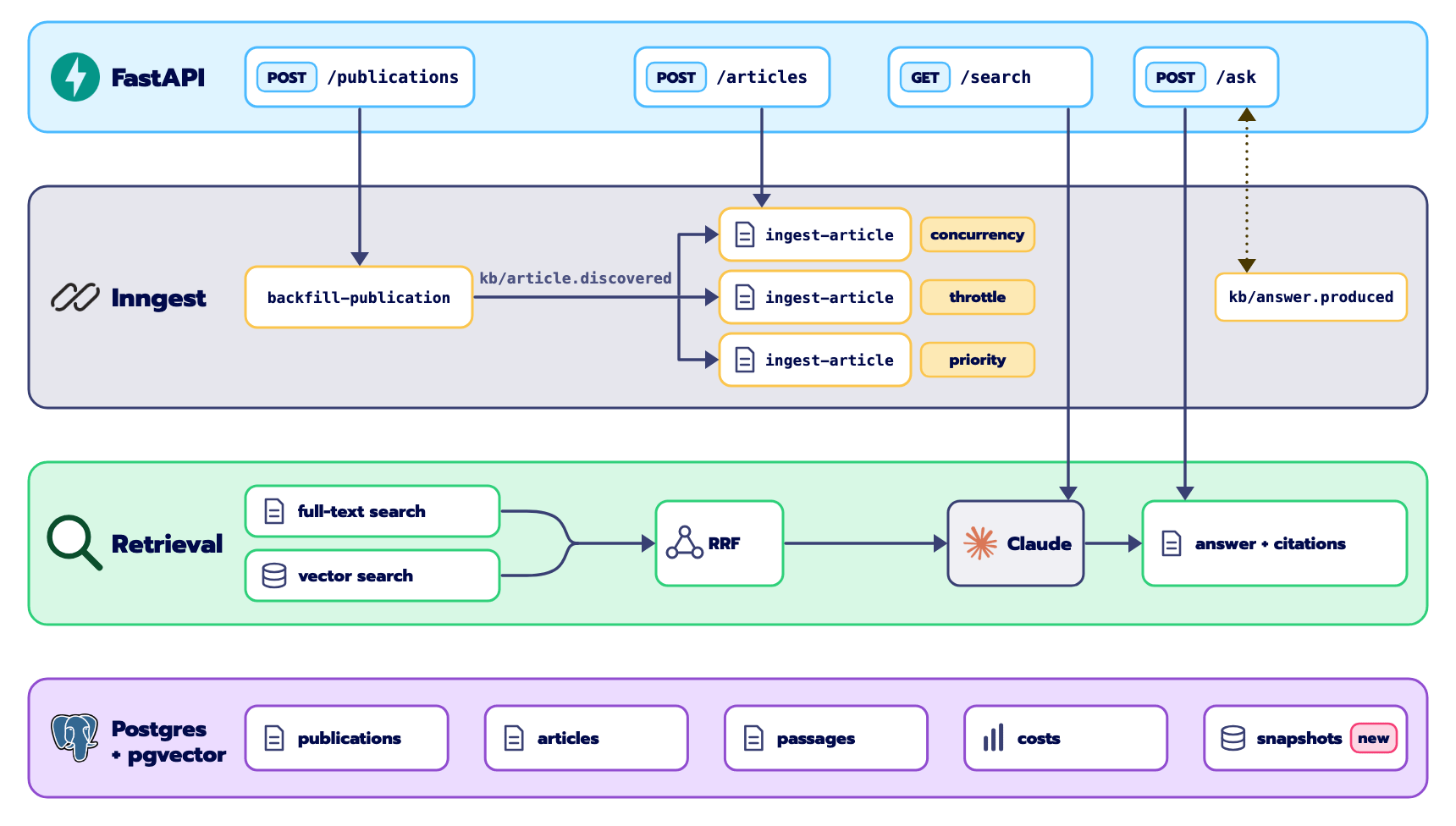
The new pieces follow the same rule as the rest of the system. Anything that adds or changes data goes through Inngest: poll-feeds discovers new articles and hands them to ingest-article, which is now also the place where edits are detected and old passages are closed. Anything that only reads goes straight to Postgres, and that includes the MCP server's read tools. The failure recorder sits on the side, listening for any run that gives up.
The rest of the lesson follows that order: first how we handle edits, then how we find out about them, then failures, then the MCP server, and finally the whole thing running end to end.
When articles change
Let's start with the hardest problem of the week. Imagine an author publishes a post about multi-agent orchestration with a broken code block, and fixes it three hours later. The next time that article goes through ingest-article, what should happen?
There are two tempting answers, and both are wrong. The first is to overwrite: update the article and its passages in place. It looks clean, but any snapshot recorded in those three hours now cites passage IDs whose text has changed, so you can no longer see what the model actually read when it answered. The second is to insert the new passages next to the old ones. Then search returns both versions, RRF happily ranks both near the top because they share most of their words, and the model writes an answer that cites the broken code and the fixed code side by side.
The approach we use is called temporal versioning.
A passage isn't "current" because it exists in the table; it's current because its valid_to column is empty. When an article changes, we don't delete anything. We set valid_to on the old passages, which marks them as history, and insert the new passages with valid_to left empty.
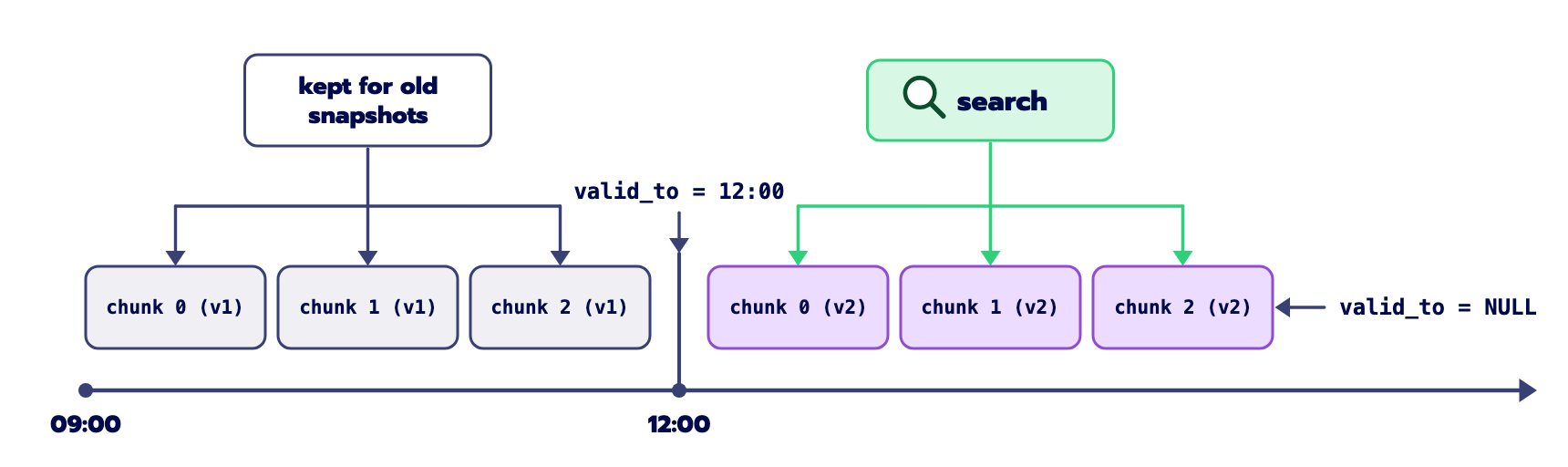
Here's how ingest-article decides. After fetching and parsing the article, the parser has already computed a SHA-256 hash of its text. A new step compares it with the content_hash stored for that canonical_id:
async def _check_content_change() -> dict[str, object]:
    async with get_session() as session:
        existing = await get_article_by_canonical_id(session, payload.canonical_id)
        if existing is None:
            return {"is_new": True, "changed": True, "article_id": None}
        if existing.content_hash == str(parsed["content_hash"]):
            return {"is_new": False, "changed": False, "article_id": str(existing.id)}
        return {"is_new": False, "changed": True, "article_id": str(existing.id)}

change_info = await ctx.step.run("check-content-change", _check_content_change)

if not change_info["changed"]:
    return {
        "article_id": str(change_info["article_id"]),
        "passage_count": 0,
        "status": "unchanged",
    }

is_update = not bool(change_info["is_new"])
See it on GitHub: kb/functions/ingest.py, lines 108–126
If the hashes match, nothing changed, and the run stops right there, before the chunk and embed steps, without a single OpenAI call. If they don't match, the article was edited: we chunk the new text, compute fresh embeddings, and before saving them, close the current passages in a single update:
async def supersede_passages(session: AsyncSession, article_id: uuid.UUID) -> int:
    """Close active passages by setting valid_to = now(). History is preserved."""
    stmt = (
        update(Passage)
        .where(Passage.article_id == article_id, Passage.valid_to.is_(None))
        .values(valid_to=func.now())
    )
    result = await session.execute(stmt)
    return getattr(result, "rowcount", 0)
See it on GitHub: kb/db/queries.py, lines 343–351
There's one detail in Postgres that makes this work. Since Week 1, passages have been unique on (article_id, chunk_index), and that rule would stop us from inserting chunk 0 of the new version while chunk 0 of the old version is still in the table. So this week's migration turns it into a partial unique index, which only applies to current passages. In SQL, it's this:
CREATE UNIQUE INDEX uq_passages_article_chunk
ON passages (article_id, chunk_index)
WHERE valid_to IS NULL;
See it on GitHub: alembic/versions/e4a7b9c1d2e3_week_3_failures_table.py, lines 36–43
Now there can only ever be one current version of each chunk, and as many old versions as the article's history needs. Both search engines, full-text and vector, only look at passages where valid_to IS NULL, so search never sees two versions of the same paragraph. And every snapshot from before the edit still points at the exact text the model saw when it answered.
Being a good citizen of the web
Versioning only helps if we notice that something changed.
When a platform doesn't offer webhooks, polling is the only way to find out about new posts. The naive version is simple: every five minutes, download each feed, parse it and compare the entries with what you already have. With a dozen publications, that's thousands of full downloads a day, and almost all of them return exactly what you downloaded five minutes ago.
The web solved this decades ago with conditional requests (described in RFC 9110). When a server sends you a feed, it usually includes two headers that identify that version of it: an ETag, which is an opaque version tag, and a Last-Modified date. If you send those values back on your next request, in the If-None-Match and If-Modified-Since headers, the server can compare them on its side. If nothing has changed, it answers with 304 Not Modified and an empty body.
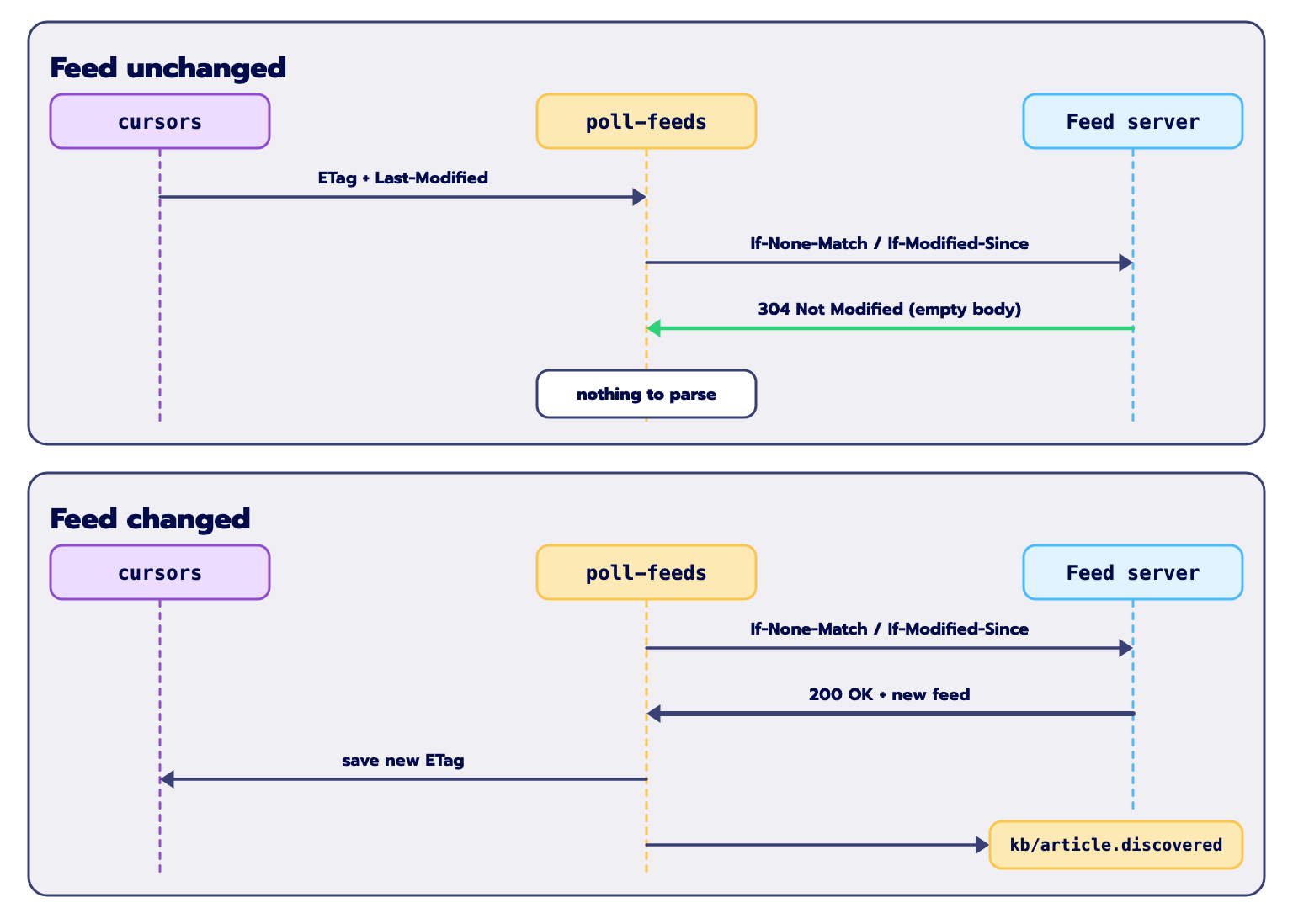
That's what poll-feeds does. Before checking a feed, it reads the ETag and Last-Modified it stored after the last successful poll from the cursors table, and sends them along:
async def fetch_feed_conditional(
    feed_url: str,
    etag: str | None = None,
    last_modified: str | None = None,
) -> tuple[int, bytes | None, str | None, str | None]:
    """Fetch an RSS feed conditionally using ETag and Last-Modified headers.
    Returns (status_code, content_or_none, response_etag, response_last_modified).
    """
    headers: dict[str, str] = {"User-Agent": settings.user_agent}
    if etag:
        headers["If-None-Match"] = etag
    if last_modified:
        headers["If-Modified-Since"] = last_modified

    async with httpx.AsyncClient(headers=headers, timeout=settings.request_timeout_s) as client:
        response = await client.get(feed_url, follow_redirects=True)
        resp_etag = response.headers.get("ETag") or etag
        resp_last_modified = response.headers.get("Last-Modified") or last_modified

        if response.status_code == 304:
            return 304, None, resp_etag, resp_last_modified

        response.raise_for_status()
        return response.status_code, response.content, resp_etag, resp_last_modified
See it on GitHub: kb/sources/rss.py, lines 30–53
When the server answers 304, there’s nothing to parse and no events to send. The function only updates a counter on the cursor, and the step finishes in a few milliseconds.
When the server answers 200, the feed has changed, either because there's a new post or because one was edited. So poll-feeds sends a kb/article.discovered event for every entry in the feed, not only the new ones. New articles go through the usual pipeline, and articles we already have go through the hash check from the previous section: if their text is the same, ingest-article stops before embedding anything, and if it changed, the old passages are closed and the new ones take their place. That's how edits get picked up on their own, without anyone resubmitting the article.
The order of the last two steps matters more than it looks:
events = [
    inngest.Event(
        name=ARTICLE_DISCOVERED,
        data=ArticleDiscovered(
            canonical_id=cid,
            publication_id=pub_id,
            url=entry.url,
            title=entry.title,
            published_at=entry.published_at,
            via="poll",
        ).model_dump(mode="json"),
    )
    for cid, entry in entries.items()
]
if events:
    await client.send(events)

# Only now, with the events safely sent, remember this version of the feed.
async with get_session() as session:
    await update_cursor(
        session,
        publication_id=pub_id,
        etag=resp_etag,
        last_modified=resp_last_modified,
        not_modified=False,
    )
    await session.commit()
See it on GitHub: kb/functions/freshness.py, lines 96–122
The new ETag is saved only after the events have been sent. If we saved it first and the send failed, Inngest would retry the step, the retry would send the new ETag, the server would answer 304, and the new articles would be lost until the feed changed again. Saving it last means a failed send is retried with a fresh 200.
This decouples how often we check from how much work each check costs. We can poll every five minutes and pick up new posts quickly, while barely touching the writers’ servers in between.
Failures are data
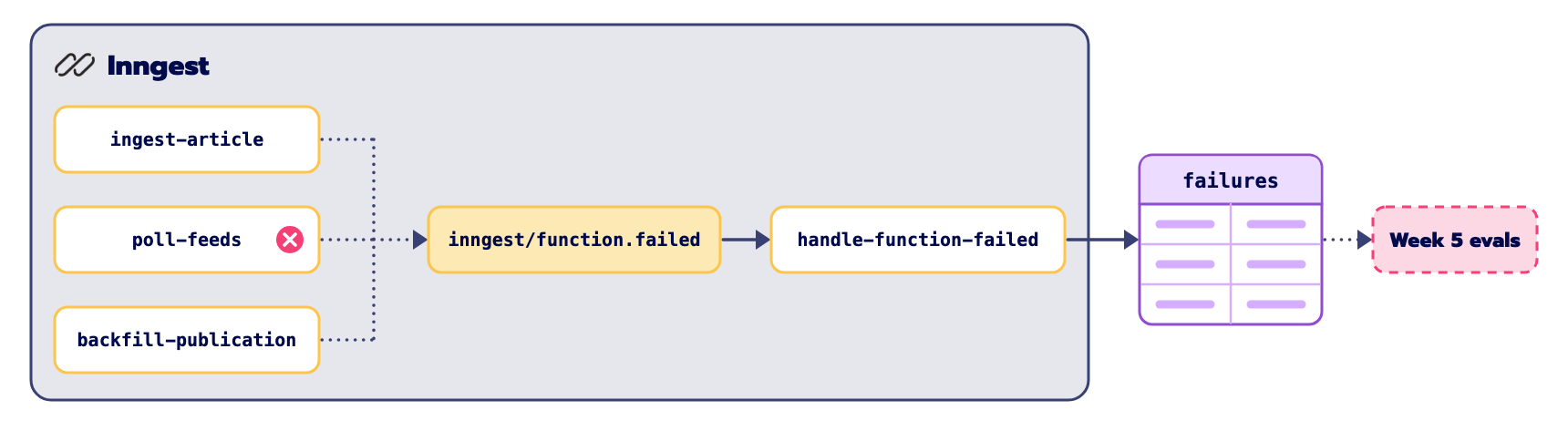
In most systems, a failure is something to get rid of. A run crashes, the stack trace goes to a log, the system retries until it works or someone silences the alert, and the details are gone.
We want to keep them. An article whose HTML breaks our parser, or an embedding response with a shape we didn't expect, is exactly the kind of case our evaluations in Week 5 should cover. Throwing those away means having to invent fake test cases later.
Inngest makes this easy with a system event. Whenever a function runs out of retries or raises an error that can't be retried, Inngest sends an inngest/function.failed event with the function's ID, the run ID, the event that triggered it and the error. So we only need one small function that listens to it and writes a row to a new failures table:
@client.create_function(
    fn_id="handle-function-failed",
    name="Record Function Failures",
    trigger=inngest.TriggerEvent(event="inngest/function.failed"),
)
async def handle_function_failed(ctx: inngest.Context) -> dict[str, object]:
    """Capture function failures into the failures table."""
    data = ctx.event.data or {}

    function_id = str(data.get("function_id") or ctx.event.name)
    run_id = str(data.get("run_id") or ctx.event.id)
    raw_error = data.get("error")
    if isinstance(raw_error, dict):
        error_msg = json.dumps(raw_error)
    else:
        error_msg = str(raw_error or "Unknown error")

    event_data = data.get("event")
    if not isinstance(event_data, dict):
        event_data = {"raw": data}

    async with get_session() as session:
        failure_id = await record_failure(
            session,
            function_id=function_id,
            run_id=run_id,
            error=error_msg,
            event_data=event_data,
        )
        await session.commit()

    return {"failure_id": str(failure_id), "status": "recorded"}
See it on GitHub: kb/functions/ops.py, lines 19–50
Because it listens to a system event, it covers every function we register, including the ones we haven't written yet. From this week on, the system collects real failures in the background while we develop it, and by Week 5 we'll have a dataset of actual problems to test against.
The MCP server
With storage, retrieval, freshness and failures in place, we get to the main milestone of this lesson: letting AI tools use the knowledge base directly.
Claude Code, Cursor and most agent frameworks now speak the Model Context Protocol (MCP), the standard way for an AI assistant to discover and call external tools. So we wrap the system in an MCP server.
The trap here is to put real logic inside the tool handlers, or to add yet another orchestration layer between the agent and the system. We do neither. Every tool is a thin, typed wrapper around a function or event that already existed in Weeks 1 and 2, and the eight tools split into two groups that follow the Asymmetry Principle from Lesson 2.
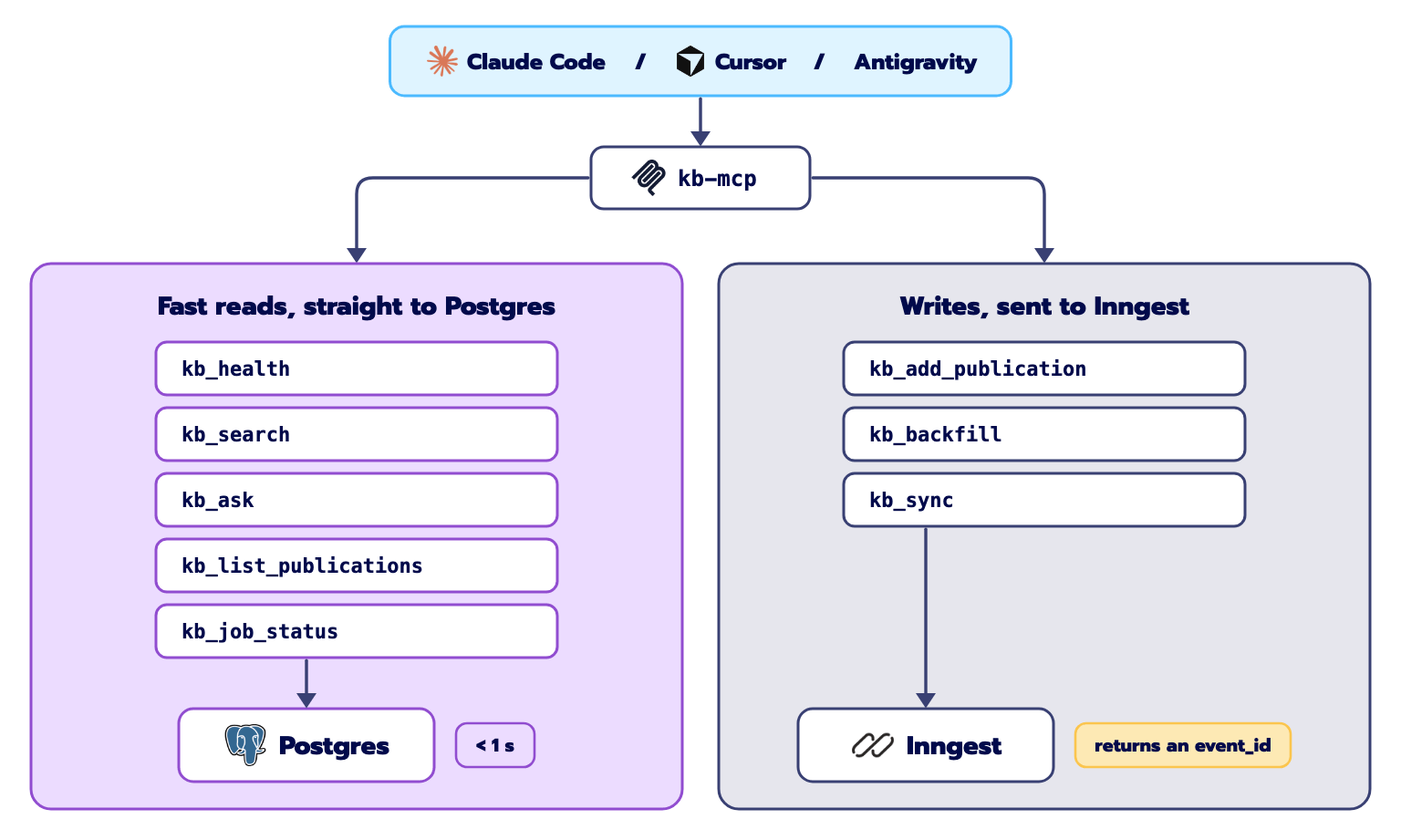
The first group is the reads: kb_health, kb_search, kb_ask, kb_list_publications and kb_job_status. They go straight to Postgres and the retrieval code, with no Inngest in between. When an agent calls kb_search("agentic memory architectures"), it's in the middle of a task and needs context now, not after a job has been queued and scheduled, so these tools answer in well under a second. kb_ask does exactly what POST /ask does: hybrid retrieval, an answer with citations from Claude, a snapshot in the database, and the telemetry event sent on the way out.
The second group is the writes: kb_add_publication, kb_backfill and kb_sync. These never scrape or embed anything inside the MCP process. That would block the connection for minutes, the tool call would time out in Claude Code or Cursor, and the agent would sit there waiting. Instead, each one builds an Inngest event, sends it to the Dev Server and returns a handle right away:
{
  "event_id": "01JMZ123ABC456DEF789",
  "trace_url": "http://localhost:8288/event/01JMZ123ABC456DEF789",
  "status": "queued"
}
The agent can carry on with its work straight away. If it (or you) wants to follow progress, it can open the trace_url in the Inngest dashboard or call kb_job_status with the event_id from time to time.
The nice part is that the MCP server adds no new orchestration at all. Everything it exposes was already there; it just gives agents a clean, typed way to reach it.
See it on GitHub: kb/mcp/
Running it end to end
Time to put everything together. Grab a coffee, and keep the Inngest dashboard open in another tab.
Start the stack
Make sure your .env has your API keys, then start everything:
make startThis starts Postgres with pgvector and the Inngest Dev Server, and applies this week’s migrations: the new cursors and failures tables and the partial index on passages. Then check that the tests pass:
uv run python -m pytestFill the knowledge base
If you’re starting from an empty database, load the three newsletters from last week:
curl -X POST http://localhost:8000/publications -H "Content-Type: application/json" \
  -d '{"feed_url": "https://theneuralmaze.com/feed"}'

curl -X POST http://localhost:8000/publications -H "Content-Type: application/json" \
  -d '{"feed_url": "https://www.decodingai.com/feed"}'

curl -X POST http://localhost:8000/publications -H "Content-Type: application/json" \
  -d '{"feed_url": "https://magazine.sebastianraschka.com/feed"}'
A quick lesson learned from last week. We gave backfill runs a priority of -600, thinking it would only push them behind manual submissions. But in Inngest, a negative priority doesn't just move a run down the queue: it delays it by that many seconds, even when nothing else is waiting. So with -600, every backfill sat idle for ten minutes before starting.
If you've seen that, set
PRIORITY_BACKFILL_S=0in your.env.
Manual articles still get +600, so they still jump ahead of anything queued in the previous ten minutes.
Open the Inngest dashboard at http://localhost:8288. You should see four functions: backfill-publication (listening to kb/publication.added), ingest-article (listening to kb/article.discovered), poll-feeds (on a five-minute cron and on a kb/feed.poll event) and handle-function-failed (listening to inngest/function.failed).
Simulate an edit
You don't need to wait for an author to edit a real post to test versioning. First, ingest one article by hand:
curl -X POST http://localhost:8000/articles -H "Content-Type: application/json" \
  -d '{"url": "https://www.theneuralmaze.com/p/the-complete-guide-to-event-driven"}'
Then make the database believe the article has changed, by overwriting its stored hash:
docker compose -f infra/docker-compose.yml exec -T postgres \
  psql -U substack_brain -d substack_brain -c \
  "UPDATE articles SET content_hash = 'stale_hash_for_testing' WHERE url = 'https://www.theneuralmaze.com/p/the-complete-guide-to-event-driven';"
And submit the same article again:
curl -X POST http://localhost:8000/articles -H "Content-Type: application/json" \
  -d '{"url": "https://www.theneuralmaze.com/p/the-complete-guide-to-event-driven"}'
Since the new hash doesn't match the stored one, ingest-article takes the versioning path. It closes the current passages by setting valid_to, inserts the new ones with valid_to empty, and sends a kb/article.updated event. Look at the passages for that article:
docker compose -f infra/docker-compose.yml exec -T postgres \
  psql -U substack_brain -d substack_brain -c \
  "SELECT p.chunk_index, p.valid_from, p.valid_to, LEFT(p.text, 50) AS snippet FROM passages p JOIN articles a ON p.article_id = a.id WHERE a.url = 'https://www.theneuralmaze.com/p/the-complete-guide-to-event-driven' ORDER BY p.chunk_index, p.valid_from;"
Each chunk now appears twice. The old version keeps its text and has a valid_to timestamp, and the new version has valid_to empty. Nothing was deleted or overwritten. And search only sees the current version:
curl "http://localhost:8000/search?q=event-driven&limit=3" | jq .Watch a 304 happen
You don't have to wait five minutes for the cron. Send a poll event to the Dev Server by hand:
curl -X POST http://localhost:8288/e/local \
  -H "Content-Type: application/json" \
  -d '{"name": "kb/feed.poll", "data": {}}'
The first time, the cursors table has no validators yet, so each server answers 200 OK with the full feed, and poll-feeds saves the ETag and Last-Modified it receives. Now send the exact same command again. This time the request carries If-None-Match and If-Modified-Since, and any server that supports conditional requests answers 304 Not Modified with an empty body.
Check the counters:
docker compose -f infra/docker-compose.yml exec -T postgres \
  psql -U substack_brain -d substack_brain -c \
  "SELECT p.slug, c.etag, c.not_modified_count, c.poll_count FROM cursors c JOIN publications p ON c.publication_id = p.id;"
For each publication whose server answered with a 304, you'll see poll_count = 2 and not_modified_count = 1. The second poll took milliseconds and parsed nothing.
Connect the MCP server
The project installs a command called kb-mcp, which starts the MCP server over stdio. In every config below, replace /absolute/path/to/substack-brain-course with the full path to your clone of the repo. A relative path like ./ depends on the folder your editor starts the server from, which is rarely the one you expect.
In Claude Code, the quickest way is the claude mcp add command, run from anywhere:
claude mcp add substack-brain -- uv --directory /absolute/path/to/substack-brain-course run kb-mcpIf you'd rather share the setup with your team, put the same server in a .mcp.json file at the root of the project:
{
  "mcpServers": {
    "substack-brain": {
      "command": "uv",
      "args": ["--directory", "/absolute/path/to/substack-brain-course", "run", "kb-mcp"]
    }
  }
}
In Cursor, add the same JSON to .cursor/mcp.json in the project, or to ~/.cursor/mcp.json to make it available in every project.
In Google Antigravity, the same JSON goes in mcp_config.json: either .agents/mcp_config.json for this workspace only, or ~/.gemini/config/mcp_config.json for every workspace on your machine.
To look at the tools before connecting any editor, you can open them in the MCP Inspector:
npx @modelcontextprotocol/inspector uv run kb-mcpOnce it's connected, your agent can search the knowledge base, ask it questions with citations and kick off ingestion, all from your terminal or editor, without ever blocking the conversation while articles are being processed.
What's next
At the start of the week, our knowledge base only knew what we had loaded by hand, and treated every article as if it could never change. Now it checks every feed on its own without hammering anyone's servers, keeps every version of an article without letting old versions leak into search, records every failure as future test data, and is available to any AI tool that speaks MCP.
So far, though, every article is just a set of passages. The system doesn't know that two posts talk about the same framework, or that an author keeps coming back to the same idea.
In Lesson 4 we'll fix that by building a knowledge graph in Memgraph on top of everything we have.
All the code from this lesson is under the week-3 tag.
The Substack Brain, lesson by lesson
Lesson 1: A durable ingestion pipeline (article · video)
Lesson 2: Flow control and hybrid retrieval (article)
→ Lesson 3: A freshness poller and an MCP server (you are here)
Lesson 4: A knowledge graph in Memgraph (next week)
Lesson 5: Evals built from real failures
Lesson 6: A research agent in production
Our sponsor

The Substack Brain is made possible by Inngest, the durable execution engine behind this course. Every step's result is recorded, so a crashed run resumes instead of restarting, and the flow control we used this week (concurrency keys, throttling and priority) is configured right on the function, with no queues or workers of your own to run.
If you're building AI pipelines or agents that need to survive the real world, give Inngest a try. Thanks to the Inngest team for supporting this course 💙
See you next week!
I'd store the parser version next to content_hash. The hash is taken over the parsed text, so the first time you tweak the HTML cleanup, every article that comes back through ingest-article looks edited and gets re-embedded, with its old passages closed for no reason. With the version stored you can tell an author's edit from your own parser change.