


Has this ever happened to you?
You open Substack and see an article about LLM Inference that you love, so you save it to read later. A few minutes later, you see another article explaining what KV Cache is, and you save that one too. Then another one about Jev, and another one about Evals, and another one about SLMs, and so on. By the end of the day, you have 47 saved articles that you'll "read later"...
The day ends, and you haven't read a single one. And the next day, 47 new saved articles that you won't read either!
I don't know about you, but this happens to me all the time, and the project I'm presenting today is the way I found to get the knowledge out of those 47 daily articles without having to spend all 24 hours of my day reading them.
Dear builders, meet the Substack Brain!
What is the Substack Brain?
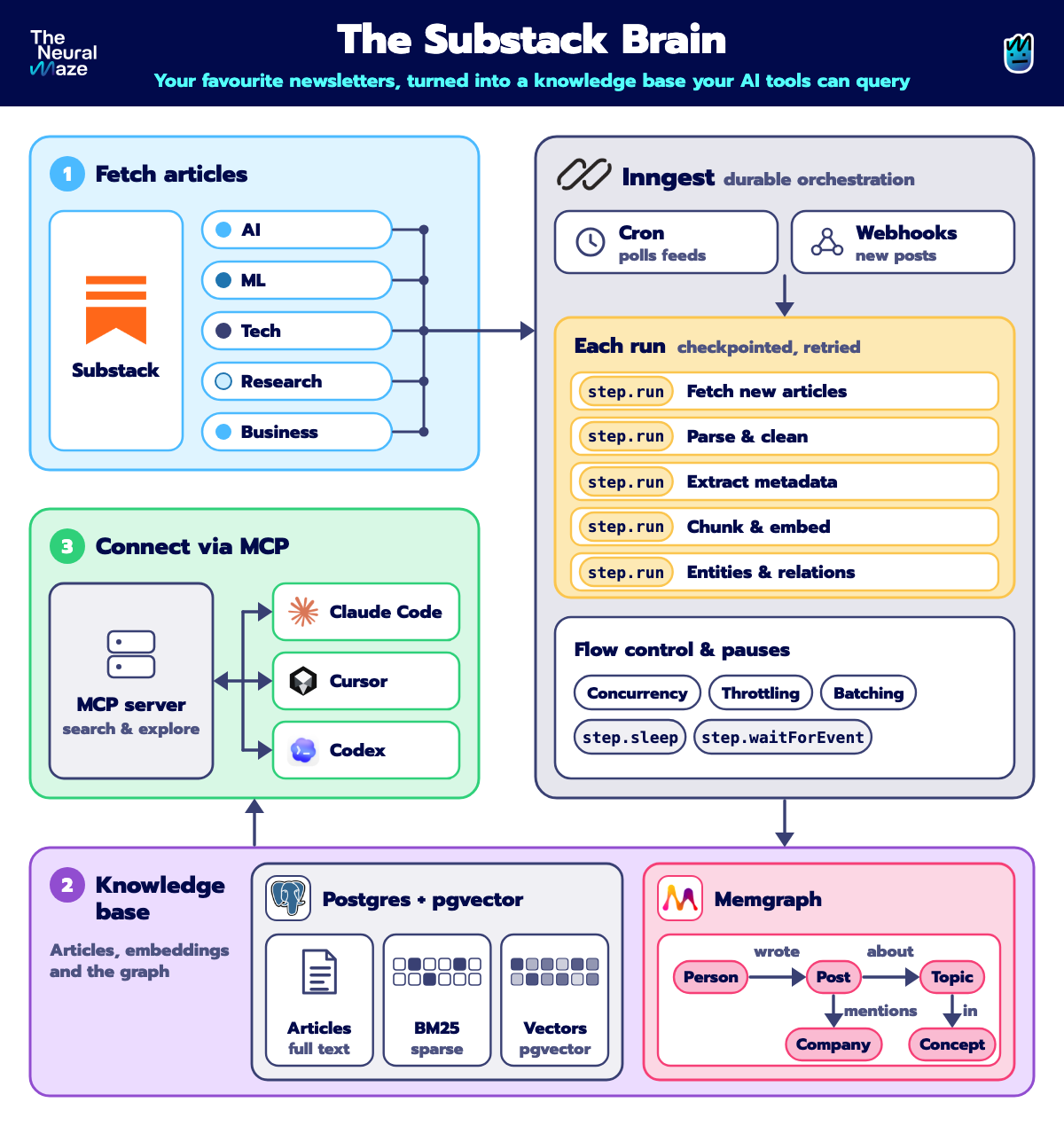
The Substack Brain is a living knowledge base built from the newsletters you actually want to read (but never have time for).
You point it at a handful of AI engineering publications, and it does the rest. It reads their RSS feeds, fetches every article, splits it into passages, embeds it and stores it in Postgres with pgvector, so every question is answered with hybrid retrieval (dense vectors + BM25).
It's also alive. It notices when a new post is published and when an old one is edited, and it never duplicates a row. Behind that is Inngest: every step of the pipeline is durable, checkpointed and retried, which is what turns a weekend demo into a system you can actually leave running.
But the real magic is the graph. The system extracts attributed claims (who said what, where, with the exact quote) into Memgraph, so you can ask who else wrote about a topic, or how an author's view changed over time.
And when you ask a question, you get an answer with citations and an as-of date. First through a plain HTTP API, and then straight from your editor, because the whole thing is exposed via MCP to Claude Code, Cursor or Codex.
How the course works
Six weeks, and every week you get three things:
📖 A Substack article. This is where we go deep. Every Wednesday, you'll get a full lesson in your inbox covering the architecture, the design decisions and the code behind that week's piece of the system.
🎥 A YouTube video. Reading about a system is one thing. Watching it being built is another. In each video, we walk through the code together, run everything live and break a few things along the way (on purpose, don't worry 😂).
💻 An open-source GitHub repo. Every line of code is public. The repo grows week by week, runs locally with a single make start, and uses real newsletters from day one. Every week ends with a working system you can clone, run and break yourself.
By the end of the six weeks, you won't just have read about a living knowledge base. You'll have one running on your machine, and you'll understand every single piece of it.
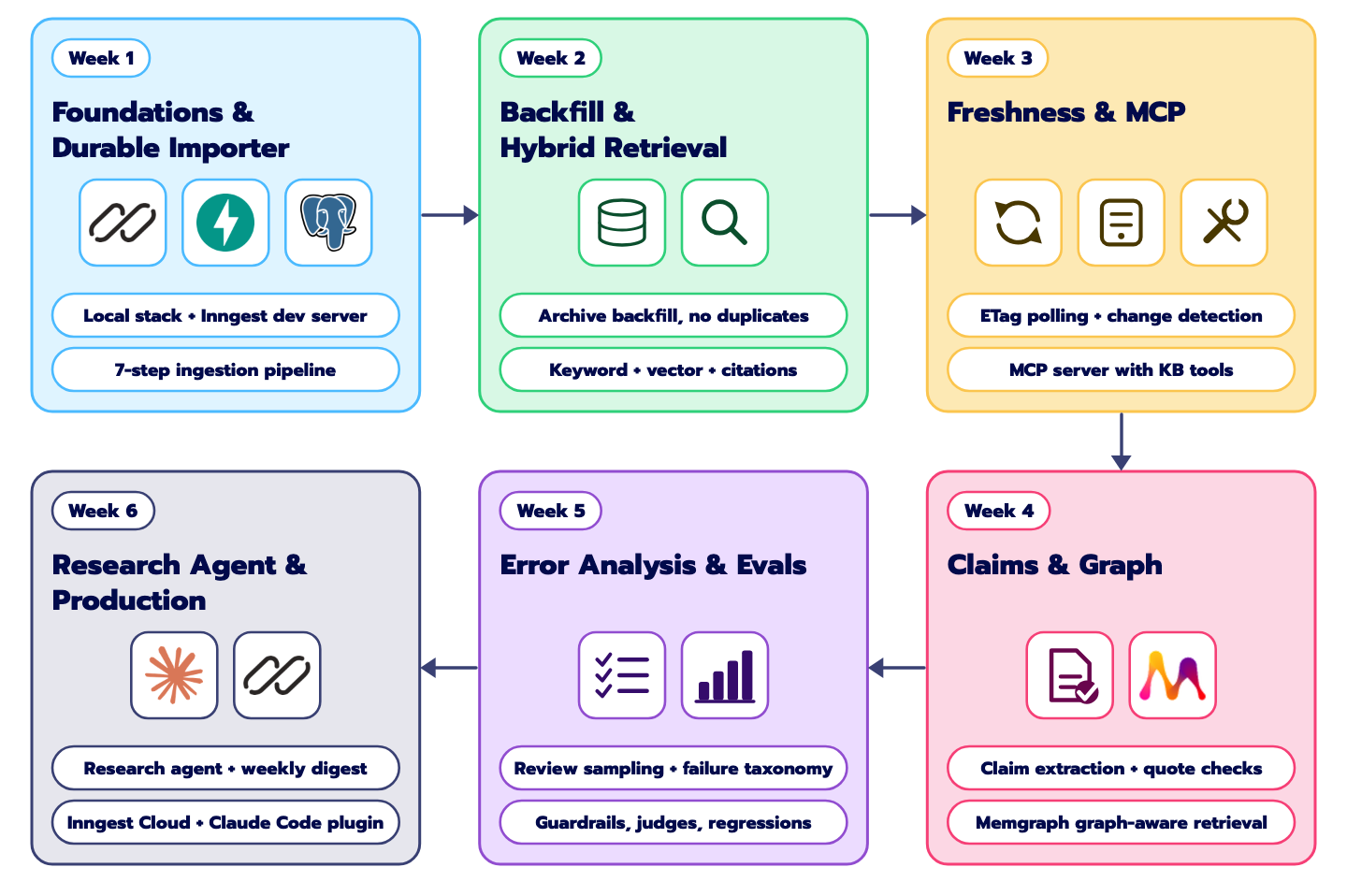
What we're building today (Week 1)
Every system needs a foundation, and ours is the ingestion pipeline orchestrated with Inngest. It's the part that reads newsletters and turns them into something your agents can search. So today, we'll build two Inngest functions.
The first one reads a newsletter's RSS feed (we'll start with The Neural Maze of course hehe) and discovers the 5 latest articles.
The second one takes each article and runs it through 7 steps: check it's from an allowed source, fetch it, parse it, split it into passages, embed them, save everything to Postgres, and announce that the article is ready.

Sounds simple, right? On a good day, it is. The interesting part is what happens on a bad day.
Building it the classic way
The usual approach looks something like this: a FastAPI endpoint that receives the feed URL, plus a background worker (Celery, RQ or a simple cron job) that runs the 7 steps one after another.
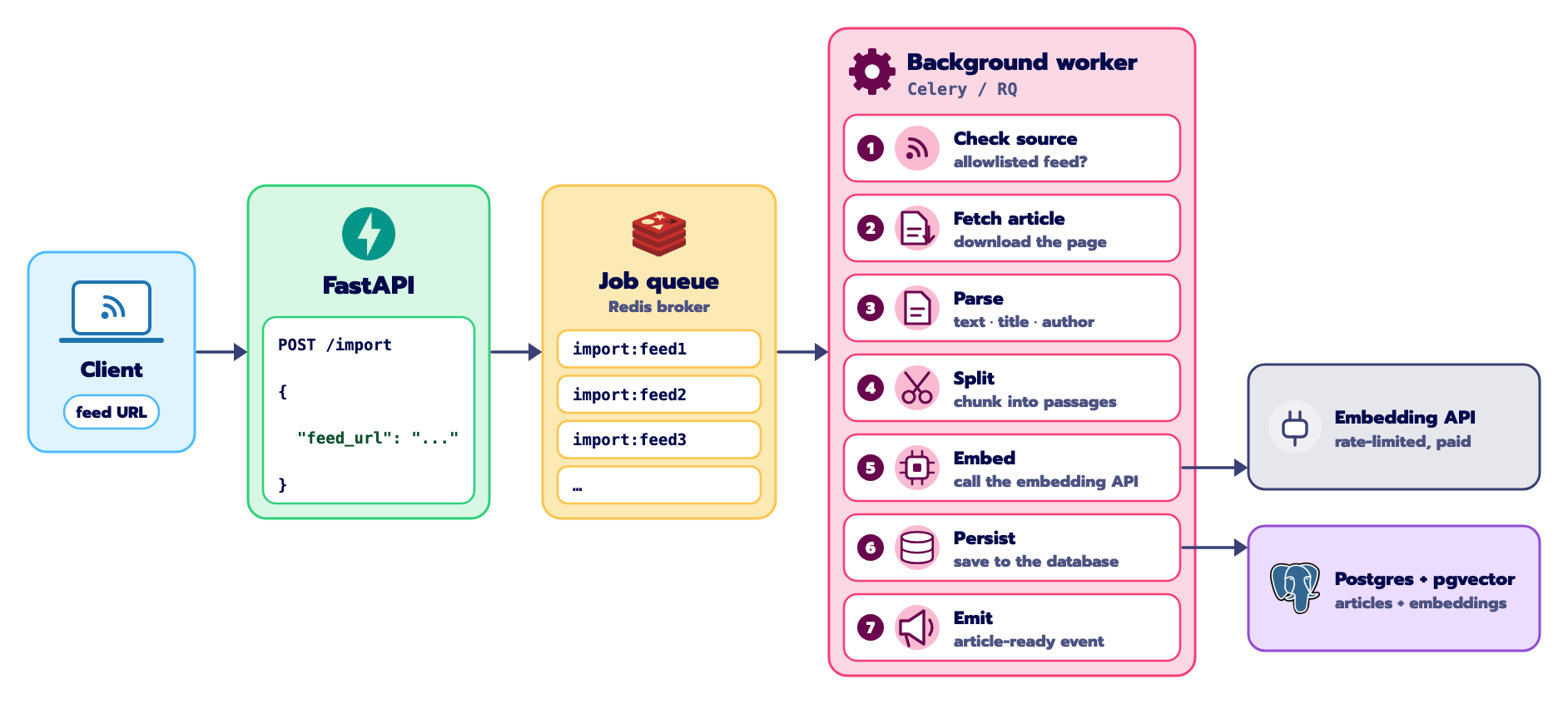
It works perfectly in a demo. But look at the steps again. Most of them are fast, local and free. Step 5 isn't.
Embedding means calling a paid, rate-limited API, often several times per article. And step 6 writes to your database.
Now imagine your embedding provider hits a quota limit halfway through step 5. The worker raises an exception, the queue marks the task as failed, and it schedules a retry. And when that retry runs, it doesn't continue from step 5. It starts again from step 1: fetching, parsing and chunking all over again, and paying again for the embeddings that had already succeeded.
To avoid that, you'd have to build a lot yourself: save progress after each step, retry each step independently, make sure a retry never writes duplicate rows, limit how many articles run at once so you don't hammer the API, and add logging so you can see what actually happened.
That's a lot of infrastructure before you've written a single line of product code!
Building it with Inngest
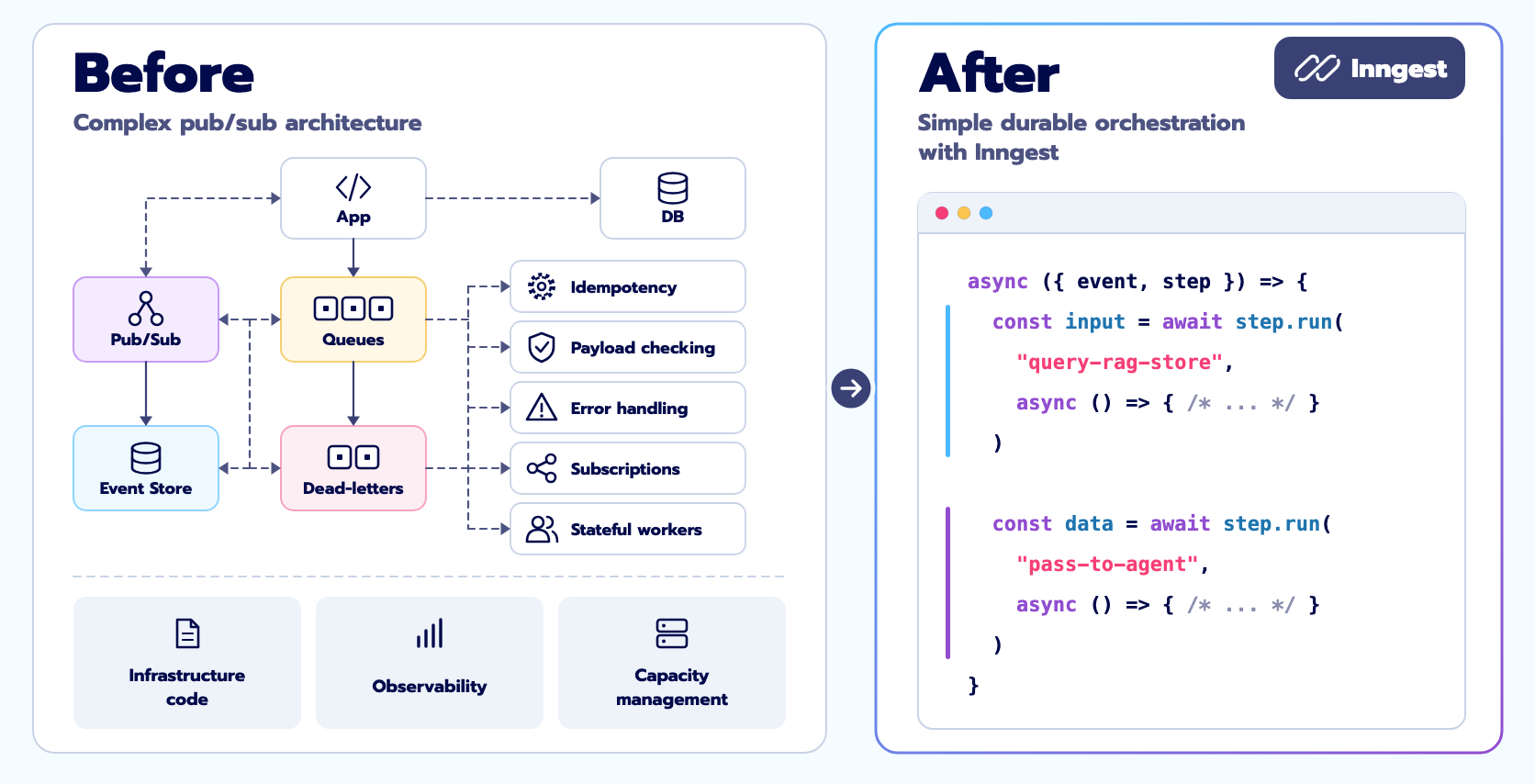
Inngest is an event-driven, durable execution engine.
It is designed to allow developers to build multi-step, stateful background workflows using standard programming languages without the operational burden of managing dedicated message brokers (like RabbitMQ or Kafka), distributed state machines, or complex worker thread pools.
Remember the classic worker from before? It pulls tasks off a queue, runs them, and reports back a simple success or failure. All the state lives in the worker's memory, and disappears when it does.
The shift Inngest introduces is simple but powerful:
It decouples orchestration from execution.
The Inngest engine operates as an external, resilient coordinator, and your application can be defined as a simple HTTP backend service, exposing endpoints where functions are served.
Whenever work is scheduled, Inngest dispatches an HTTP request containing the event context alongside a journal of every step that has already succeeded in that run. As your function executes, the Inngest SDK intercepts each ctx.step.run boundary: if a step's output is already in the journal, it is returned immediately from memory without re-running code; if not, the callable runs, and the SDK yields the result back to Inngest over the HTTP response. Inngest commits that output to its internal Write-Ahead Log (WAL) and schedules the next cycle.
So if your worker crashes, reboots or runs out of memory mid-sequence, Inngest simply dispatches the run again. The function replays from the top, but skips straight to the point of failure without repeating a single completed step.
Inngest's Four Building Blocks
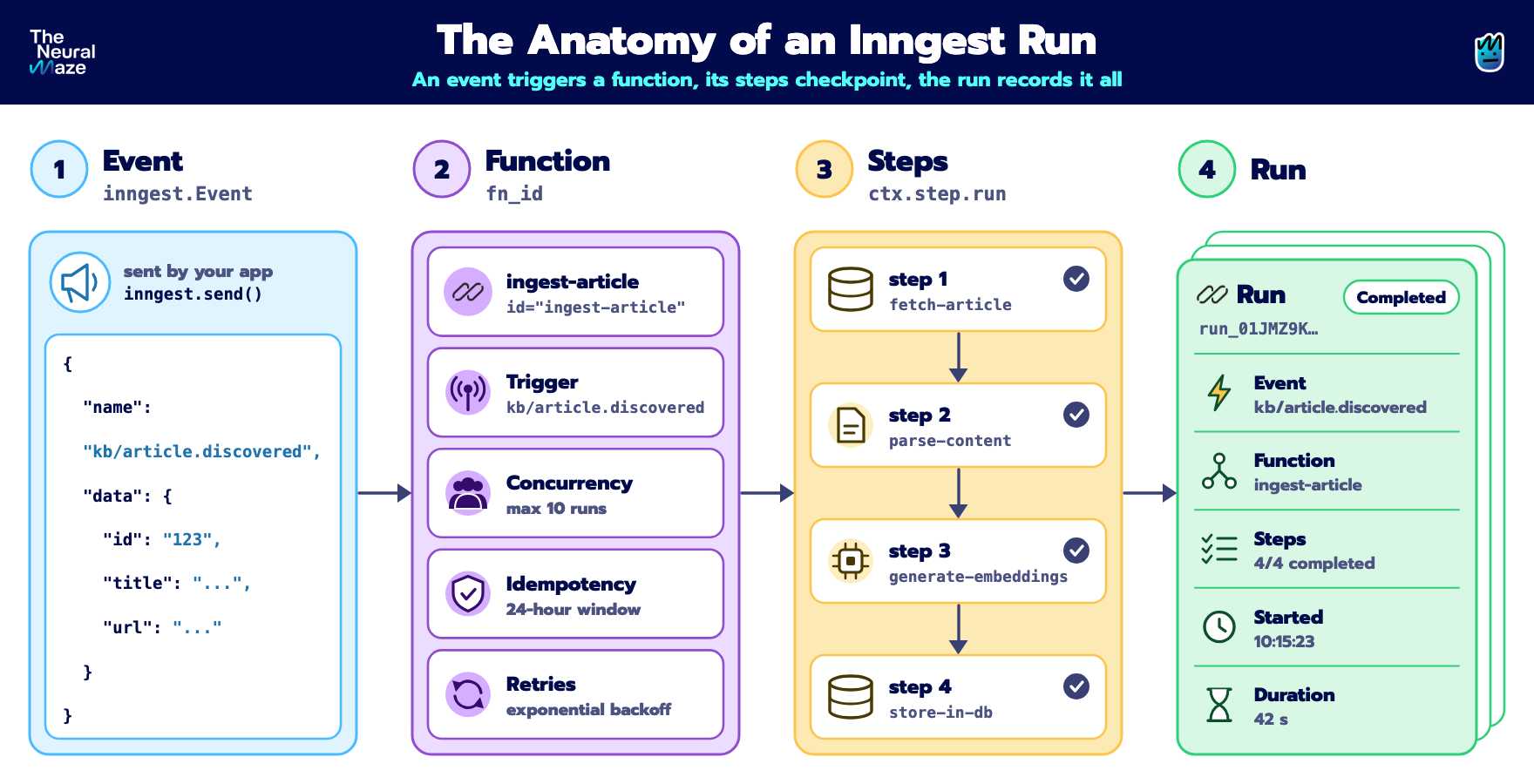
So far, we have made explicit the relevance of elaborating fine-grained structures in our processes in order to build a strong observability tool. As you might have already guessed, the entire stack can be built upon these four primitives.
Events (inngest.Event)
Inngest workflows never call each other directly. Work starts by publishing an event. Instead of services invoking each other through fragile, tightly coupled network calls, components broadcast immutable records of things that have already happened.
An event carries a structured payload and is published asynchronously. The publisher doesn't need to know who’s listening or how they work, so new workflows can subscribe, scale or fail independently without affecting the source.
Functions (fn_id)
A function is the durable workflow itself. Beyond the sequence of logic, it defines the guardrails for execution: how it's triggered (by incoming events or on a schedule), plus runtime policies like concurrency limits to avoid overwhelming downstream services, idempotency windows to discard duplicates, and retry strategies to handle transient network hiccups.
Steps (ctx.step.run, ctx.step.asleep)
The step is the core unit of durable execution. It acts as an atomic checkpoint: Inngest guarantees the operation runs to completion, captures its serializable output, and records it in a persistent journal. All it takes is wrapping a block of code in await ctx.step.run("step-identifier", callable).
Once a step succeeds, its result is permanent for that run. If a later step crashes or a provider goes down, completed steps are never executed again on recovery. Steps can also tell the difference between temporary faults, which deserve automatic retries, and permanent errors, which should stop the workflow immediately instead of wasting resources.
Runs
To really master Inngest, you need to distinguish a function from a run. The function is the static blueprint: the code in your application that defines steps, concurrency limits and retry budgets. A run is a live execution of that function, created by Inngest when an event arrives.
Every trigger creates an independent run with its own unique ID (e.g. run_01JMZ9K...). Each run has its own lifecycle state (Queued, Running, Paused, Retrying or Completed), its own concurrency slot, and its own isolated journal tracking the timeline and memoized outputs of each step.
For example, when the publication discovery workflow fans out five kb/article.discovered events, Inngest creates five separate, concurrent runs of the ingest-article function. Each run is fully autonomous, so a crash or retry in one article’s run has zero impact on the others.
The Week 1 architecture
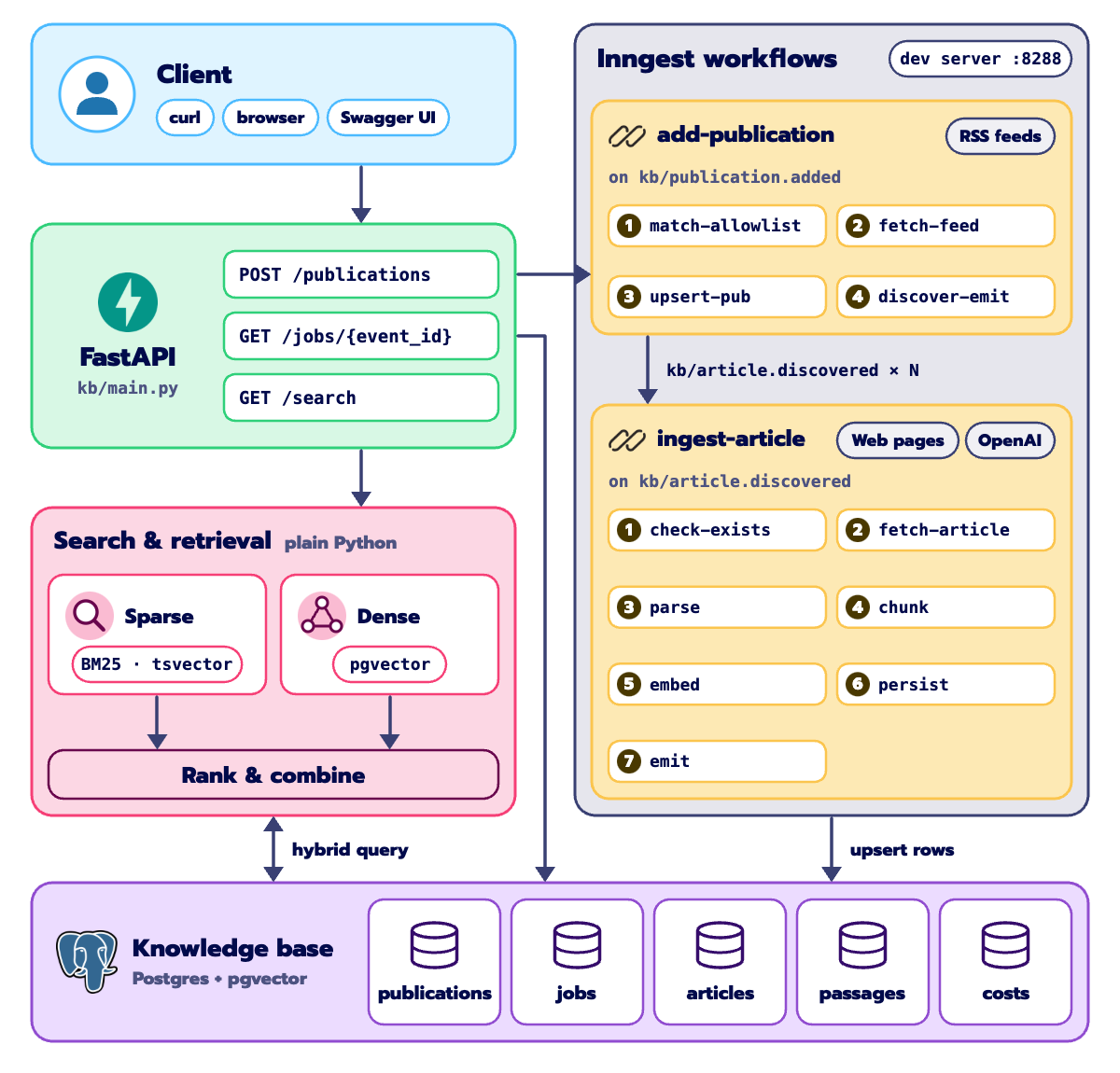
Now that you know what the pipeline does, let's look at the services that run it. Discovery and ingestion are split into two asynchronous event boundaries, and four services make it all work:
API gateway and function host. A lightweight FastAPI application. It serves the Inngest SDK integration at /api/inngest, accepts HTTP triggers at POST /publications, exposes job status at GET /jobs/{event_id}, and handles retrieval queries at GET /search.
Orchestrator (Inngest Dev Server). A local container running inngest/inngest:v1.45.1 on port 8288. It keeps the state journal, tracks step retries and coordinates the execution loop.
Database (PostgreSQL 16 + pgvector). Running on host port 5433. It holds the tables for articles, passages, jobs and cost telemetry. Embeddings are indexed with HNSW (vector_cosine_ops), and full-text search runs on a generated tsvector column backed by a GIN index.
Inspection GUI (Adminer). A database browser on port 8081, so you can inspect table rows, passage embeddings and text vectors directly.
Run it yourself
From now on, we will reference the code that has been shipped in the github repository alongside this week’s subdirectory.
Let's walk through deploying and running the entire cluster locally.
Cloning the repository
First of all, just clone the repository:
git clone https://github.com/neural-maze/substack-brain-course.gitAnd then, go to the working directory.
cd substack-brain-courseThe rest of the instructions in this section will closely follow the week-1.md (also available in the repository).
Configuring Environment Variables
Initialize your local environment file from the provided template:
cp .env.example .env
Open .env in your editor. There are several key environment variables to understand:
OPENAI_API_KEY: (Required) Your OpenAI API key. This is used by Step 5 (embed) and the dense retrieval endpoint to generate 1536-dimensional embeddings usingtext-embedding-3-small.ANTHROPIC_API_KEY: (Optional for Week 1) Reserved for our claim-extraction agents in Week 4. Leave blank for now.DATABASE_URL: Pre-configured to point to our containerized PostgreSQL instance on port5433:postgresql+asyncpg://substack_brain:substack_brain_pw@localhost:5433/substack_brainINNGEST_BASE_URL: Set tohttp://localhost:8288to route local dev server telemetry.LAB_PORT: Set to8000, the host port where Uvicorn will bind the FastAPI application.USER_AGENT: Identifies our scraper honestly to publisher origins, ensuring compliance with responsible scraping standards.
Launching the stack with make start
Execute the automated spin-up target: make start
Under the hood, the Makefile executes four sequential steps, from containers orchestration via Docker Compose, to database schema migrations and vector indexes, and starting the FastAPI service in foreground reload mode.
Once we have used this first terminal for deploying the local stack, we will continue in a fresh new terminal to interact with the available endpoints.
Confirming Subsystem Health (The Idle State)
In your second terminal, verify that the application, database, and Inngest are in communication:
curl -s http://localhost:8000/health | jq . Once the instruction is run, you will see:
{
  "status": "ok",
  "database": "ok",
  "inngest": "ok",
  "articles": 0,
  "passages": 0
}
Notice that articles: 0 and passages: 0. When you run make start, nothing has been scraped or ingested yet, and zero third-party API spend has occurred.
The infrastructure is running in an idle, event-driven state:
PostgreSQL has been migrated and is waiting for data.
The Inngest Dev Server is listening for events on port
8288.Uvicorn is serving the application on port
8000.
Setting Up The Inspection
Before triggering any operations, open two browser tabs to look inside the engine:
The Inngest Dev Server (
http://localhost:8288):Click on Functions to confirm that
add-publicationandingest-articleare registered.The Runs tab will be empty because no events have been published yet.
Adminer Database Explorer (
http://localhost:8081):System: PostgreSQL(manually switch from MySQL)
Server:
postgresUsername / Password / Database:
substack_brain/substack_brain_pw/substack_brainYou will see the initialized, empty tables:
publications,articles,passages,jobs,costs, andcursors.
Triggering Our First Ingestion (The POST Command)
Work in Inngest is entirely event-driven. To start ingestion, send an HTTP POST request to /publications:
curl -X POST http://localhost:8000/publications \
  -H "Content-Type: application/json" \
  -d '{"feed_url": "https://theneuralmaze.substack.com/feed"}' | jq .
The API responds in under 50 milliseconds with a queued event handle:
{
  "event_id": "01JMZ9K7...",
  "trace_url": "http://localhost:8288/event/01JMZ9K7...",
  "status": "queued"
}
FastAPI does not wait for the ingestion pipeline to complete—it immediately emits the Inngest event kb/publication.added and returns.
Inngest then takes over asynchronously:
add-publicationtriggers, fetches the RSS feed XML, and saves the publication to PostgreSQL.It fans out 5
kb/article.discoveredevents.Inngest dispatches 5 parallel instances of
ingest-article(governed by our concurrency limit of 3) to process each article.
You can monitor completion in your terminal:
curl -s http://localhost:8000/jobs/<EVENT_ID> | jq .And refresh Adminer to watch rows appear in articles and passages with their real 1536-dimensional embeddings.
Our Sponsor

None of this would have been possible without Inngest.
A huge thank you to the Inngest team for backing this project. Supporting a free, fully open-source course, where every line of code is public and every lesson is available to everyone, is a real bet on the developer community, and I'm genuinely grateful for it.
Thanks for making this happen! 🙌