


Hey everyone! 👋
Here’s a quick update for everyone following the Phone Calling Agents Course — whether you’re tuning in through the free posts or joining as a premium subscriber and building along each week.
The course includes five lessons (starting at Lesson 0), and this past Wednesday we released the written version of Lesson 3. Tomorrow — Sunday, December 7 — we’ll be hosting our fourth Live Session, where we’ll walk through all the code we’ve built so far and run a few exciting live demos.
Here’s the short recap of everything we’ve covered so far! 👇
Lesson 0
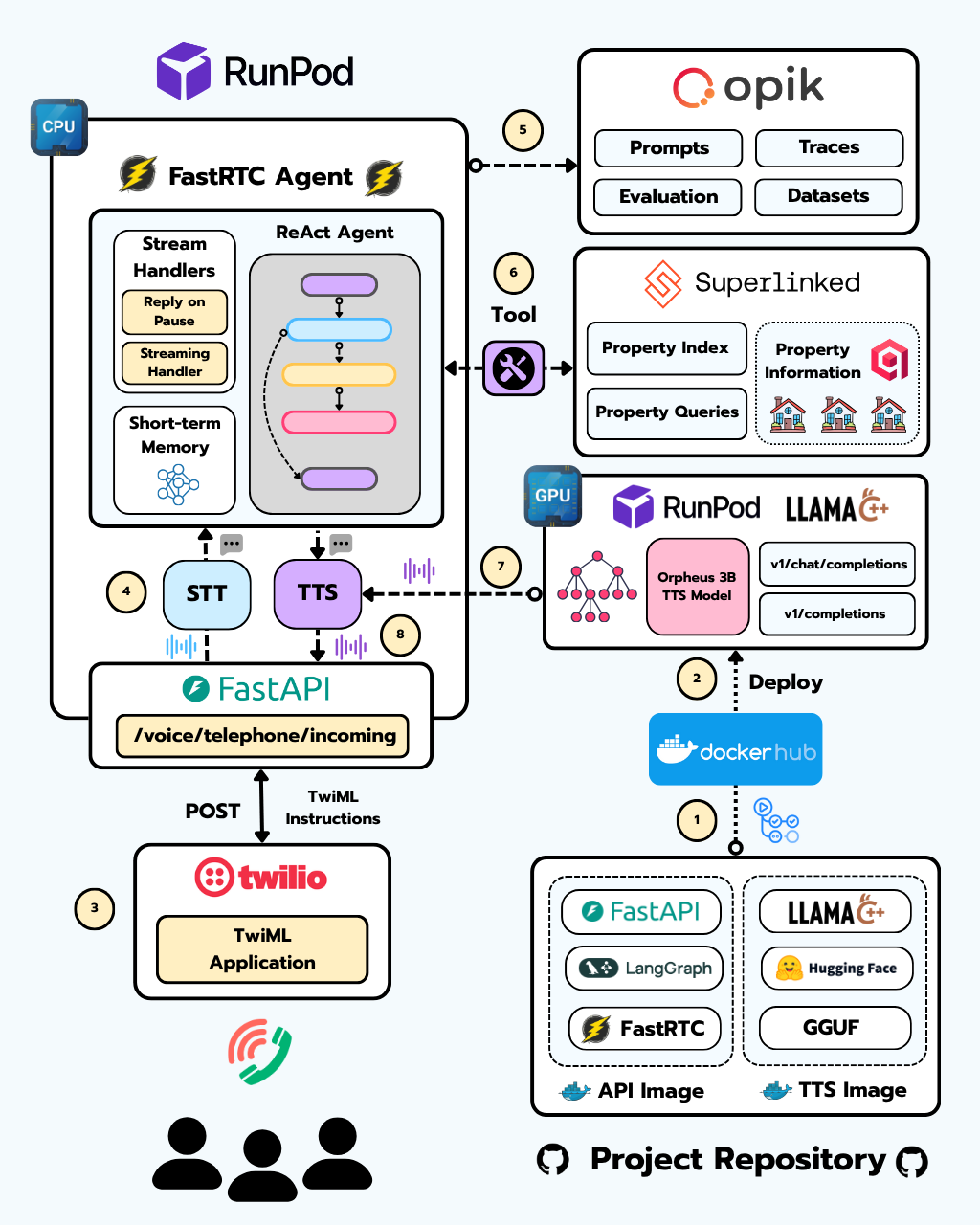
Lesson 0 is all about the big picture.
We break down the overall architecture of the project, walk you through how the course is structured, and give you a preview of what’s coming in the next lessons.
We also introduce the core tech stack we’ll be using, including tools such as:
FastRTC for WebRTC and WebSocket communication
Superlinked + Qdrant for storing property data and running searches across multiple data types
Moonshine and Whisper for speech-to-text
Kokoro and Orpheus 3B for text-to-speech
Runpod as our GPU cloud for deploying the application
Llama.cpp for efficiently serving GGUF models
Twilio for handling both incoming and outgoing phone calls
Here are the resources for this Lesson:
Lesson 1
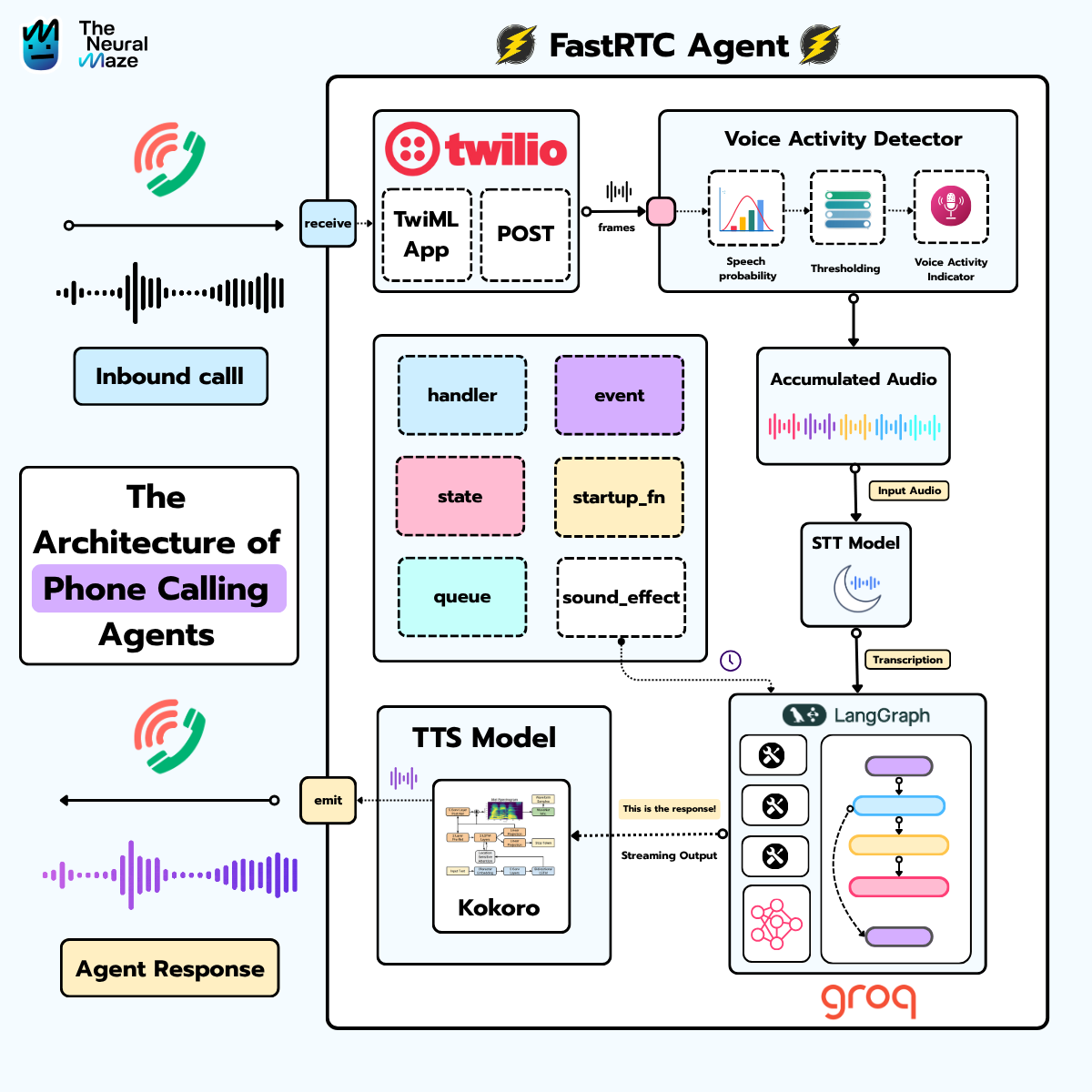
Lesson 1 is where the real building begins.
No more introductions, this is the lesson where you get hands-on. You’ll dive deep into FastRTC and the fundamentals of real-time communication (WebRTC and WebSockets), and you’ll also learn how to integrate FastRTC with LangGraph, the most mature agentic framework available today.
The lesson is split into two parts:
Part 1 - The FastRTC Playground
You’ll work through a detailed notebook designed to teach you everything you need to know about FastRTC from the ground up.
Part 2 - Connecting your FastRTC Agent
You’ll learn how to link your agent with:
Gradio UI, giving you a sci-fi–inspired interface on your computer that establishes a WebRTC connection so you can talk with your agent (very “Her” vibes).
Twilio, where you’ll plug your Voice Agent into Twilio to make your first phone call. (Heads up: everything is running locally at this stage!)
Here are the resources for this Lesson:
Lesson 2
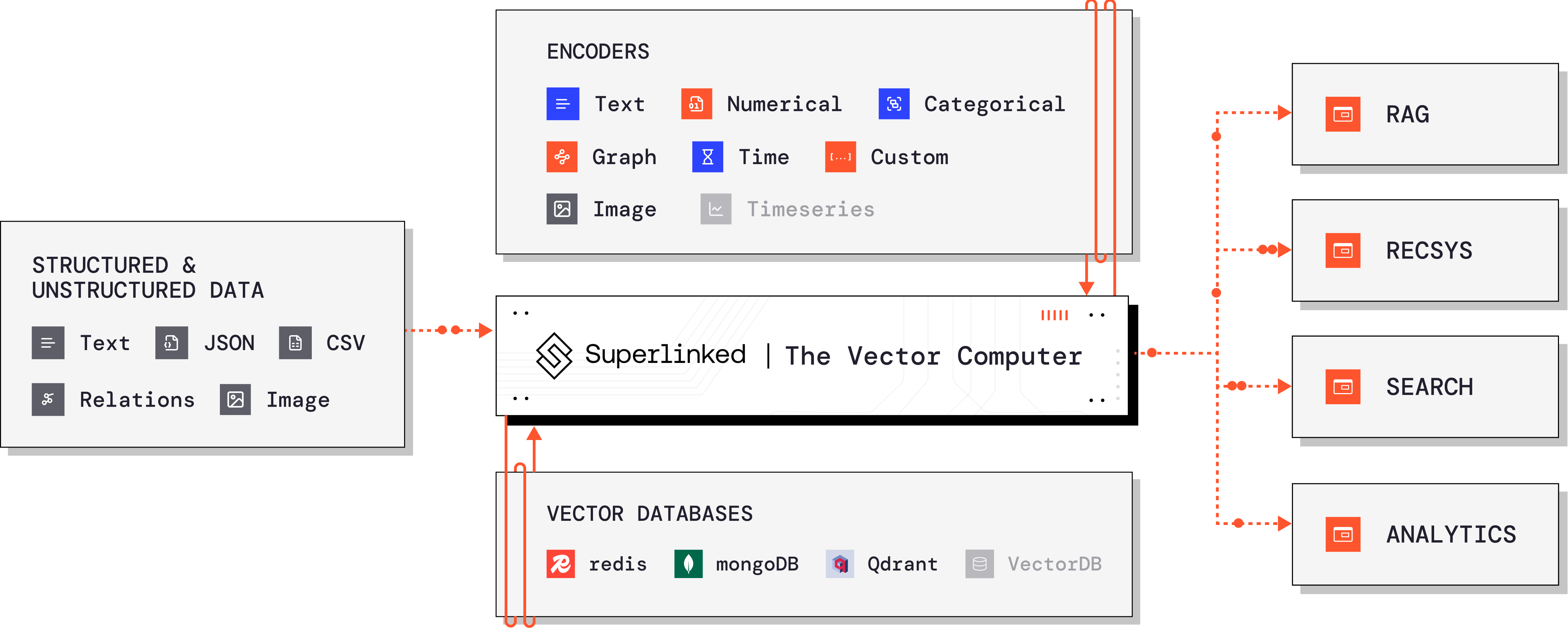
This is the lesson where we fix one of the biggest missing pieces in modern AI systems: real retrieval for real-world queries.
You’ll learn why classic vector search breaks down the moment you leave clean text inputs behind — and how Superlinked lets us navigate complex, multi-attribute queries with precision.
By the end of this lesson, your agent won’t just retrieve text… it will understand preferences, constraints, and trade-offs the way real users express them.
The lesson is split into two parts:
Part 1 - Superlinked 101
You’ll explore why traditional vector search can’t handle mixed signals like price, size, location, and text descriptions — and how Superlinked brings all these attributes together.
Working through the hands-on notebook, you’ll learn the core Superlinked concepts:
How to define Schemas
How to build multi-space Indexes
How to write parameterized Queries
How natural queries let your agent interpret user intent automatically
Part 2 - Plugging Superlinked into your Voice Agent
You’ll wire your property search engine directly into your voice agent by wrapping it as a tool — and suddenly, your agent can answer queries like:
Find me a modern, spacious apartment under €400k in Barrio de Salamanca.Here are the resources for this Lesson:
Lesson 3
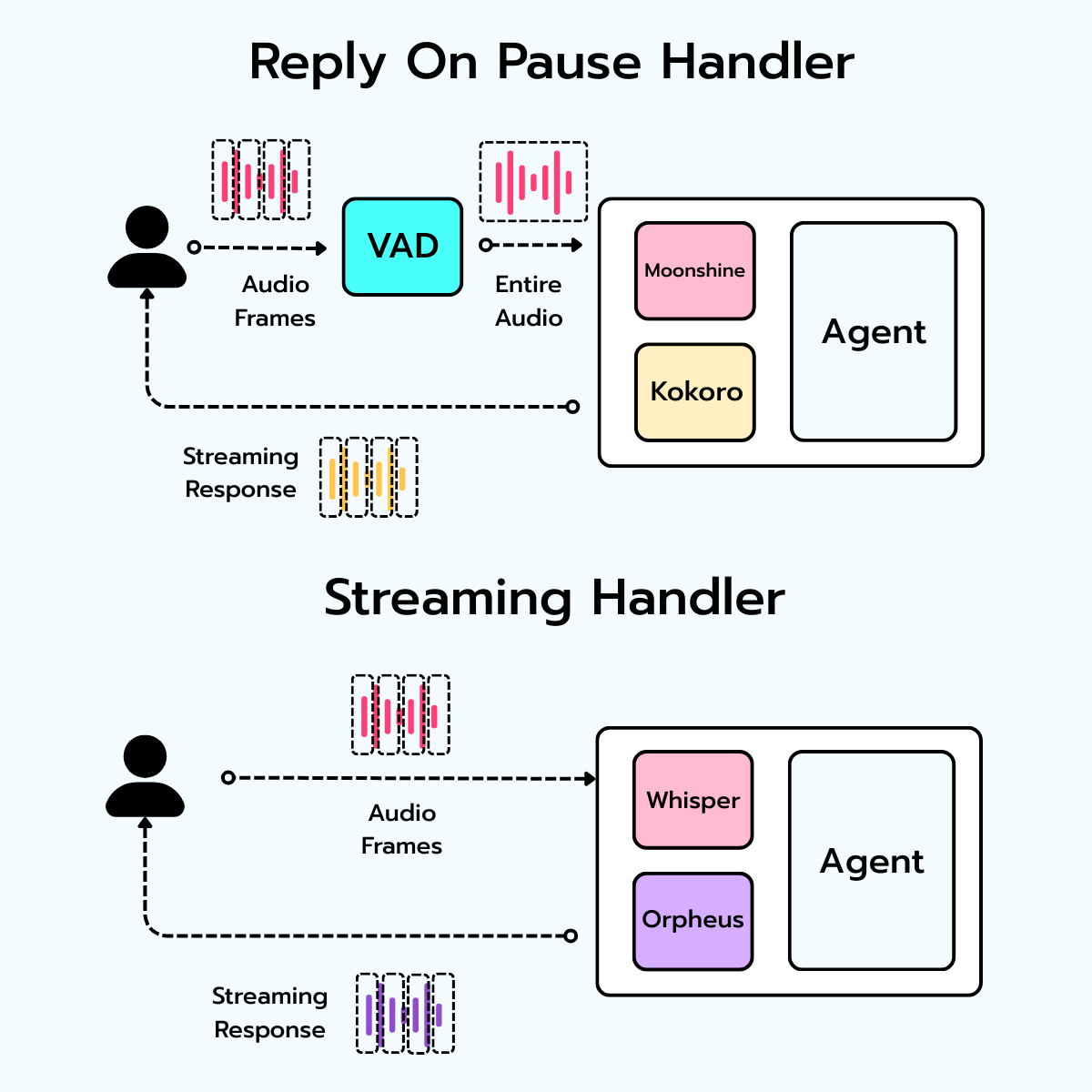
Lesson 3 is where your agent stops sounding like a demo and starts feeling like a real product.
So far, Moonshine (STT) and Kokoro (TTS) have been “good enough” to get things running. But they struggle with accents, mishear key details (Madrid neighborhoods for example), and never quite sound human.
In this lesson, we upgrade the entire voice stack.
You’ll move to Whisper for transcription and Orpheus 3B for speech generation — and, more importantly, you’ll learn how to deploy both to production on a GPU cloud like Runpod.
By the end, your agent will transcribe accented speech accurately, reply with natural, expressive audio, and run on infrastructure you control like a real AI engineer.
Here are the resources for this Lesson:
🎥 Lesson 3 — Recorded Live Session (check out the next section!)
Want to join us live tomorrow?
If you’re serious about learning how to build real-time voice agents—not demos, but production-ready systems—the premium track has everything you need.
👉 Upgrade now and join us for tomorrow’s live session.
See you there! 👋
The progression from Moonshine/Kokoro to Whisper/Orpheus 3B is the right call. Most tutorials stop at the demo stage, but accent handling and neighborhood-specific terminology are where voice agents actually break in production. Running your own inference on Runpod instead of relying on API calls gives you way more control over latency and costs when you scale.
Thanks for writing this, it clarifies a lot and as someone passionate about AI, I apreciate seeing the practical architectural breakdown.