


Today, I’m really excited to introduce Marcelo Acosta Cavalero, an AWS Certified Solutions Architect with a strong focus on Machine Learning and more than 30 years of experience in technology.
I feel really lucky to have Marcelo as one of The Neural Maze’s premium subscribers. He recently shared with me an amazing project where he built a WhatsApp Multimodal Agent entirely using AWS technologies.
It’s a brilliant example of how expertise and curiosity can turn ideas into reality.
Without further ado, I’ll let Marcelo take it from here.
Enjoy!
Miguel
I watched Miguel Otero Pedrido and Jesus Copado’s brilliant Ava the WhatsApp Agent series and tried building something similar. They built a multimodal WhatsApp bot using LangGraph and Google Cloud Run. The agent could hold conversations, analyze images, generate art, and process voice messages. After going through the series, I had one question …
💡 What would this look like built 100% on AWS?
I started sketching out the architecture and quickly realized there were too many ways to build it.
Pure Lambda orchestration? Bedrock Agents? Bedrock AgentCore? LangChain on Lambda? Step Functions? Each approach had tradeoffs I couldn’t ignore.
That’s when I chose to build a hybrid system — not because hybrid is inherently superior, but because developing both approaches in parallel would push me to truly understand when each one is the right fit.
The result is a production-ready WhatsApp bot on a manageable budget that demonstrates two distinct architectural patterns in the same codebase.
💻 You can find the complete code and deployment scripts here!
What You’ll Build
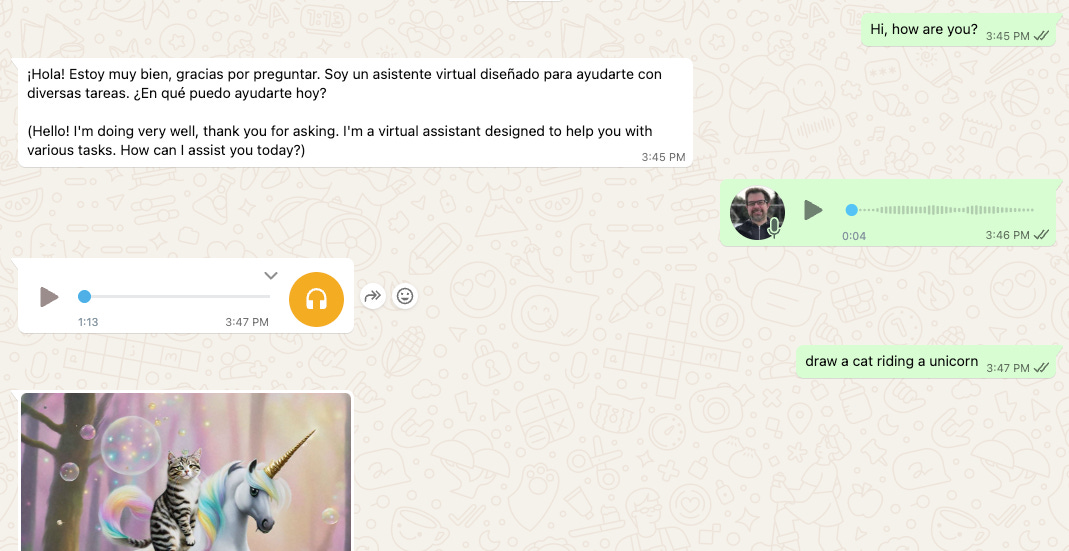
By the end of this guide, you’ll understand how to build a WhatsApp bot with:
Natural conversations powered by Claude 3.5 Sonnet
Image analysis using Claude Vision
AI image generation with Stable Diffusion XL (or Amazon Titan)
Voice message transcription with AWS Transcribe
Text-to-speech responses using Amazon Polly
A serverless architecture that scales automatically
More importantly, you’ll understand when to use direct Lambda processing versus Bedrock Agent frameworks.
Why Hybrid Architecture?
Most tutorials pick one approach and call it a day. I’m showing you both — because the “best” architecture always depends on what you’re building.
Here’s the truth: simple operations don’t need the overhead of agent frameworks. Complex ones often do. I learned that the hard way after rebuilding parts of this system three times.
In this project, direct Lambda functions handle straightforward tasks like image analysis, text-to-speech, and transcription. These are deterministic processes that don’t require language understanding or multi-turn reasoning.
For image generation, though, I use Bedrock Agents. Why? 🤔
Because transforming a request like “create a sunset over mountains” into an optimized image prompt takes natural language understanding and prompt engineering — something an agent handles far better than rigid logic.
This setup avoids wasting resources where agents add no value, and uses them where they truly make a difference.
The Cost Reality Check
Before we dive deeper, here’s what running this bot actually costs:
For 1,000 messages per day:
Lambda execution: $5-10
Bedrock models: $20-30
S3 storage: $1-2
API Gateway: $1
Other services: $3-5
💰 Total: $30-50 per month.
Image generation adds extra cost per image. Titan costs $0.01 per image, Stable Diffusion XL costs $0.04. These costs scale with usage, but you have full control over which model you use.
Paying only for what you use across AWS services often beats being locked into third-party platforms with mandatory monthly fees.
Architecture Overview
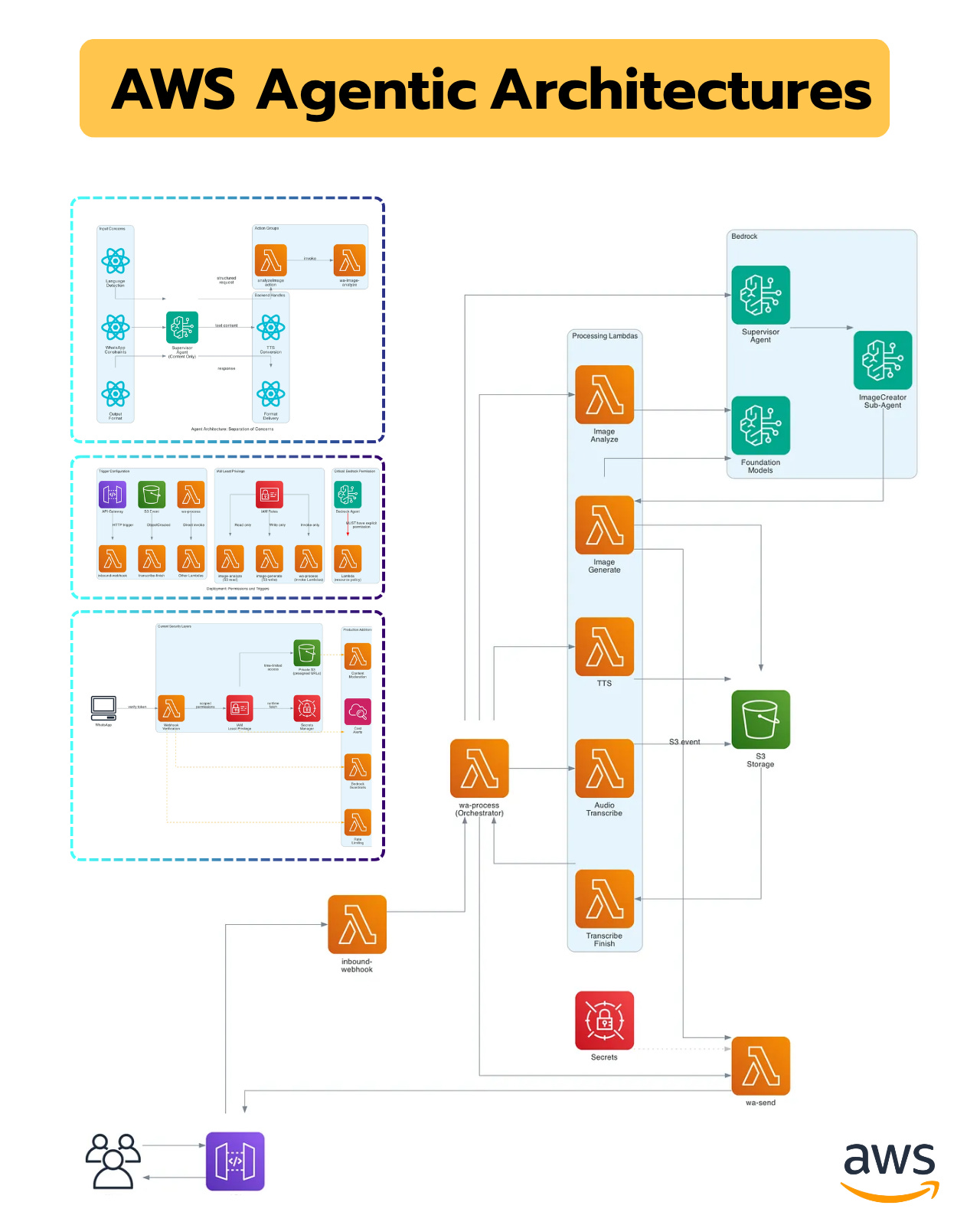
The system consists of 8 Lambda functions working together.
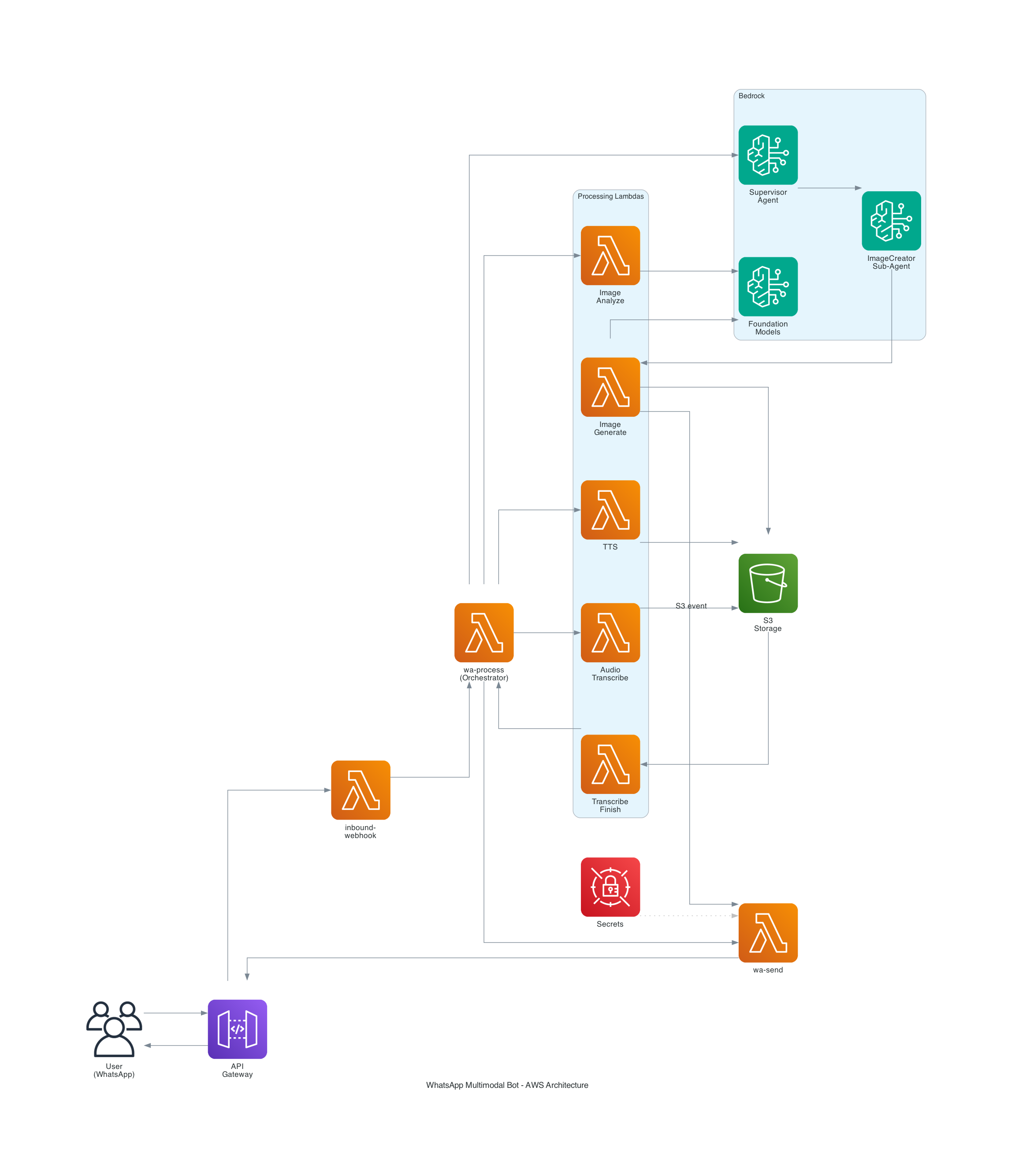
Entry and orchestration:
inbound-webhook: Receives WhatsApp messages via API Gateway
wa-process: Main orchestrator that routes requests
wa-send: Sends messages back to WhatsApp
Feature handlers:
wa-image-analyze: Analyzes images using Claude Vision
wa-image-generate: Generates images using Titan or Stable Diffusion
wa-tts: Converts text to speech with Amazon Polly
wa-audio-transcribe: Starts transcription jobs using AWS Transcribe
wa-transcribe-finish: Handles transcription callbacks
Supporting services:
AWS Bedrock: Supervisor Agent + ImageCreator Sub-Agent
Amazon Polly: Text-to-speech synthesis
AWS Transcribe: Audio transcription
S3 buckets: Media storage and generated images
Secrets Manager: WhatsApp API credentials
The architecture diagram shows the complete flow, but I’ll walk you through how each piece works and why I made specific decisions.

Decision Framework: Lambda vs Agents
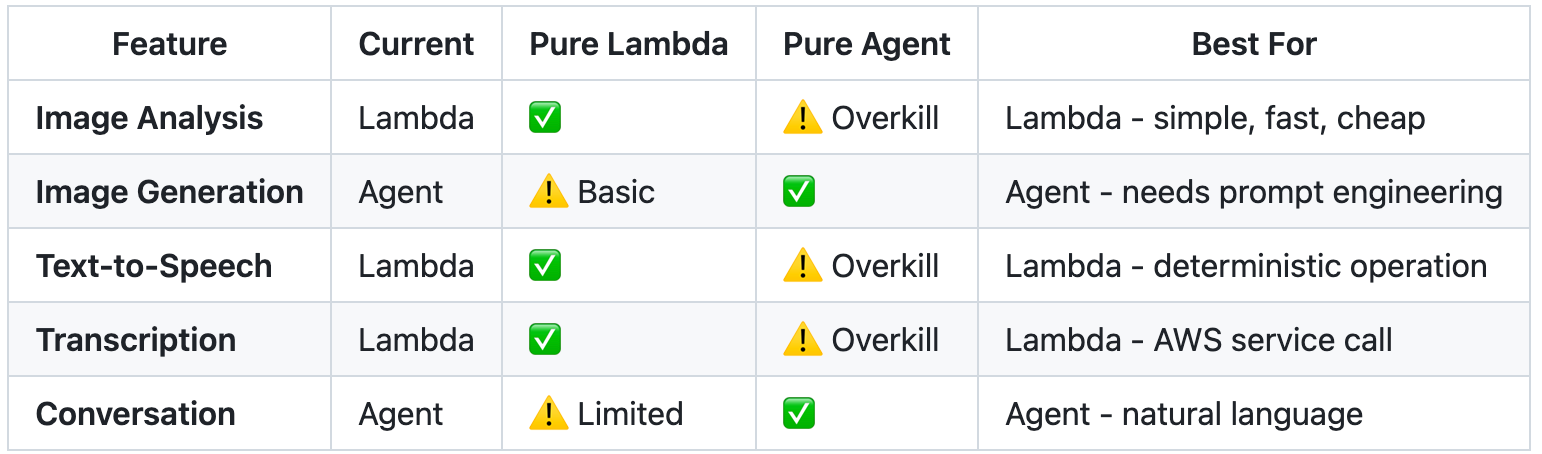
Here’s how I decided which approach to use for each feature.
Use direct Lambda when:
The operation is deterministic (TTS always works the same way)
You’re calling an AWS service directly (Transcribe, Polly)
The input-output relationship is simple
You want lower latency and cost
Use Bedrock Agents when:
You need natural language understanding
The task requires reasoning or optimization
Multi-turn conversations matter
Context needs to persist across interactions
Image analysis is handled by a Lambda function — a straightforward operation: take an image, send it to Claude Vision, and return the description. No complex logic or prompt engineering required.
Image generation, on the other hand, is powered by Agents. A simple user request like “sunset” needs to evolve into a rich, detailed prompt — for example, “a photorealistic sunset over mountain peaks, illuminated by golden hour light, ultra-detailed, 8K resolution.” That’s where the agent excels, turning vague intent into precise instructions.
The goal isn’t to pick a winner, but to match each method to what it does best.
Building the Foundation
Let’s start with the basics. You’ll need:
AWS account with Bedrock access
Python 3.9 or higher
AWS CLI configured
WhatsApp Business API account from Meta for Developers
You also need to enable model access in Bedrock for:
Claude 3.5 Sonnet v2
Claude 3.5 Haiku
Titan Image Generator v2
Model access is free to enable. You only pay when you use them.
Setting Up WhatsApp Business API
Getting WhatsApp access is straightforward but takes a few steps:
Go to Meta for Developers and create an app
Add the WhatsApp product to your app
Get your Phone Number ID and Access Token
Generate a verify token (any random string you choose)
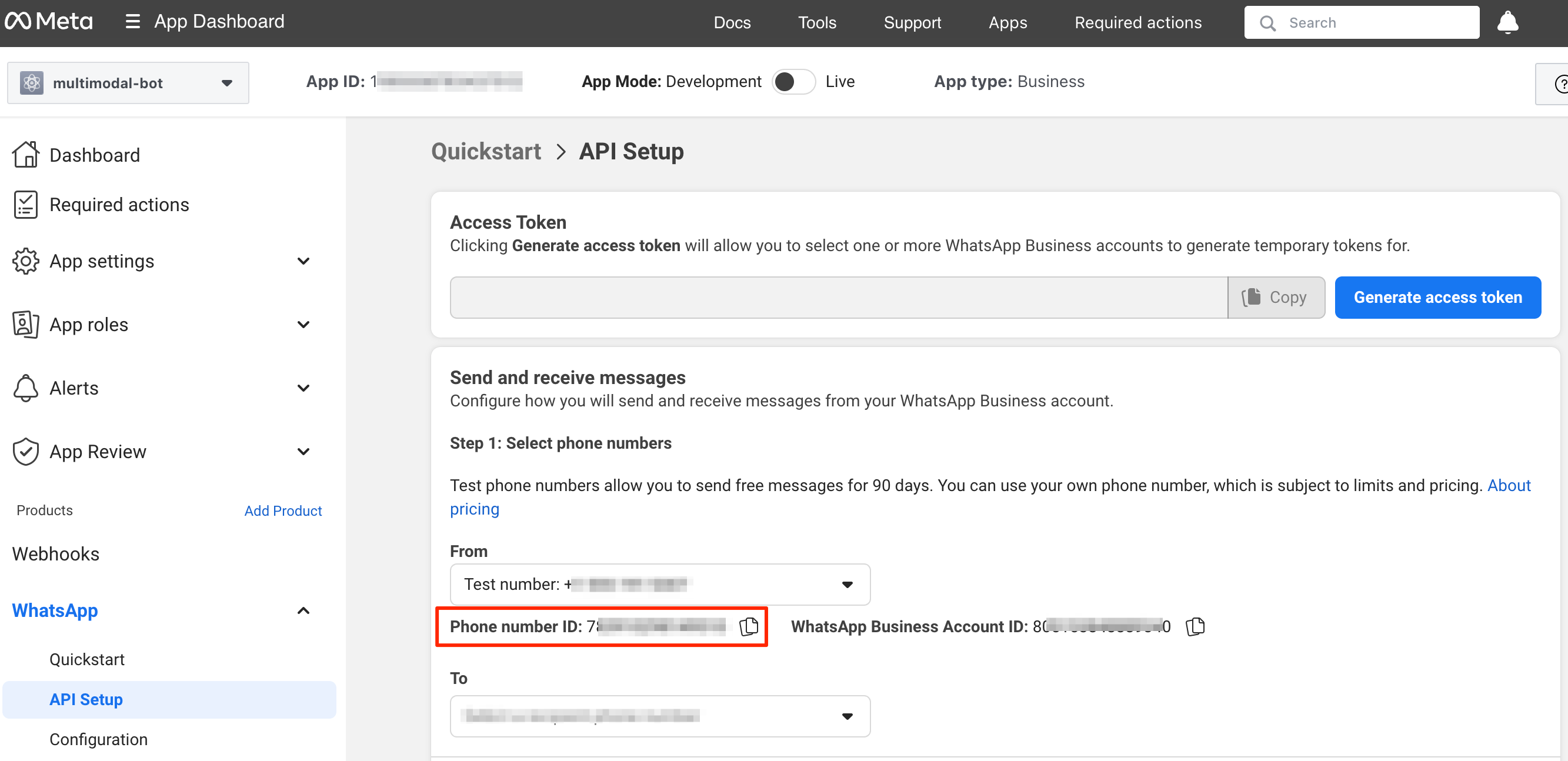
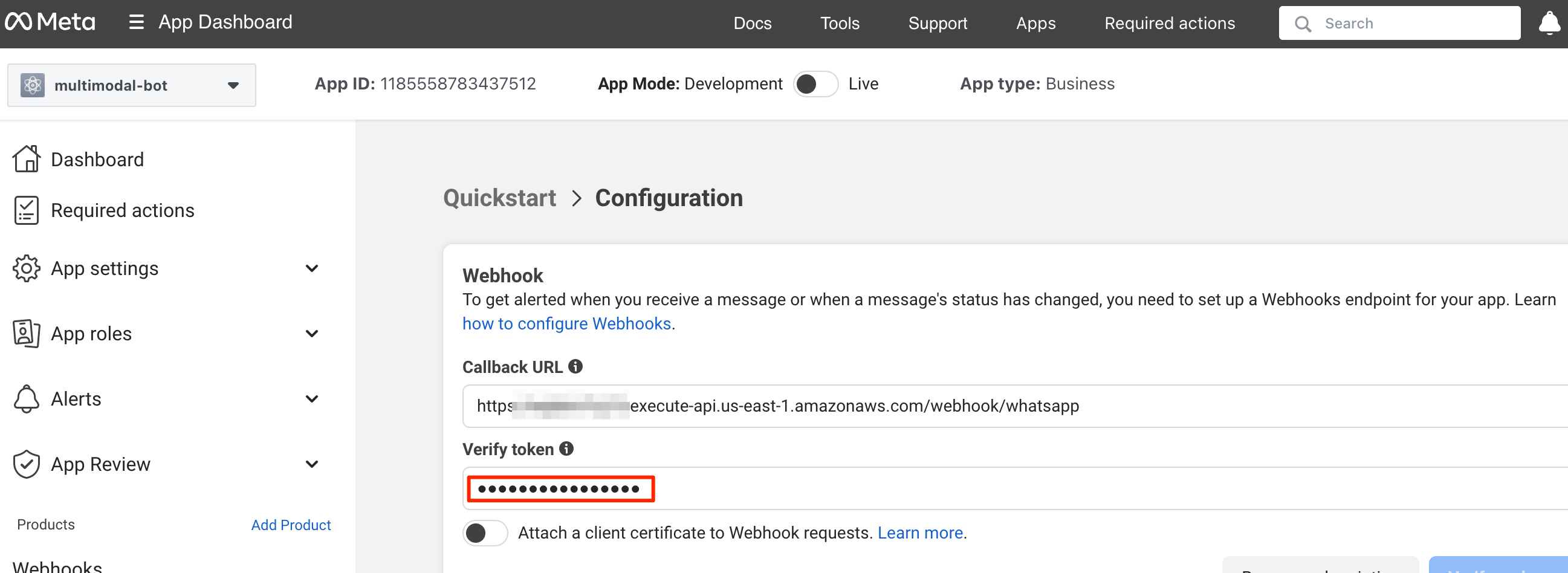
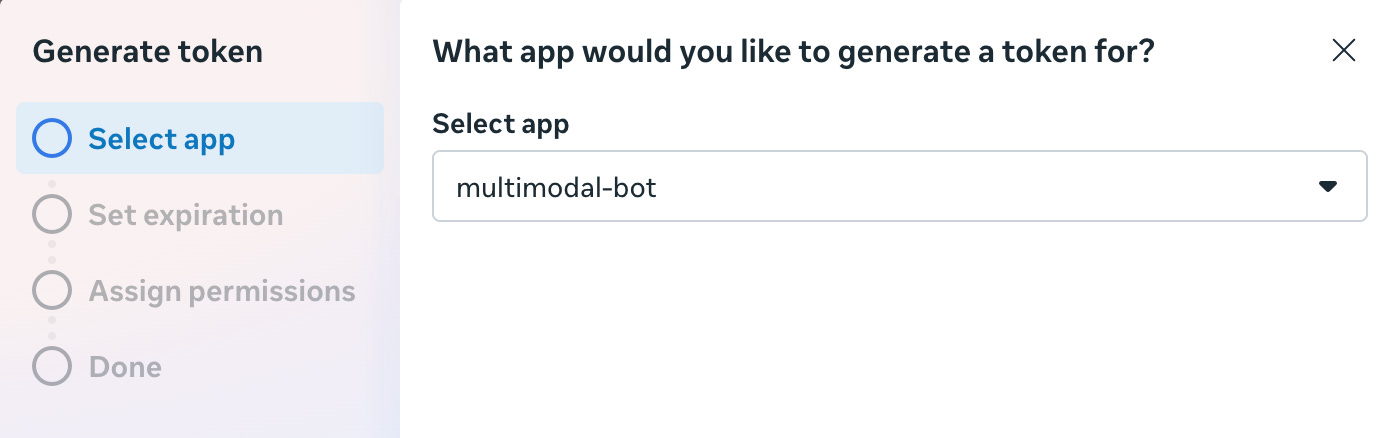
Store the long-lived access token in AWS Secrets Manager. This is important because this token needs rotation over time.
Create a secret with this structure:
{
  "token": "your_long_lived_access_token"
}
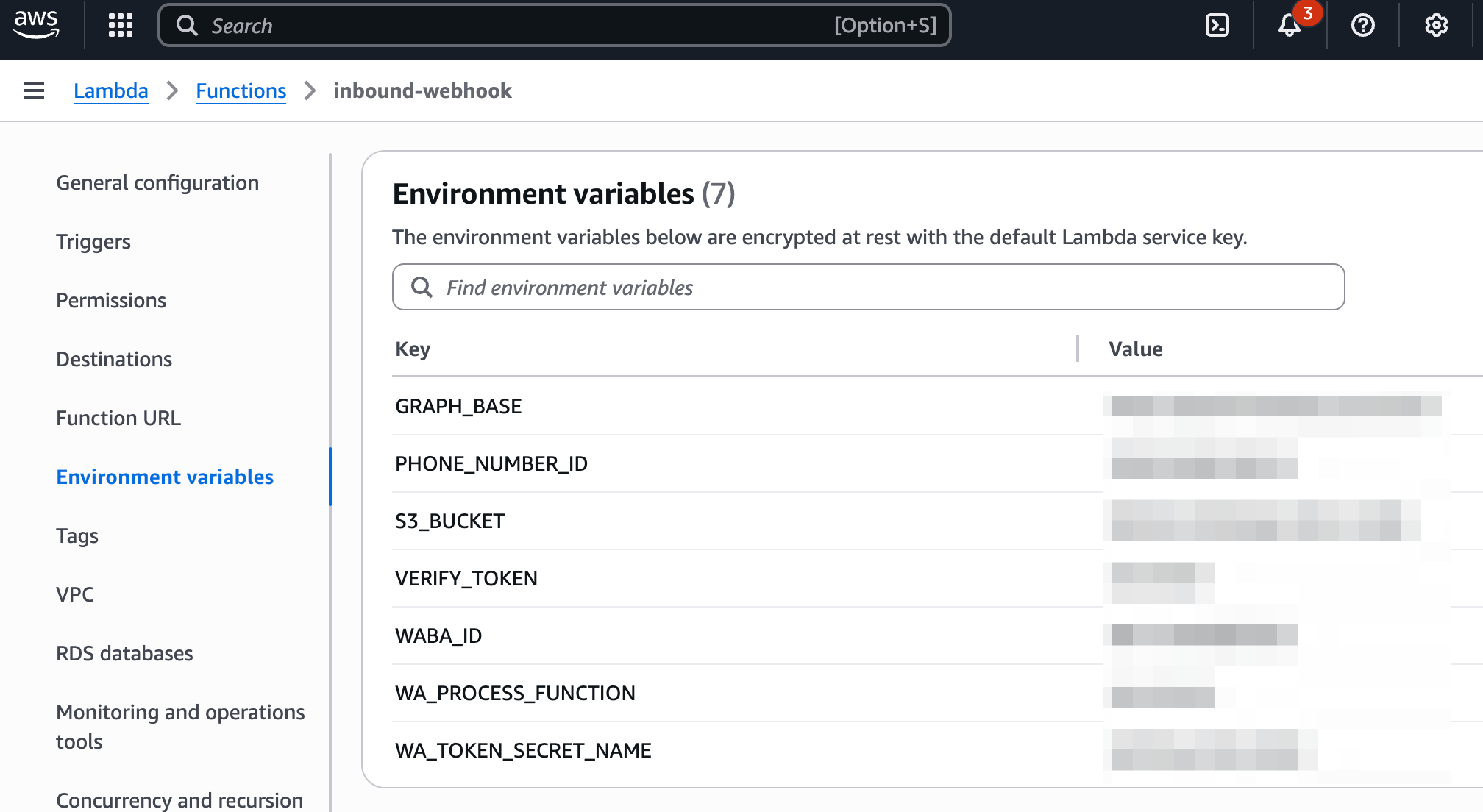
The Phone Number ID and Verify Token go in Lambda environment variables. Only the access token needs to be in Secrets Manager because it’s the credential that requires rotation and is security-sensitive.
The Configuration Strategy
Lambda functions don’t use .env files. Each function has its own environment variables set directly in AWS Console or via CLI.
The .env.example file in the repo is just a reference document showing what variables exist and where they’re used.
Different Lambda functions need different configurations. The orchestrator needs agent IDs. The image generator needs model IDs and bucket names. The sender only needs to know where to find the access token in Secrets Manager.
This keeps each function’s configuration minimal and explicit
Building the Entry Point
Every WhatsApp message hits inbound-webhook first. This Lambda handles two responsibilities:
Webhook verification
Receiving messages
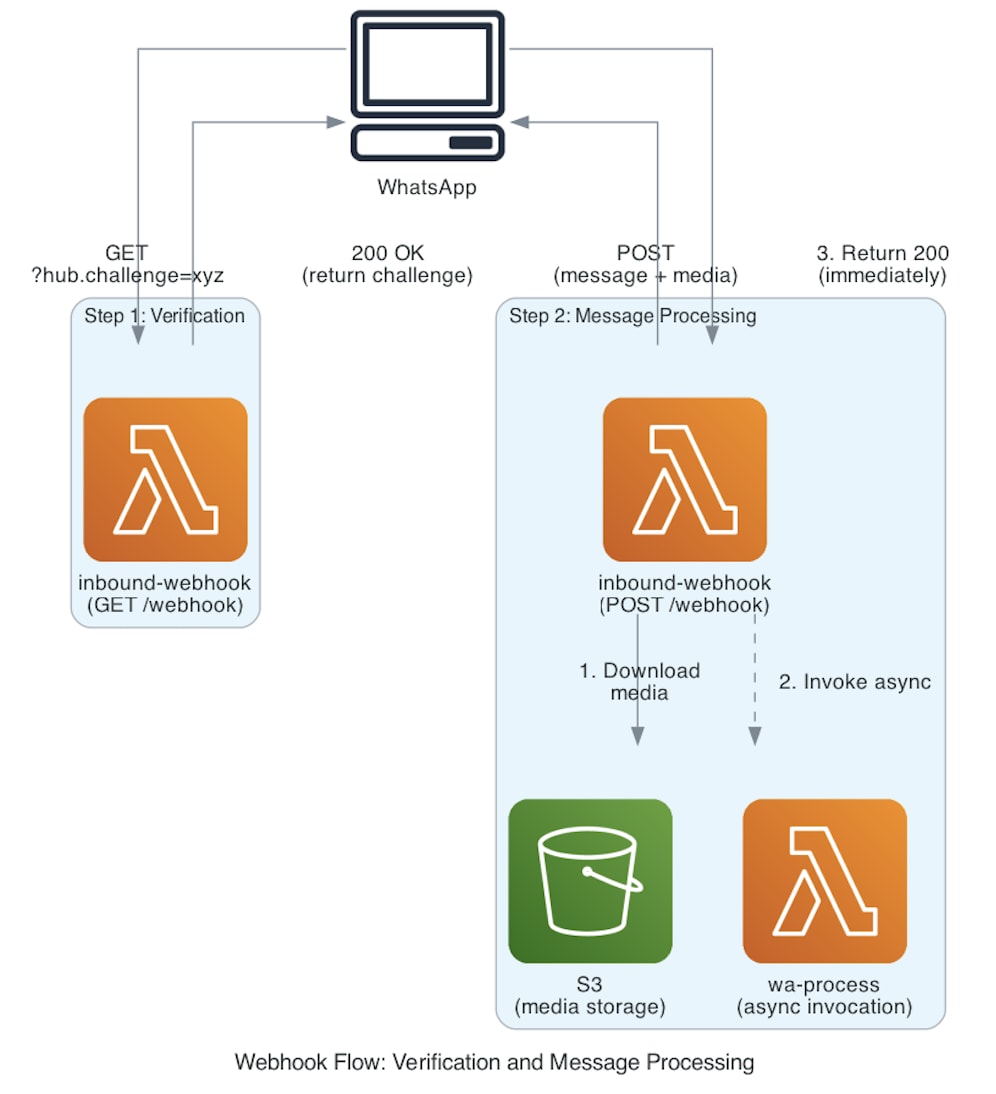
The verification flow is simple: when you set up the webhook, WhatsApp sends a GET request containing a challenge token. Your Lambda function checks that the token matches your configuration and then returns it — confirming that you own the endpoint.
Once verification succeeds, WhatsApp switches to POST requests to deliver message data. When media files (like images or audio) arrive, the webhook saves them to S3 for processing and then triggers wa-process asynchronously.
📌 At this point, that asynchronous pattern is essential.
WhatsApp requires a 200 OK response within a few seconds, but generating a reply might take 10–20 seconds. By invoking the processor asynchronously, you can confirm receipt right away while the actual work continues in the background.
Building the Orchestrator
The wa-process Lambda is the brain of the system. It receives a message and decides what to do with it.
The logic follows a simple flow: identify message type (text, image, audio), check for special intents like voice responses, route to the appropriate handler, and send the response back.
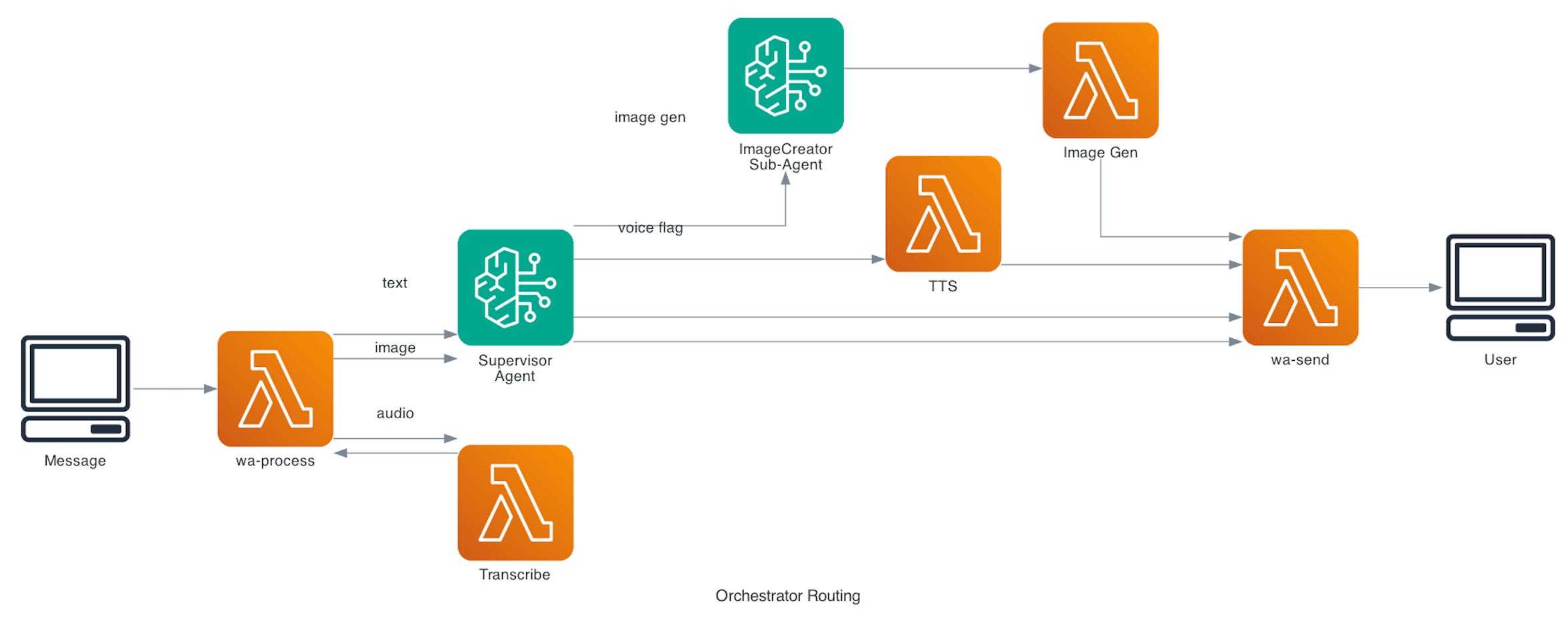
For text messages, the function invokes the Bedrock Supervisor Agent and sends the response directly.
For images with questions, it prepares context that includes the S3 URI and user’s question, then invokes the agent.
For audio, it triggers the transcription Lambda and waits for the callback.
✅ This is where the hybrid architecture really shines. The orchestrator doesn’t need to know whether a feature runs through a Lambda or an Agent framework — it just routes each request to the right service.
Text and image analysis are handled by the agent.
Audio transcription runs through a direct Lambda call.
Image generation is delegated to a sub-agent.
The orchestrator simply coordinates them all.
It also manages voice response requests. When a user asks for a voice reply, the orchestrator sets a flag and invokes the agent to generate text. Once the text is ready, it calls wa-tts to convert it into audio. This clear separation of responsibilities keeps the agent focused on content generation, while the orchestrator controls delivery and output formats.
Image Analysis - Direct Lambda Pattern
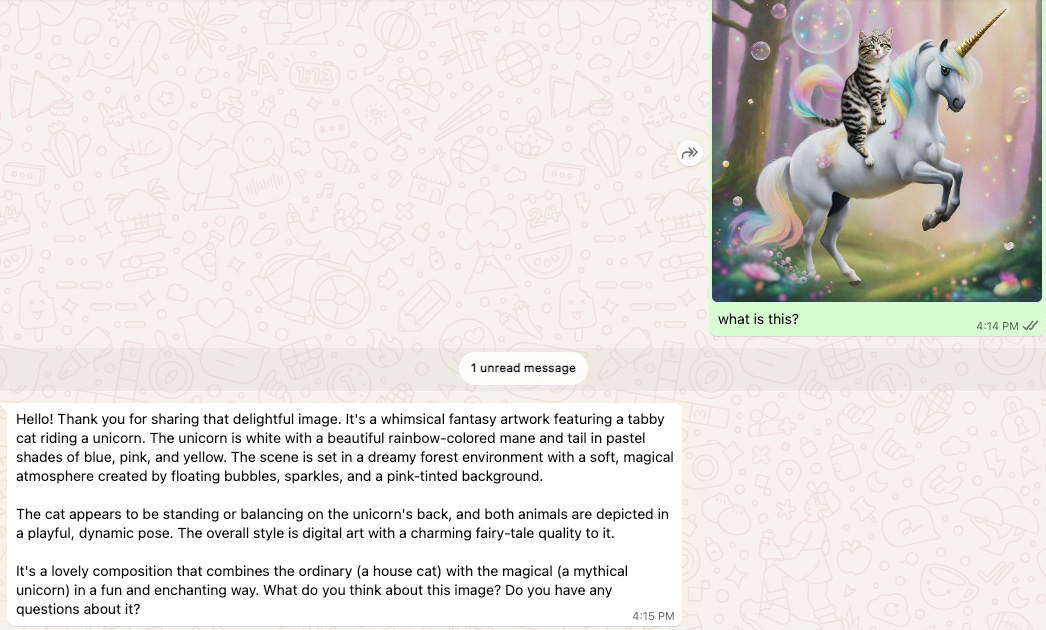
Image analysis is a clear example of the direct Lambda pattern. The task is straightforward: fetch an image from S3, send it to Claude Vision through the Bedrock Converse API, and return the generated description.
Instead of passing an S3 reference, the Lambda downloads the image bytes directly. This approach makes the integration more robust against potential API changes. The image data, along with the user’s question, is then sent to Claude 3.5 Sonnet Vision, which produces the final description.
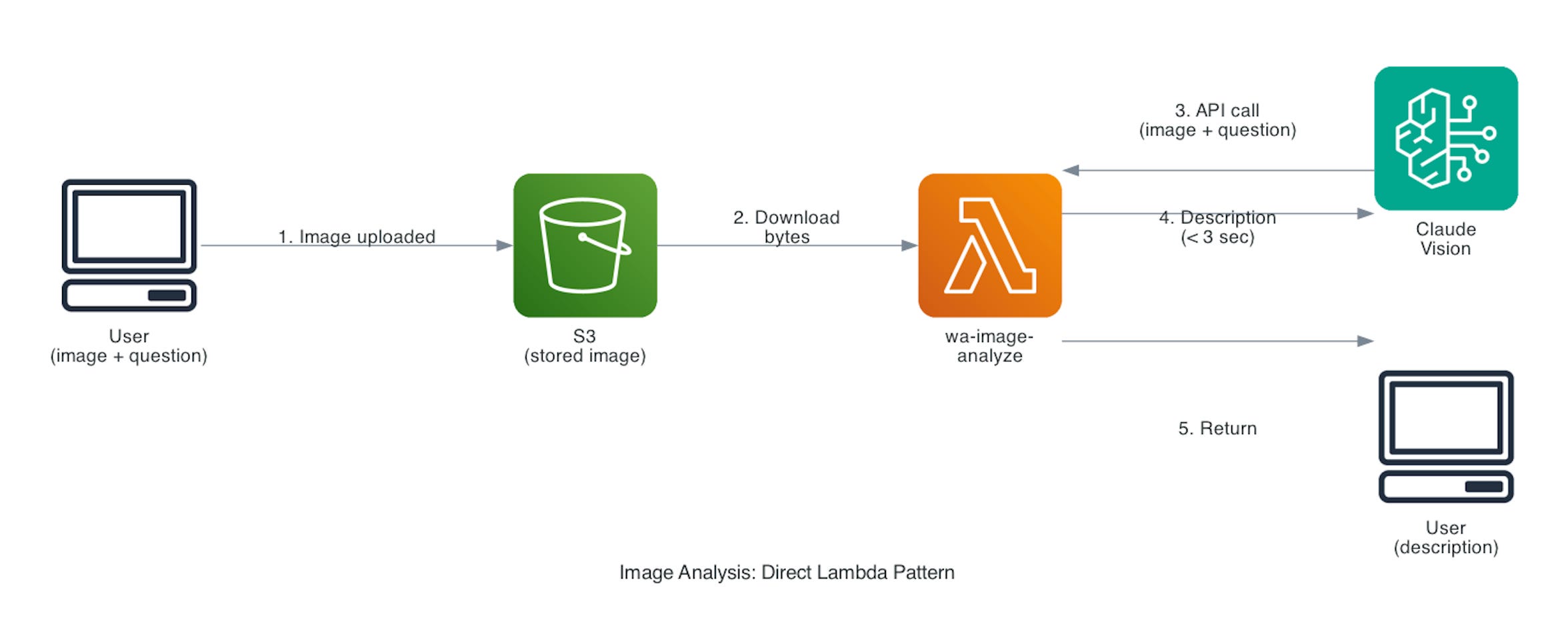
This direct approach gives you complete control — no agent orchestration, no prompt tuning, just a clean API call. The entire Lambda runs in under three seconds.
Costs are straightforward too: about $0.008 per image. At 1,000 images a month, that’s roughly $8. Using an agent framework here would only add unnecessary orchestration overhead without delivering extra value.
🙋 So when should you add an agent layer?
Use one when image analysis needs to trigger follow-up actions, preserve conversation context across multiple images, or connect to knowledge bases for deeper reasoning.
For simple “analyze this image” requests, the direct Lambda approach remains the smarter, faster, and more cost-efficient choice.
Voice and Audio - Direct Lambda Pattern
For text-to-speech (TTS), the wa-tts Lambda receives text from the orchestrator and calls Amazon Polly to synthesize it into speech. Polly returns an MP3 audio stream, which the Lambda uploads to S3. It then generates a presigned URL for the file and returns it to the orchestrator. Finally, the orchestrator calls wa-send with that URL to deliver the audio message to WhatsApp.
💰 The entire process is fast and inexpensive — about $0.016 per request (Polly’s rate is $16 per million characters).
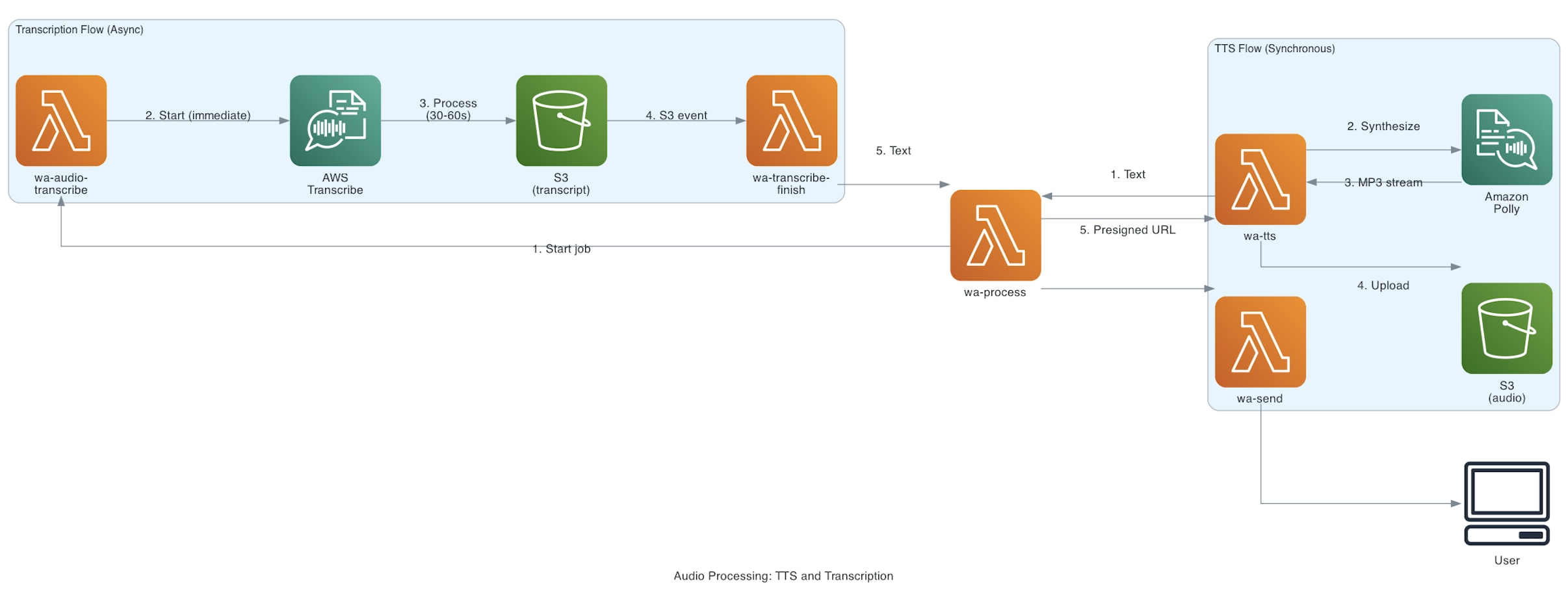
Audio transcription is a bit more involved because AWS Transcribe works asynchronously — you can’t just call it and get an immediate response.
The wa-audio-transcribe Lambda starts a transcription job, telling Transcribe where to find the audio file in S3 (uploaded earlier by the webhook), what format it’s in (typically OGG for WhatsApp voice notes), and where to save the output. It then returns right away.
Transcribe handles the rest in the background. When the job finishes, it writes the transcript JSON back to S3, triggering an ObjectCreated event that invokes the wa-transcribe-finish Lambda. This function reads the transcript, extracts the text, and sends it to the orchestrator as if it were a new text message — which the orchestrator then passes to the agent for processing.
✅ This asynchronous pattern is essential for long-running tasks. WhatsApp users expect near-instant acknowledgment, but transcription can take 30–60 seconds depending on audio length. By offloading the work and handling callbacks, the system confirms receipt immediately while the heavy lifting happens in the background.
Conversations - Agent Framework Pattern
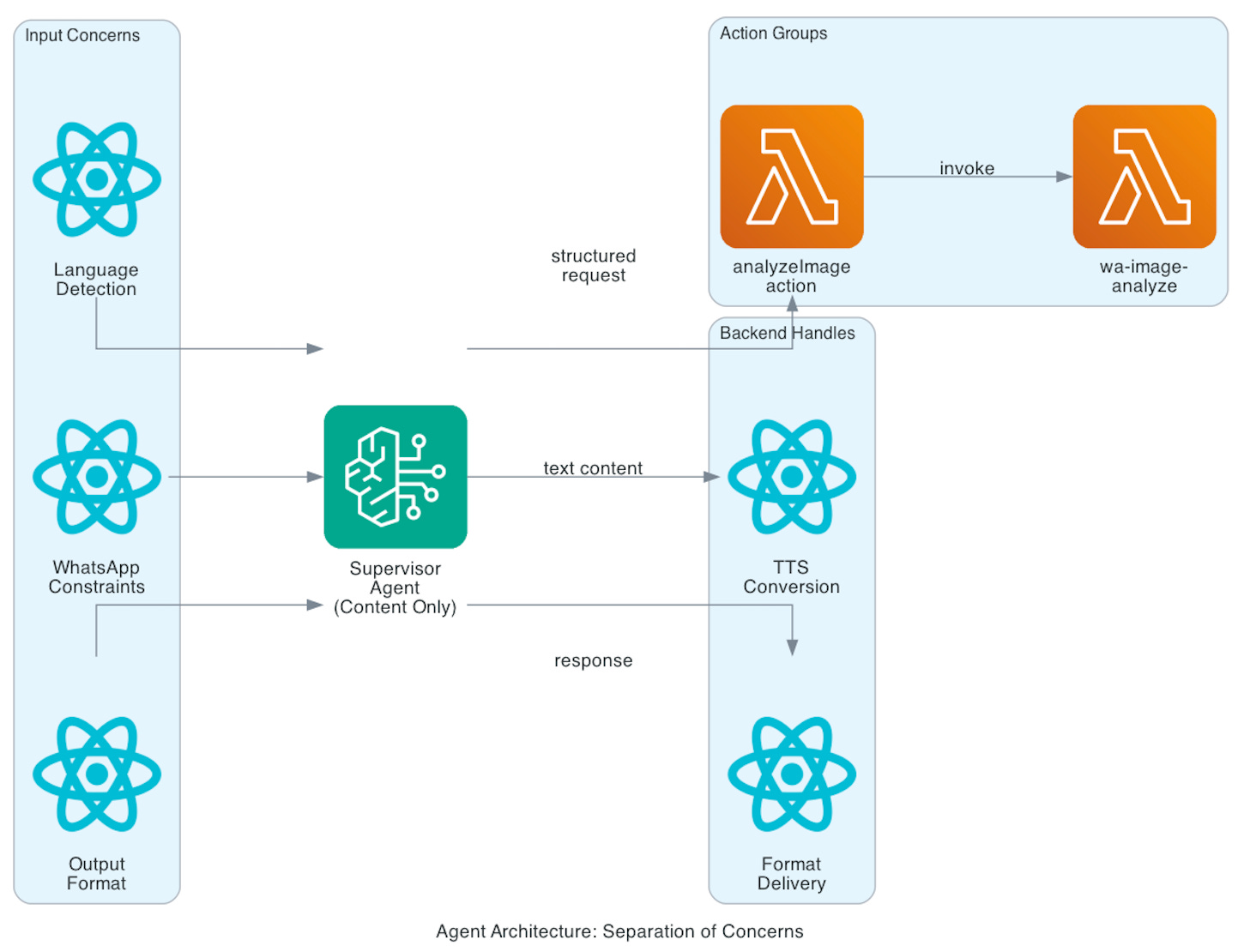
Designing the agent instructions takes careful thought. You’re balancing several competing priorities: maintaining a natural conversational tone, working within WhatsApp’s messaging limits, supporting multiple languages, and managing different output formats.
Language Handling
The instructions must handle language detection and matching. Users may send messages in Spanish, English, or Portuguese, and the agent needs to detect and respond in the same language. That’s relatively simple for text—but it gets tricky once voice responses are involved.
Here’s the subtle challenge: if a user requests an audio reply and the agent says, “I’ll send you an audio message about quantum physics,” the TTS system will faithfully convert that entire sentence into speech. The user then hears the preamble rather than the actual content. The solution is explicit guidance in the system prompt: never mention the output format—just generate the content. The backend handles format conversion automatically.
WhatsApp Constraints
WhatsApp isn’t designed for long-form messages. Large paragraphs quickly overwhelm the chat experience. The agent instructions therefore emphasize brevity and clarity—responses should be short, natural, and helpful, without sacrificing accuracy.
Architectural Benefits
This approach keeps the agent focused purely on content generation, not infrastructure or delivery. You can introduce new output types (like video captions or PDFs) without rewriting the agent prompt. The separation between content and delivery remains clean and modular.
Trade-offs
The downside is that these instructions tend to grow more detailed and prescriptive over time. That added specificity reduces the agent’s flexibility and requires thorough testing, since the agent won’t necessarily signal when it’s mishandling a format or misunderstanding a rule.
Action Groups and Integration
The agent interacts with Lambda functions through action groups. For image analysis, for instance, the action group defines a function with parameters for the S3 URI, an optional question, and an optional language code.
When a user sends an image and a question, the orchestrator formats this as a structured context block. The agent parses it, invokes the analyzeImage action, and returns the result.
This separation is powerful: you can update the underlying implementation—switching models, adding caching, or introducing fallbacks—without touching the orchestrator or agent instructions. The interface remains stable, even as the system evolves behind the scenes.
Image Generation - Agent Framework Pattern
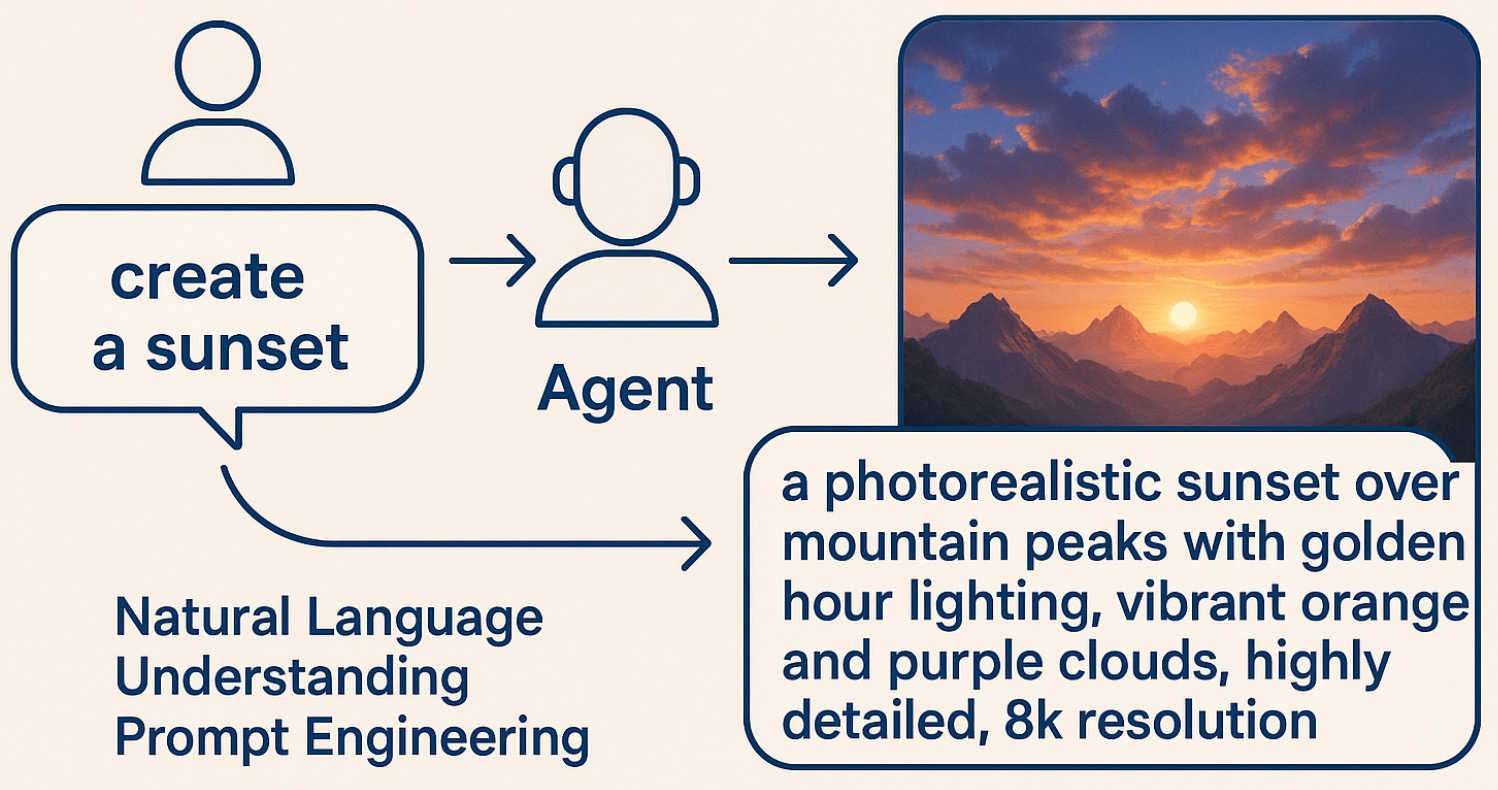
Image generation is a great example of why agents matter for complex tasks. When a user says, “create a sunset,” that vague instruction needs to turn into a detailed prompt like “a photorealistic sunset over mountain peaks during golden hour, with vibrant orange and purple clouds, highly detailed, 8K resolution.”
💡 That transformation requires natural language understanding and prompt engineering—precisely what agents excel at.
The architecture uses a sub-agent pattern. The Supervisor Agent detects image generation requests and delegates them to an ImageCreator sub-agent. This separation keeps responsibilities clear:
The Supervisor handles routing and conversation context.
The ImageCreator focuses on prompt optimization.
The Lambda executes the actual image generation.
The ImageCreator sub-agent interprets the user’s natural language, enhances it with style cues, adds quality modifiers, and builds negative prompts to avoid common issues. It then calls the wa-image-generate Lambda through an action group.
The Lambda receives the optimized prompt and invokes the selected Bedrock image model (either Stable Diffusion XL or Titan). Once the image is generated, it uploads it to S3, creates a presigned URL, and uses Claude Haiku to write a natural-language caption in the user’s language. Finally, it calls wa-send to deliver the image and caption back to WhatsApp.
The sub-agent then returns a simple success message to the Supervisor, which passes it back to the orchestrator. Because the Lambda has already sent the image, the orchestrator doesn’t send anything further.
This multi-layer delegation—orchestrator → supervisor → sub-agent → Lambda—may look complex, but each layer serves a distinct purpose:
The orchestrator routes based on message type.
The supervisor manages context and intent.
The sub-agent optimizes prompts.
The Lambda handles image generation and delivery.
Each component stays focused on doing one thing exceptionally well, keeping the system flexible, maintainable, and easy to extend.
The Configuration Pattern
Earlier I mentioned environment variables are set per-Lambda. Here’s the complete pattern:
Secrets Manager (long-lived token only):
WhatsApp access token (needs rotation, security-sensitive)
Lambda environment variables (function-specific):
wa-process: Agent IDs, region, function names
wa-image-generate: Model IDs, bucket names
inbound-webhook: Bucket names, verify token, downstream functions
wa-send: Phone number ID, secret name
This approach scales better than shared configuration. Each function only knows what it needs. Changes to one function don’t affect others.
Setting these via CLI looks like:
aws lambda update-function-configuration \

--function-name wa-process \

--environment Variables='{

"BEDROCK_AGENT_ID":"AGENTXXX",

"BEDROCK_AGENT_ALIAS_ID":"ALIASXXX",

"BEDROCK_REGION":"us-east-1",

"MEDIA_BUCKET":"my-media-bucket"

}'
Or use the AWS Console for easier management. Both approaches work.
Deployment Strategy
The repository includes automated deployment scripts that handle the entire setup process. Still, it’s worth understanding what happens under the hood—knowing how deployment works makes troubleshooting much easier later.
Deploying a Lambda involves several key steps: packaging the code, creating the function with the correct runtime and memory settings, configuring environment variables, and attaching event triggers. Each function has its own performance profile—the webhook and orchestrator need fast response times, image generation requires more time and memory, and audio transcription sits somewhere in between.
The scripts also create IAM roles with tightly scoped permissions. Each Lambda follows the principle of least privilege, accessing only the AWS services it needs:
The image analyzer reads from S3 but doesn’t write.
The image generator writes to S3 but doesn’t read user data.
The orchestrator invokes other Lambdas but doesn’t access S3 directly.
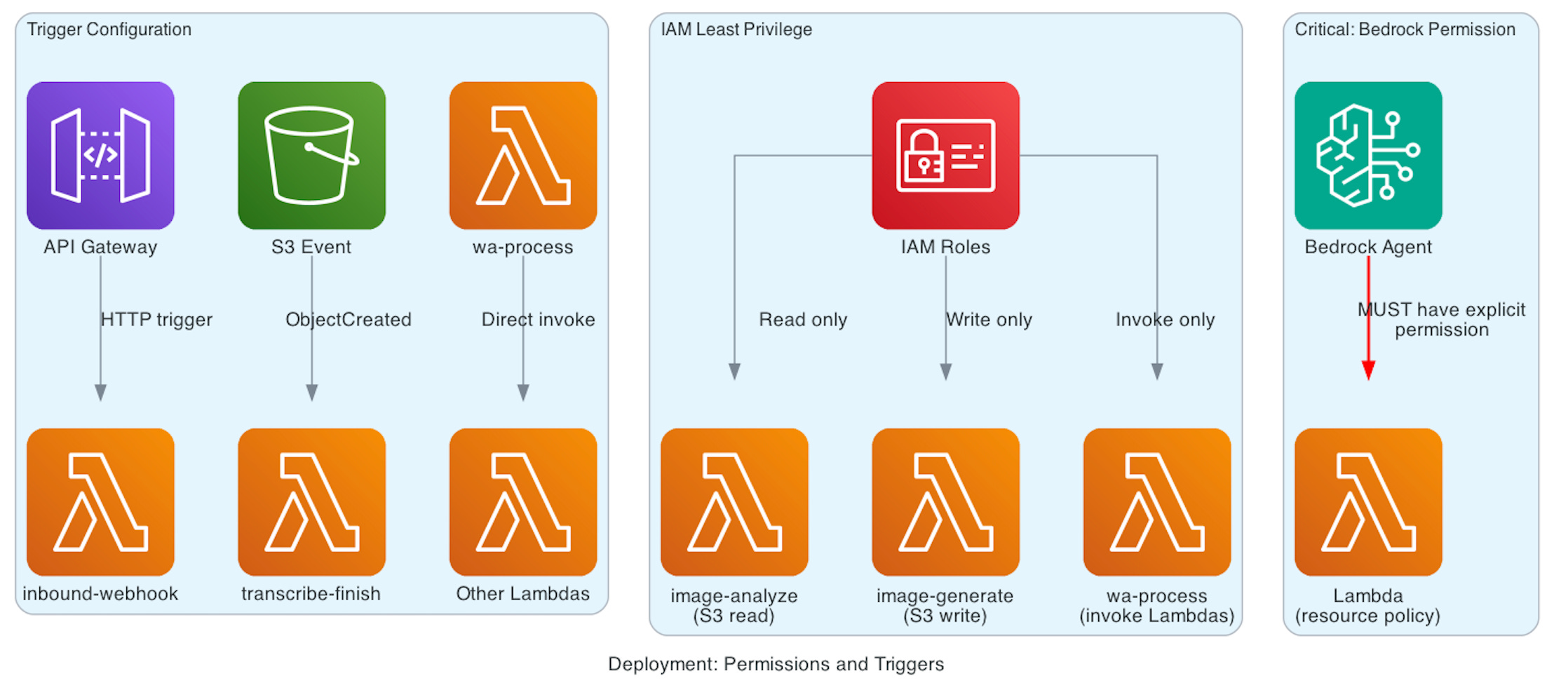
Trigger configuration is another key part of deployment. API Gateway triggers the webhook Lambda on incoming HTTP requests. S3 ObjectCreated events trigger the transcription-finish Lambda when new transcripts are written. Other Lambdas are called directly by internal functions and don’t require external triggers.
⚠️ One critical detail that often gets overlooked: Bedrock Agents need explicit permission to invoke Lambda functions.
WS doesn’t grant this automatically. You must add a resource-based policy to each Lambda, allowing the bedrock.amazonaws.com service principal to invoke it—scoped specifically to your agent’s ARN. Without this permission, the agent will fail silently, returning vague errors like “I cannot help with that.”
The automated deployment scripts take care of these configurations, but understanding them is invaluable when debugging.
If an agent can’t invoke a Lambda → check the resource policy.
If a Lambda times out → check the timeout configuration.
If environment variables are missing → check the function settings.
Knowing what happens during deployment helps you diagnose issues quickly when something breaks.
Setting Up Bedrock Agents
Creating agents through the AWS Console is straightforward but has specific steps.
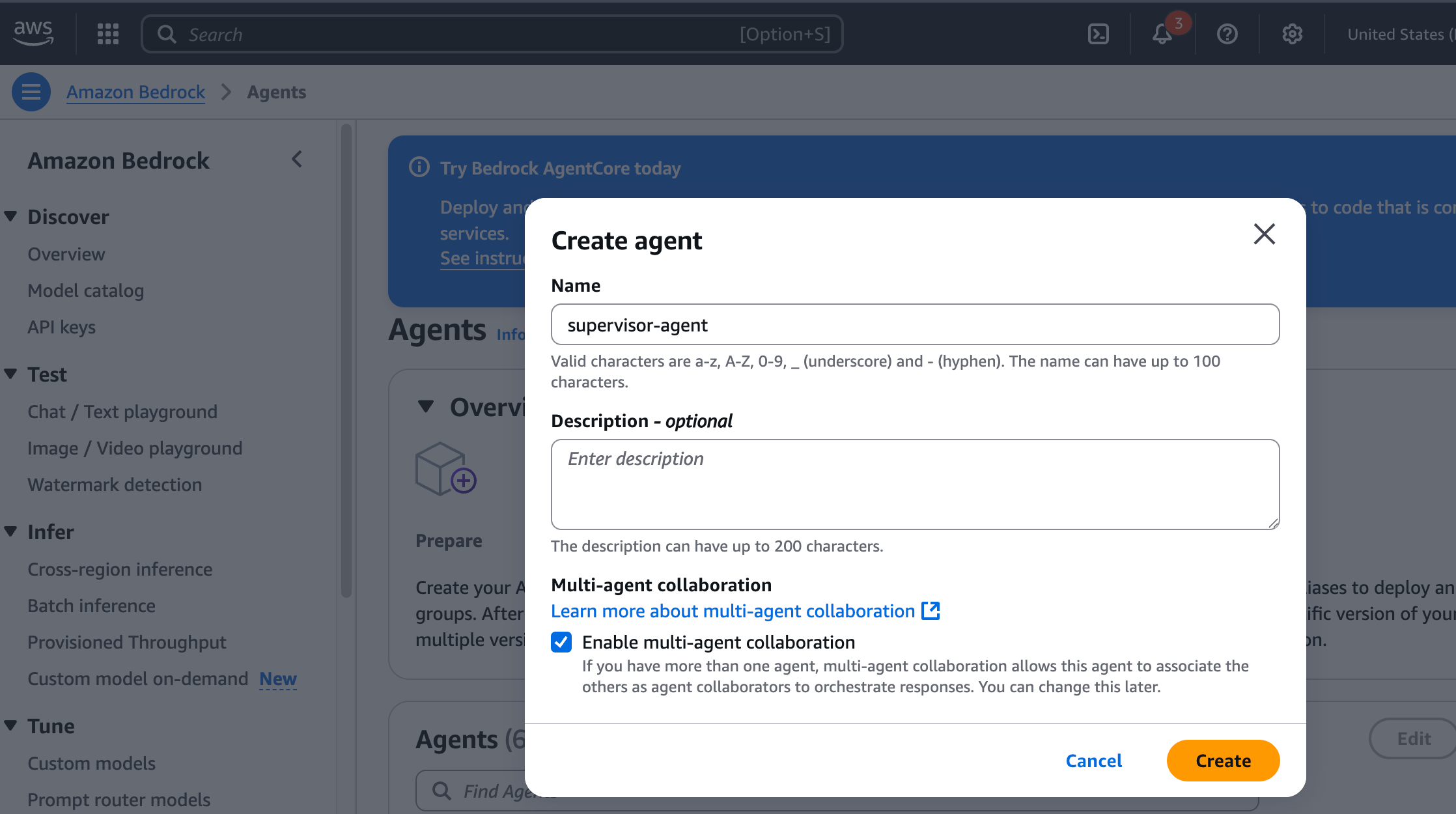
For the Supervisor Agent:
Go to Bedrock Console → Agents → Create Agent
Name it descriptively (I use whatsapp-supervisor-agent)
Choose Claude 3.5 Sonnet v2 as the foundation model
Copy instructions from supervisor-agent-instructions.txt
Add action group for image analysis
Prepare the agent (this compiles everything)
Create an alias pointing to the prepared version
That last step trips people up. Changes to an agent don’t take effect until you:
Prepare the agent (creates a new version)
Update the alias to point to the new version
If you change instructions and skip these steps, your bot still uses the old version.
For the ImageCreator sub-agent:
Create another agent with a focused name
Use simpler instructions (it has one job)
Add action group with the OpenAPI schema from lambdas/wa-image-generate/openapi-schema.json
Prepare and create alias
Then link them:
Edit the Supervisor Agent
Add ImageCreator as a collaborator
Specify when to delegate (image generation requests)
Prepare the supervisor again
Update its alias
The supervisor now knows to call the sub-agent for image requests.
Image Generation Models
The system supports two image generation models—both managed through a single Lambda function. You can select which model to use by setting the IMAGE_MODEL_ID environment variable.
VISION_MODEL_ID = os.environ.get("VISION_MODEL_ID", "us.anthropic.claude-3-5-sonnet-20241022-v2:0")
By default, the Lambda uses Stable Diffusion XL, which provides greater creative flexibility through style presets and costs around $0.04 per image. The alternative is Amazon Titan Image Generator v1, optimized for photorealistic results at roughly $0.01 per image.
The Lambda automatically detects which model is configured and adjusts its API calls accordingly. Although the two models use different input formats and return different response structures, the Lambda abstracts those differences. From the agent’s perspective, image generation behaves identically no matter which model is active.
Switching models is simple: update the Lambda’s environment variable in the AWS Console or via the CLI. The beauty of this design is that only the image generation Lambda changes—the orchestrator, agents, and other functions remain untouched. The abstraction layer handles all model-specific logic, keeping the overall system clean, modular, and easy to maintain.
Performance Optimization

⏱️ Lambda cold starts have a noticeable impact on user experience. When a function hasn’t been invoked recently, AWS must initialize a new runtime environment—adding 1–3 seconds of latency.
In this demo, provisioned concurrency isn’t enabled to keep costs low. However, for production environments with steady traffic, it’s worth enabling provisioned concurrency for the webhook and orchestrator functions. These sit directly in the user response path, where even small delays are noticeable. Other Lambdas—those running asynchronously or behind the scenes—can tolerate cold starts without affecting user experience.
Agent response time varies by task complexity:
Simple text responses: ~2–4 seconds
Image generation requests: ~10–15 seconds (including reasoning, image creation, and upload)
For audio transcription, the system immediately sends an acknowledgment, then delivers the transcription once it’s complete. This pattern sets realistic user expectations while keeping the experience responsive, even for longer-running operations.
Security Considerations
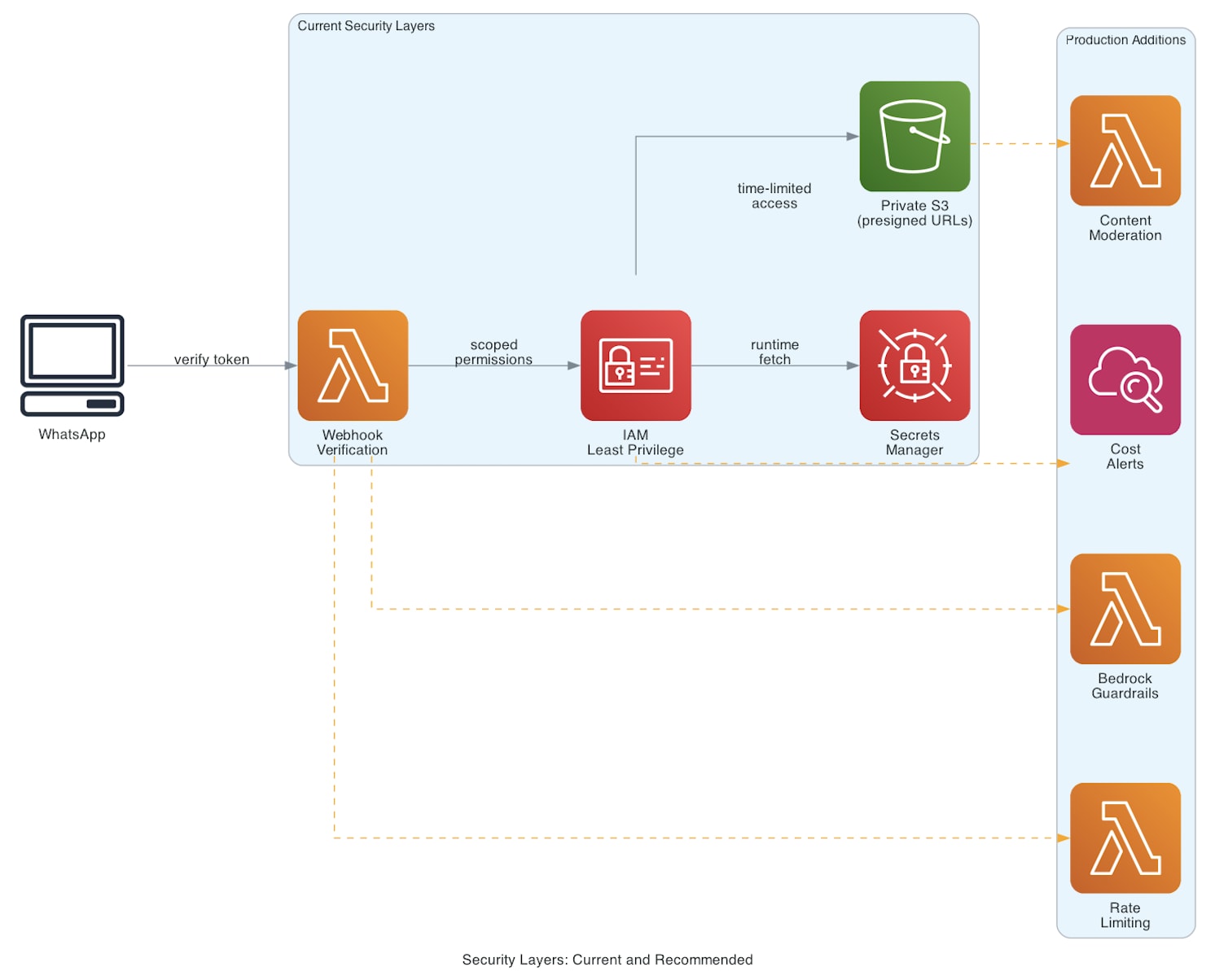
The system has several security layers.
Webhook verification ensures only WhatsApp can send messages. Without the correct verify token, requests are rejected.
IAM roles follow least privilege. Each Lambda only has permissions for the specific AWS services it needs. The image analyzer can read from S3 but not write. The image generator can write but not read others’ images.
Secrets Manager handles credential rotation. The WhatsApp access token can be rotated without code changes. Lambda functions fetch the current token at runtime.
S3 buckets are private by default. Images are shared via presigned URLs that expire after 7 days. No public bucket access.
What’s missing? Content moderation. The current implementation doesn’t filter generated images or user prompts. For production use, add:
Bedrock Guardrails to filter inappropriate prompts
Image scanning before sending to users
Rate limiting per user
Cost monitoring and alerts
These additions depend on your specific requirements and risk tolerance.
Lessons learned

I rebuilt parts of this system three times. Here’s what I learned:
Agent instructions require precision. Vague instructions lead to unpredictable behavior. The voice response handling needed explicit rules about never mentioning the output format. Language detection needed clear fallback behavior. Each edge case required specific handling in the instructions.
Hybrid architecture balances trade-offs. Pure agent systems cost more and respond slower for simple operations. Pure Lambda systems require writing all the conversational logic yourself. The hybrid approach uses agents where their natural language capabilities add value and direct Lambdas where they don’t.
Async patterns matter for user experience. WhatsApp users expect quick acknowledgments. Transcription takes 30-60 seconds. Image generation takes 10-15 seconds. The async callback patterns let the system respond immediately while work happens in the background.
Component isolation simplifies debugging. Each Lambda has a single responsibility. When something breaks, you can test that Lambda independently. Clear interfaces between components mean changes don’t cascade unexpectedly.
Permission issues cause silent failures. Bedrock Agents fail with generic error messages when they can’t invoke Lambdas. IAM permission debugging takes time. Checking permissions early when something doesn’t work saves troubleshooting time later.
Alternative Approaches
This hybrid architecture is one way to build this system. Here are alternatives and when to use them.
Pure Lambda orchestration: Remove Bedrock Agents entirely. The orchestrator directly calls all functions based on deterministic logic. Simpler and cheaper, but you write all the prompt engineering logic yourself.
Pure Agent architecture: Make everything an agent action group. Image analysis, TTS, transcription all go through the agent. Unified conversational interface with better context management, but higher cost and latency for simple tasks.
Bedrock AgentCore: Use AWS Bedrock AgentCore with your choice of agent framework (LangGraph, CrewAI, LlamaIndex). More infrastructure services like 8-hour runtimes and built-in observability, but requires more architectural decisions upfront.
Agent framework (LangChain, CrewAI): Replace Bedrock Agents with an open-source framework hosted in Lambda. Full control and portability, but you handle state management and dependencies yourself.
Step Functions orchestration: Use AWS Step Functions for workflow management instead of Lambda orchestration. Visual workflows with built-in retry logic, but more services to manage.
The right choice depends on your requirements. The hybrid approach teaches you both patterns so you can decide what works for your use case.
For a detailed comparison with pros, cons, and migration paths, see the ARCHITECTURE_DECISIONS.md document in the repo.
Where to Go From Here
If you build something with this architecture, I’d like to hear about it. What worked? What didn’t? What did you change?
Start with the README for an overview, then dive into the architecture decisions document to understand the tradeoffs. The code includes comments explaining why specific approaches were chosen.
For questions or discussion, you can find me here or on Linkedin. I regularly share updates about AI systems and AWS architecture patterns.
Build something interesting with this, and then share what you learned!
Hey! It’s Miguel again! 👋
Before I go, just a quick update: Jesús Copado and I are wrapping up the code for our Phone Voice Agent Course, deployed on Runpod. The first article (course overview) will be live next Wednesday (Nov 12).
Remember, this will be my first live course, where paid subscribers will get access to:
Deep-dive articles
Weekly live sessions covering each lesson
Let me know what you think and as always, let’s keep building!