



On Sunday, December 14th, we officially wrapped up our latest course: The Phone Calling Agents Course.
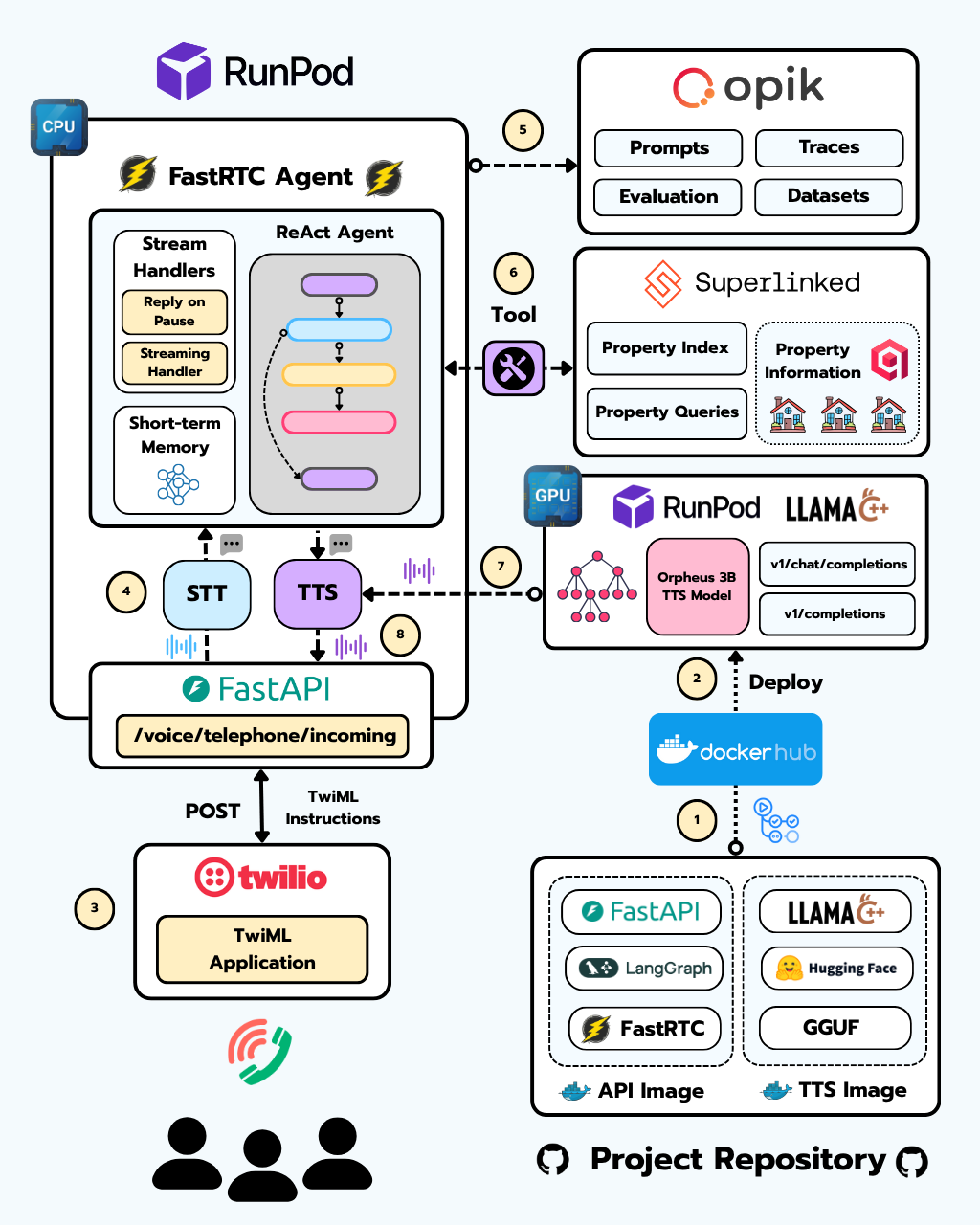
Over five structured lessons, we guided students step by step through the process of building a fully functional AI Agent Call Center, from real-time audio pipelines to deployment, production readiness, and live phone integrations.
This article serves as the central hub for the course. Inside, you’ll find links to all essential resources, including in-depth articles, code releases, and recordings from the live sessions.
Before we jump into each lesson, though, let’s take a quick look at how the course is structured and what you can expect to learn! 👇
The Structure of the Course
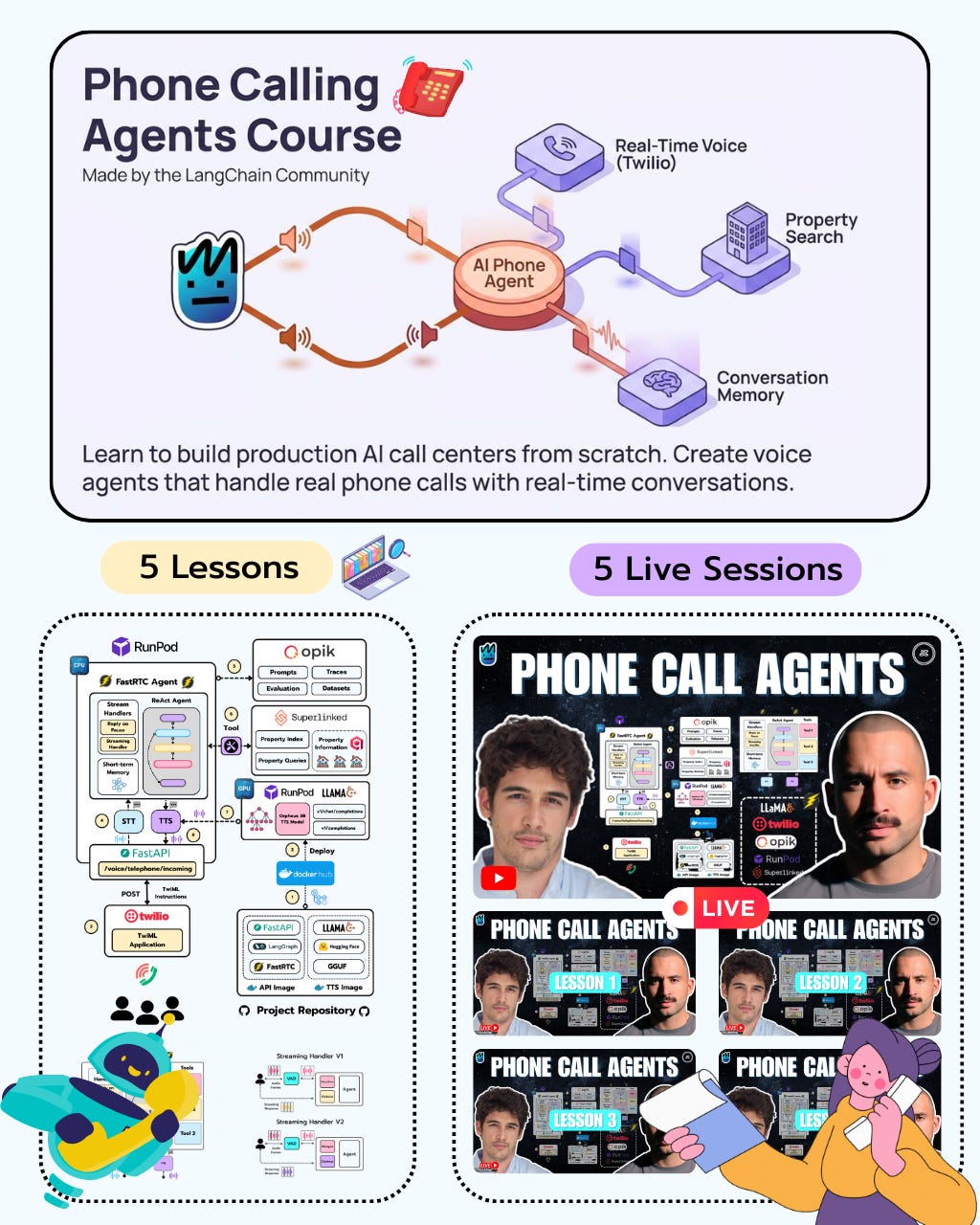
If you’ve followed my previous courses, you already know how this goes. I’m very much a learning-by-doing guy, which means one thing: expect code… lots of code.
This course is split into five lessons, and each lesson comes with the same set of resources:
One GitHub code release
One deep-dive article on Substack
One live session, where we walk through the code in detail
The idea is simple. For each lesson, I recommend following these three steps:
Step 1: Read the deep-dive article and go through the code included in that week’s release.
Step 2: Once you’re done with the article and have reviewed the code, watch the live session, where we break everything down line by line.
Step 3: Keep experimenting. Modify things, test ideas, and push that week’s content further.
Now that you know how the course is structured, let’s jump into a quick breakdown of each lesson.
Lesson 0
💻 You can find the Lesson 0 code release here (surprise: the repo is empty 😄).
This lesson is purely introductory. The goal is to give you a solid understanding of the system we’re about to build, its main components, and the different technologies we’ll be using along the way.

One cool thing about the live session is that we ran it as a multi-stream, broadcasting simultaneously on LinkedIn Live, YouTube, and Substack.
You don’t need to be a premium subscriber to watch this one, so go ahead and check it out. And if you decide that Jesús and I are actually charismatic (😂), you might want to go premium to catch the rest of the live sessions 😉
Lesson 1
💻 You can find the Lesson 1 code release here
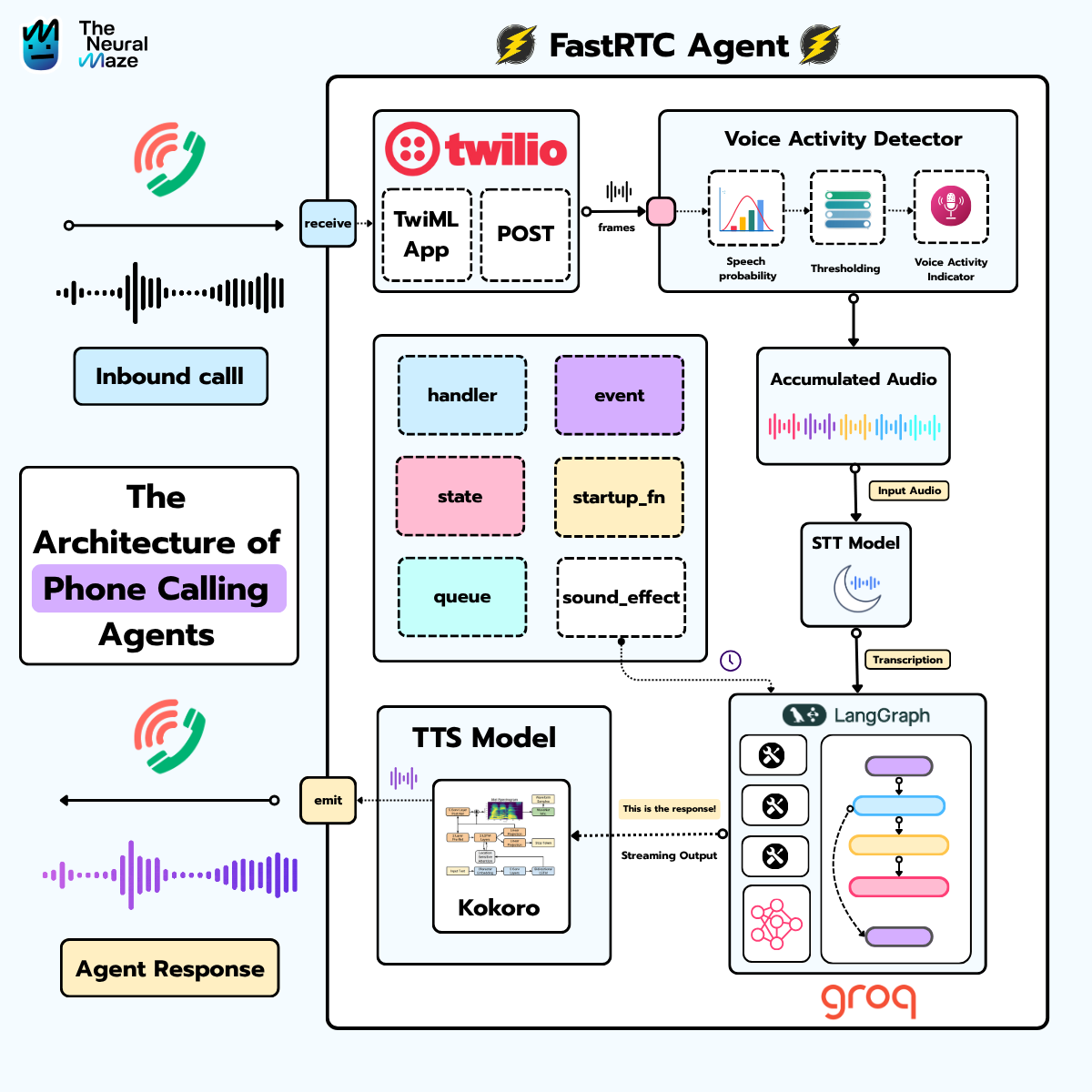
In this lesson, we dig into what actually powers live agent conversations: WebRTC, WebSockets, and how FastRTC makes working with both dramatically easier. We cut through the complexity, compare where each technology shines, and show how they come together to enable low-latency, two-way audio.
By the end of this lesson, you’ll have your first real-time voice agent up and running—ready to talk through both a Gradio UI and Twilio.

After reading the article, jump into the live session below 👇

Lesson 2
💻 You can find the Lesson 2 code release here
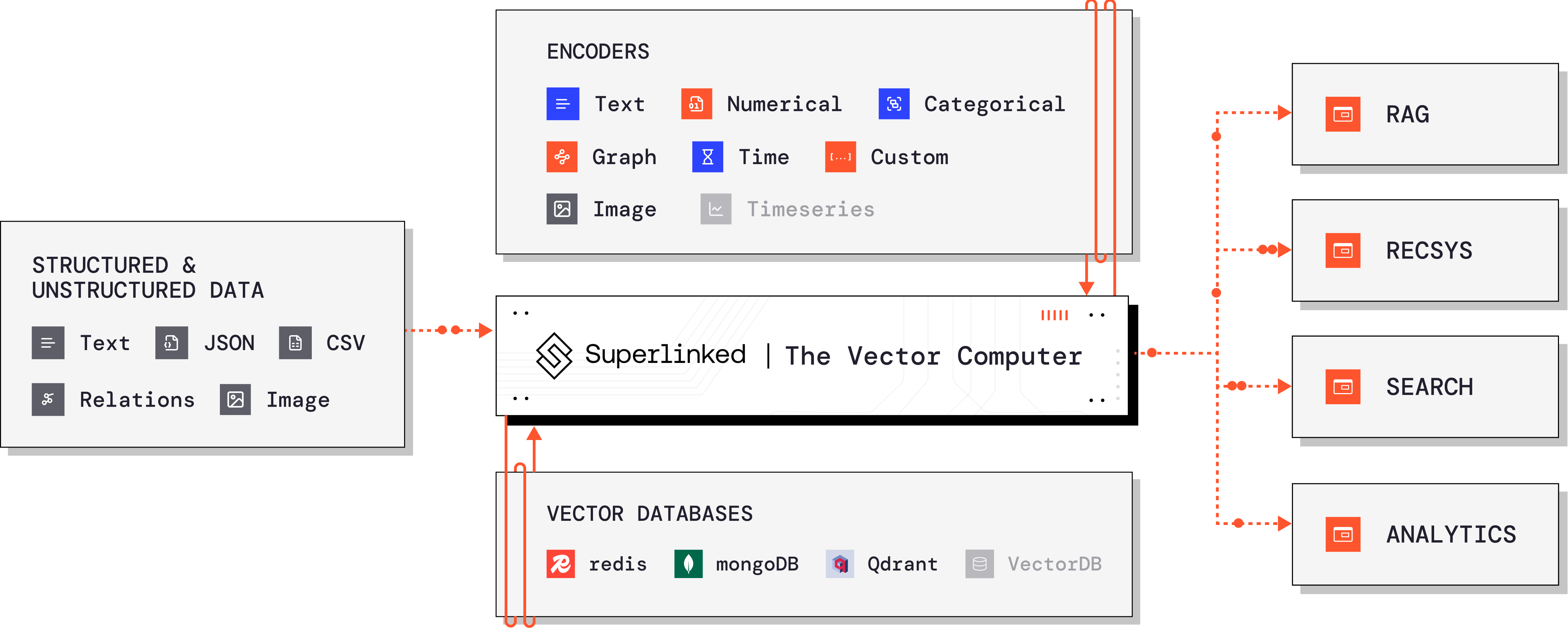
In this lesson, we look at why traditional vector search falls short for our property search use case, and how Superlinked lets us handle complex, multi-attribute queries properly.

Once you’re done with the article, go watch the live session below 👇

Lesson 3
💻 You can find the Lesson 3 code release here
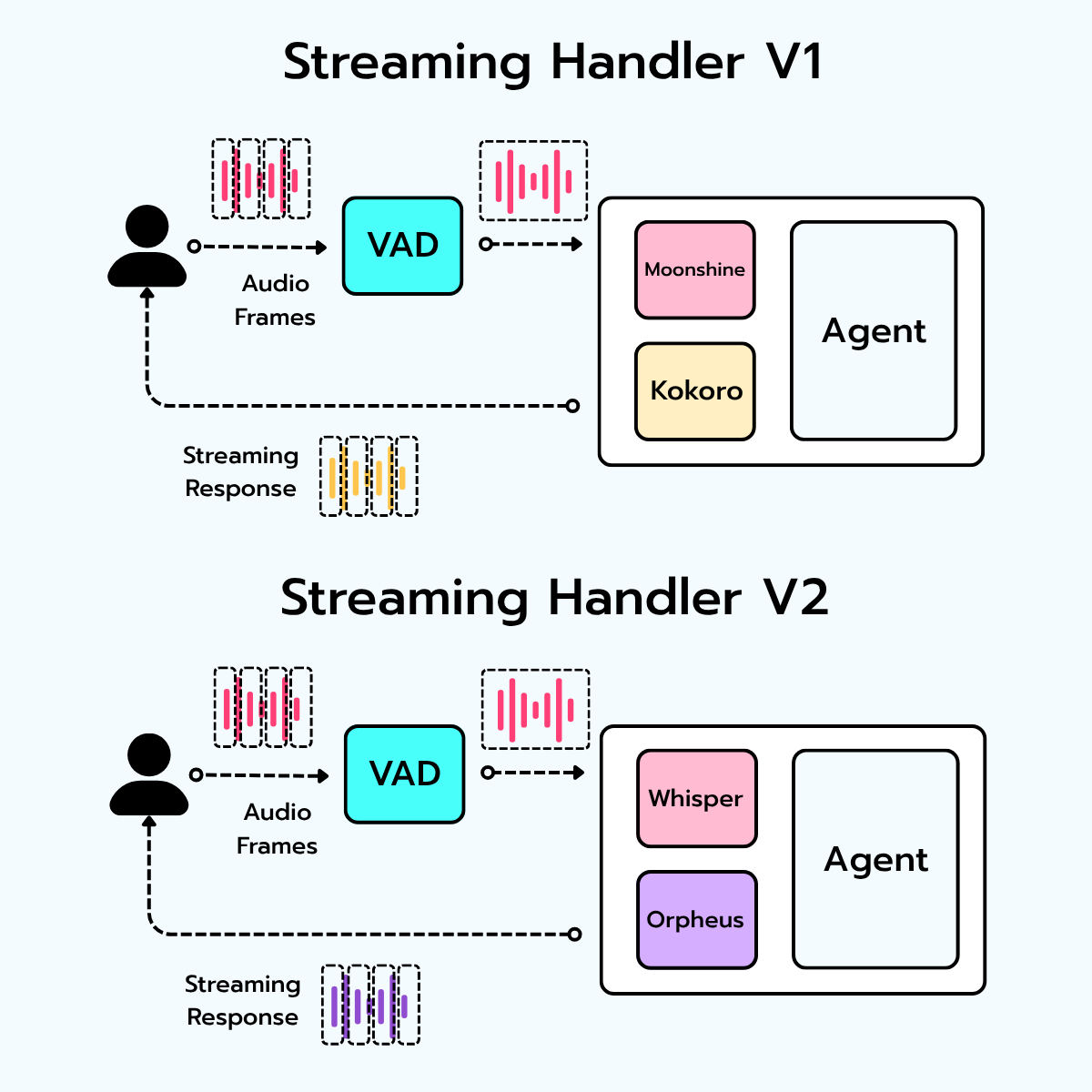
So far, we’ve been using Moonshine for STT and Kokoro for TTS. Moonshine tried its best—but unless your English was flawless, it struggled. Kokoro, on the other hand, punched above its weight. Small, fast, and reliable—but never exactly… human.
That changes in this lesson. We retire the old models and bring in the heavy hitters:
Whisper for Speech-to-Text
Orpheus 3B for Text-to-Speech
But this lesson isn’t just about swapping models. We show you how to host and deploy your own STT and TTS models on Runpod, running them on GPU cloud infrastructure.
By the end of this lesson, you’ll have faster-whisper and Orpheus 3B deployed like a real AI engineer.

Once you’ve read the article, watch the live session below! 👇

Lesson 4
💻 You can find the Lesson 4 code release here
In this lesson, we complete the application we’ve been building over the previous lessons.
We deploy an avatar system that allows us to define multiple call-center workers instead of relying on a single default agent. We add full system tracing to measure transcription time, response generation, and tool call performance, and we introduce prompt versioning along with storage for all transcribed conversations.
We then deploy the FastAPI application to the cloud on Runpod, replacing ngrok with a proper production setup, and connect the deployment to Twilio to enable inbound and outbound phone calls.

Once you’ve read the article, watch the live session below! 👇

This is my first live-session-based course, but it definitely won’t be the last. I’m planning to do more of these, and over the next few weeks I’ll send out a poll to get your input on the ideas I’m considering—and help me prioritize what you’d like to see next.
I’m also working on deep-dive articles on llama.cpp and vLLM, focused on self-hosting LLMs.
So stay tuned, and see you next Wednesday! 👋
This is a great “production checklist in disguise.” Latency budgets, tracing, prompt versioning, transcript storage, and deployment details are exactly the parts that decide whether a voice agent survives real traffic. The course hub is a solid reference for the full path from realtime audio to something you can actually operate.
I was stuck on the exact same problem. Built an agent system last month and hit the monetization wall hard. The question isn't whether agents can work—they can. It's whether you can make them profitable without hand-holding customers through edge cases.
The nightshift angle is interesting (wrote about it: https://thoughts.jock.pl/p/my-ai-agent-works-night-shifts-builds). Let me know if you find a reliable cost model that doesn't require constant tuning. Most people gloss over the operational overhead.