


Let's kick off Lesson 7 with a simple question:
Why should we care about anything other than text? 🤔
Throughout this series, we've been finetuning models that do one thing: read text and write text.
And that makes sense, text-to-text is the bread and butter of LLM finetuning, and it's where the most mature tooling lives … But the world isn't text-only, dear builder.
I mean, think about it. A radiologist doesn't diagnose from a paragraph, they diagnose from an X-ray. Or podcasters, they don't type their episodes, they speak them! And increasingly, the models we're finetuning can handle all of these modalities.
What's remarkable is that the finetuning techniques you've already learned (LoRA, QLoRA, …) apply almost identically to these multimodal models. The architectures differ in how they encode or decode non-text signals, but the training loop is the same.
You attach adapters to the transformer backbone, prepare a dataset, and run SFTTrainer.
In this lesson, we'll focus on two multimodal directions that are both practically useful and surprisingly accessible:
Vision finetuning — teaching a model to understand images and generate text about them
Text-to-Speech (TTS) finetuning — teaching a model to generate human-like speech from text
We'll build the intuition for how each one works, explore real-world use cases, and then preview the two specific models we'll be finetuning hands-on in Friday's lab.
Ready? Let's go! 👇
When Should You Go Multimodal?
Before diving into architectures, let's ground ourselves in the why.
Here are concrete scenarios where multimodal finetuning unlocks capabilities that text-only models simply can't provide.
And who knows … maybe one of these clicks with a problem you've been trying to solve, or inspires a product idea you hadn't considered.
💬 Any other use case worth mentioning? Let us know in the comments!
Vision Finetuning Use Cases
Let's look at four use cases where vision finetuning really shines.
🏥 Medical image analysis
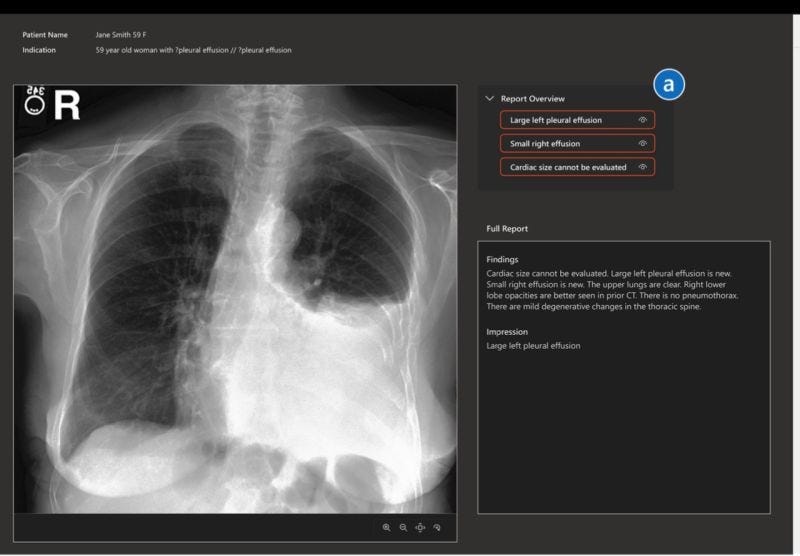
A finetuned vision model can look at a chest X-ray and generate a structured radiology report.
This doesn't replace radiologists, but it can pre-fill reports, flag urgent findings, and reduce turnaround time. General-purpose VLMs often get medical terminology wrong or miss subtle findings … finetuning on domain-specific image-report pairs fixes this.
📄 Document understanding & OCR
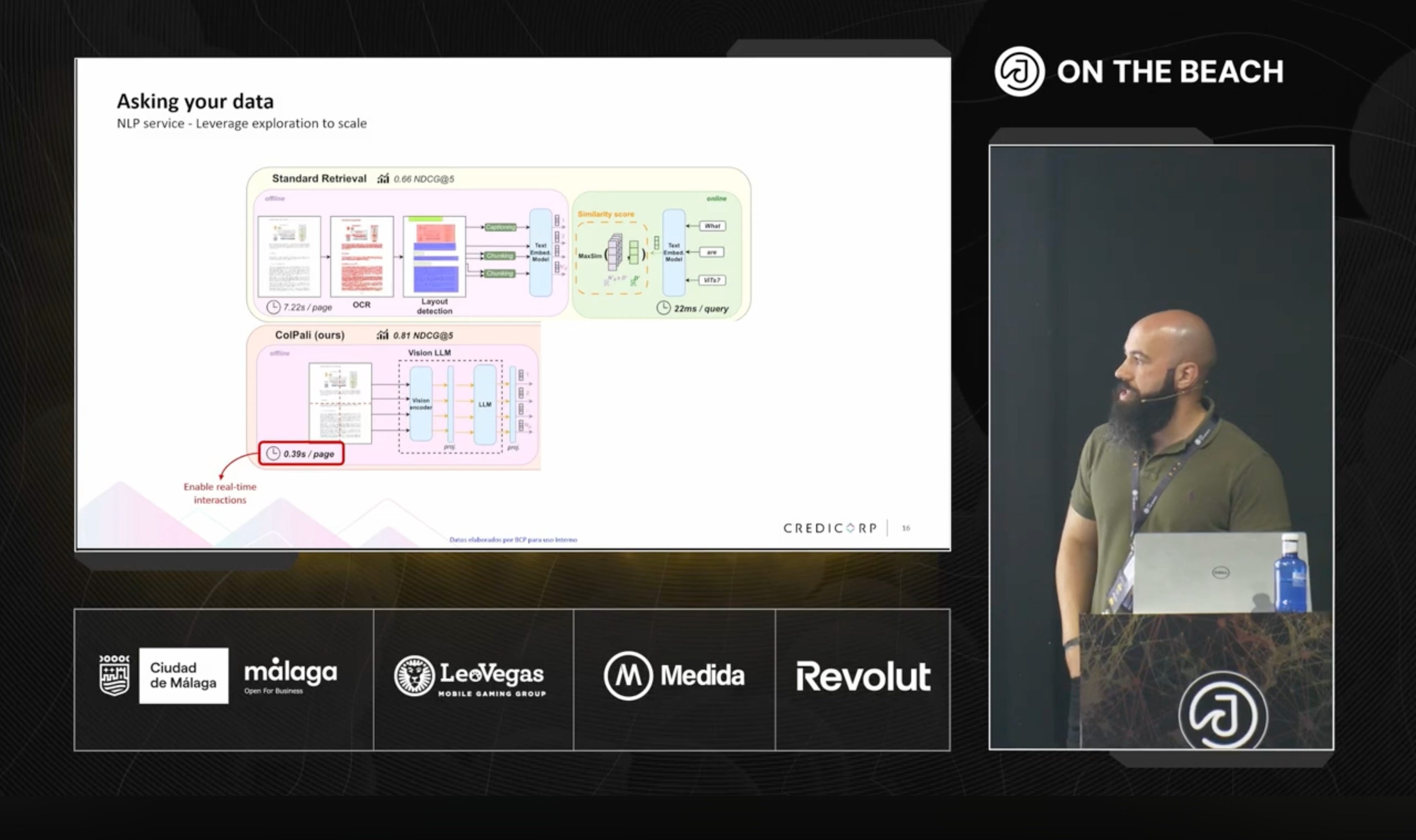
Invoices, handwritten forms, receipts, architectural blueprints … these are all images that contain structured information.
A finetuned VLM can extract fields from a scanned invoice (vendor, amount, date, line items) and output structured JSON, or convert handwritten mathematical notation into LaTeX.
This is far more robust than traditional OCR pipelines because the model understands context, not just characters.
🏭 Industrial quality inspection
A camera on a production line captures images of manufactured parts. A finetuned model can flag defects (scratches, misalignments, color inconsistencies) and classify their severity.
General VLMs don't know what a "hairline crack on a ceramic tile" looks like; finetuning on a few hundred labeled examples teaches them.
🚜 Agricultural crop monitoring
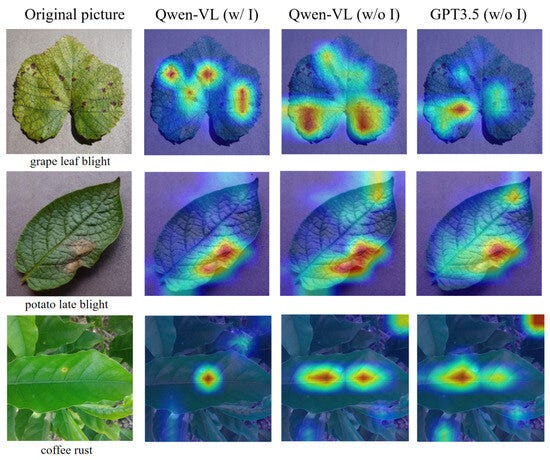
Diseased crops cost billions in losses every year, and early detection is everything.
A vision model finetuned on labeled images of crop diseases can distinguish between dozens of conditions (fungal infections, nutrient deficiencies, pest damage) from a single photo.
This works at the individual farmer level (snap a photo in the field) or at scale (drone footage over entire plantations).
TTS Finetuning Use Cases
Same exercise, different modality. Here are three use cases where TTS finetuning really shines.
🎙️ Voice cloning for content creators
A podcaster or YouTuber can finetune a TTS model on their own voice recordings.
The result is a synthetic voice that captures not just their timbre, but their pacing, emphasis patterns, and verbal quirks.
This enables generating full episodes from a script, creating audio versions of blog posts, or producing content in multiple languages (all in their own voice).
🏢 Brand-consistent customer service

Companies want their voice assistants, IVR systems, and phone bots to sound consistent and on-brand.
Finetuning a TTS model on a specific voice actor's recordings (with consent!!!) creates a scalable, consistent voice that can handle any text input without re-recording.
📚 Audiobook narration at scale
Publishers can finetune TTS models to produce expressive, narrator-quality audiobooks at a fraction of the cost and time of traditional recording.
Finetuning is key here, as base TTS models often sound flat over long passages. A model finetuned on a narrator's expressive readings learns their dramatic range.
Part I: Vision Finetuning
All modern vision-language models (VLMs) share the same high-level structure.
Regardless of whether you’re working with Qwen3-VL, Llama 3.2 Vision, Gemma 3, or any other VLM, the architecture follows three stages:
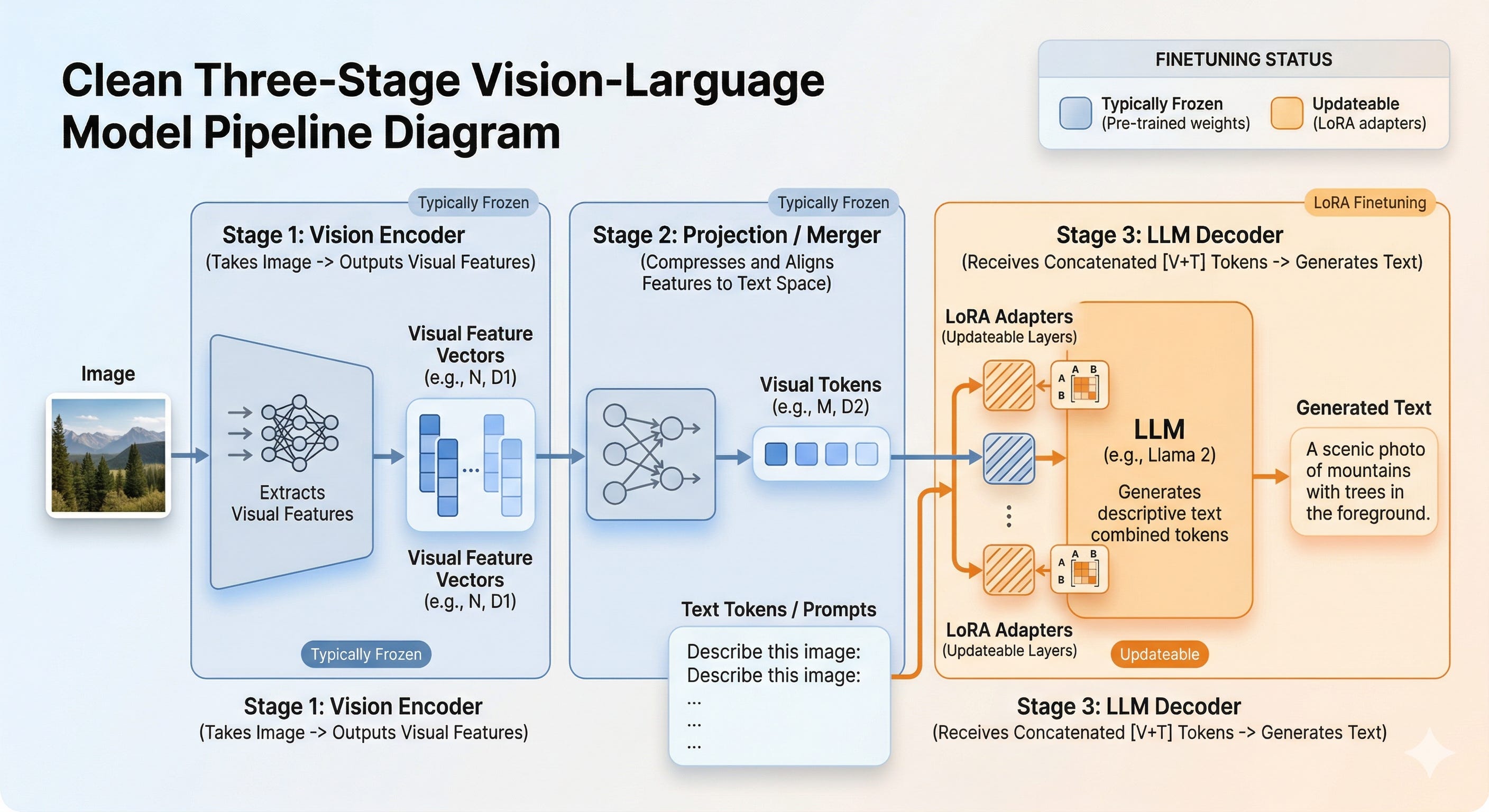
➤ Stage 1 (The Vision Encoder)
Turns an image into a sequence of feature vectors.
This is almost always a Vision Transformer (ViT), the same architecture used in CLIP, SigLIP, and other vision foundation models.
The image is split into small patches (typically 14×14 or 16×16 pixels), each patch is linearly projected into an embedding, and the full sequence is processed by transformer layers with self-attention.
The key output: a sequence of visual tokens (one per image patch) that encode spatial and semantic information about the image.
➤ Stage 2 (The Projection Layer)
Bridges the gap between vision and language.
The visual tokens from the encoder live in a different embedding space than the text tokens the LLM expects.
The projection layer (often a simple MLP or cross-attention module) transforms and compresses these visual tokens into the LLM's embedding dimension.
Some models also reduce the number of tokens here, for example, grouping 2×2 adjacent visual tokens into one, cutting the sequence length by 4×.
This matters because visual tokens are expensive: a 500×500 image can produce hundreds of tokens, and every token adds to the LLM's context length.
➤ Stage 3 (The LLM Decoder)
It's a standard autoregressive transformer, the same kind of model you've been finetuning throughout this course.
It receives a concatenated sequence: the projected visual tokens followed by the text tokens from the user's prompt. It then generates a text response, token by token.
Where LoRA Fits In
Here's the crucial insight for finetuning: you almost never need to touch the vision encoder.
The vision encoder was pretrained on millions (sometimes billions) of image-text pairs.
It already knows how to extract rich visual features from images. What it doesn't know is how to map those features to your specific domain's language — the terminology of radiology reports, the format of LaTeX equations, the structure of invoice JSON.
That's the LLM decoder's job. So when you finetune a vision model:
The vision encoder stays frozen (no gradients, no updates)
The projection layer may or may not be trainable (model-dependent)
The LLM decoder gets LoRA adapters on its attention layers — exactly the same as text finetuning
This means your training cost is essentially the same as finetuning a text-only LLM of the same size. The vision encoder adds inference cost (encoding the image), but not training cost.
The Math (for those who want it)
The forward pass through a VLM during finetuning looks like this:
Visual encoding (frozen):
Where N_v is the number of visual tokens (depends on image resolution) and d_v is the vision encoder's hidden dimension.
Projection (may be trainable):
Where N'_v <= N_v (compression may reduce token count) and d is the LLM's hidden dimension.
Concatenation and LLM forward pass (with LoRA):
Where h_t are the text token embeddings, and Δθ are the LoRA parameters. The loss is computed only on the text output tokens (not the visual tokens), exactly like standard SFT:
Key Practical Considerations
Image resolution matters. Higher resolution = more visual tokens = longer sequences = more VRAM. Most models support dynamic resolution (you don’t need to resize to a fixed 224×224), but you should aim for 300-1000px during training to balance quality and efficiency.
Keep dimensions consistent. If your training images have wildly different aspect ratios and sizes, the number of visual tokens per sample will vary a lot, making batching inefficient. Standardize where possible.
Mix general and domain data. If you finetune only on, say, radiology images, the model may "forget" how to handle general visual questions. A common strategy is to mix your domain-specific dataset with a general VQA dataset (e.g., 80% domain, 20% general).
Part II: TTS Finetuning
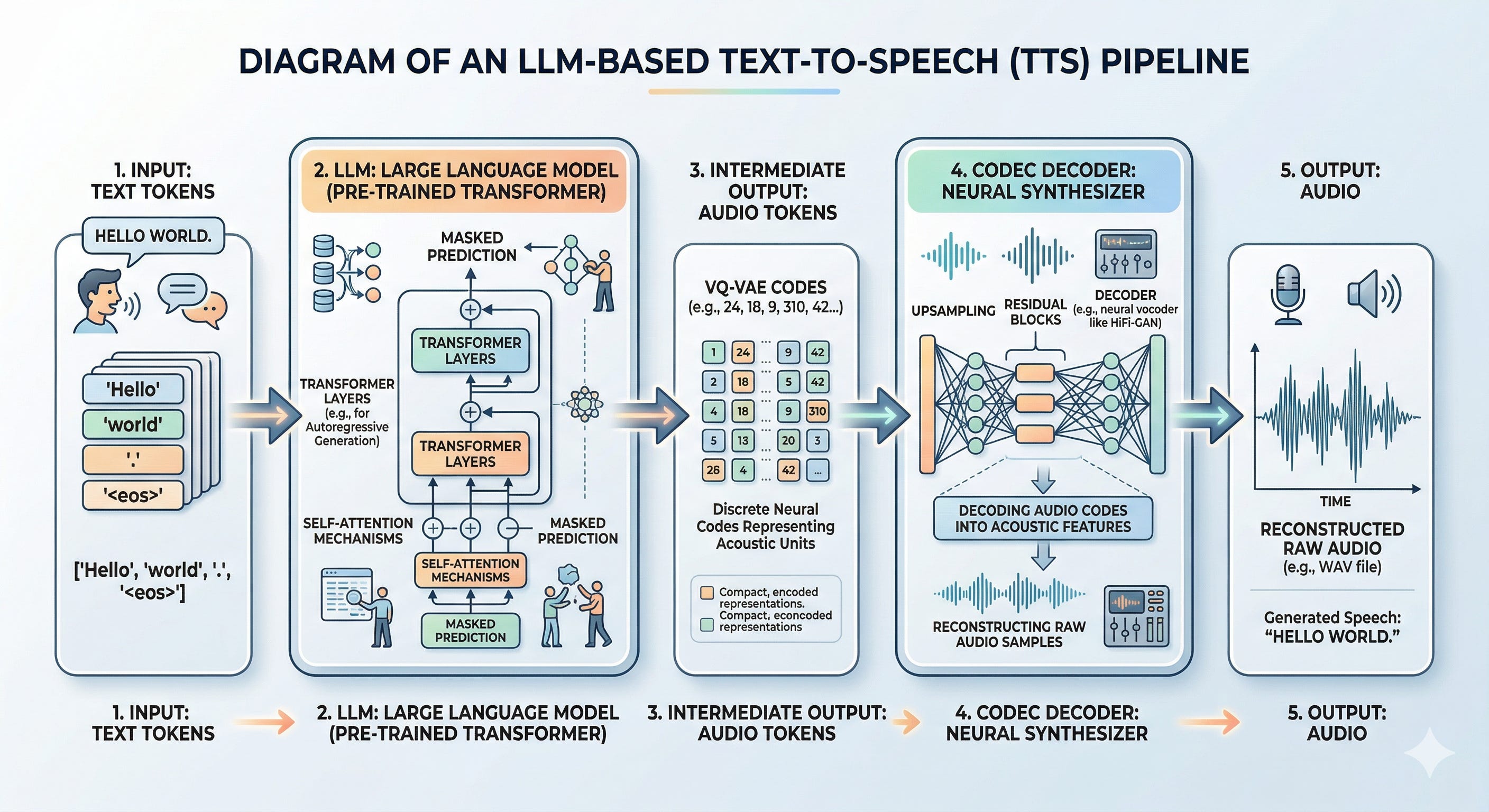
Traditional TTS was a complex, multi-stage pipeline: text normalization → phoneme conversion → prosody modeling → waveform synthesis. Each stage had its own model, its own failure modes, and its own engineering headaches.
Modern LLM-based TTS throws all of that away. The core idea is stunningly simple:
Treat audio as just another language.
Instead of predicting the next text token, the LLM predicts the next audio token.
The architecture is the same autoregressive transformer you already know. The only new ingredient is a neural audio codec — a "tokenizer for sound" that converts continuous audio waveforms into discrete tokens (and back).
The Neural Audio Codec: Tokenizing Sound
The codec is the key innovation that makes LLM-based TTS possible. Here's how it works:
Encoding (audio → tokens): The codec's encoder takes a raw audio waveform and compresses it into a sequence of discrete integer codes — just like a text tokenizer converts characters into token IDs. These codes are chosen from a learned codebook (think of it like a vocabulary, but for audio chunks).
Decoding (tokens → audio): The codec's decoder takes the discrete codes and reconstructs the audio waveform. The reconstruction isn't perfect (it's lossy compression, like MP3), but modern codecs achieve remarkably high quality at low bitrates.
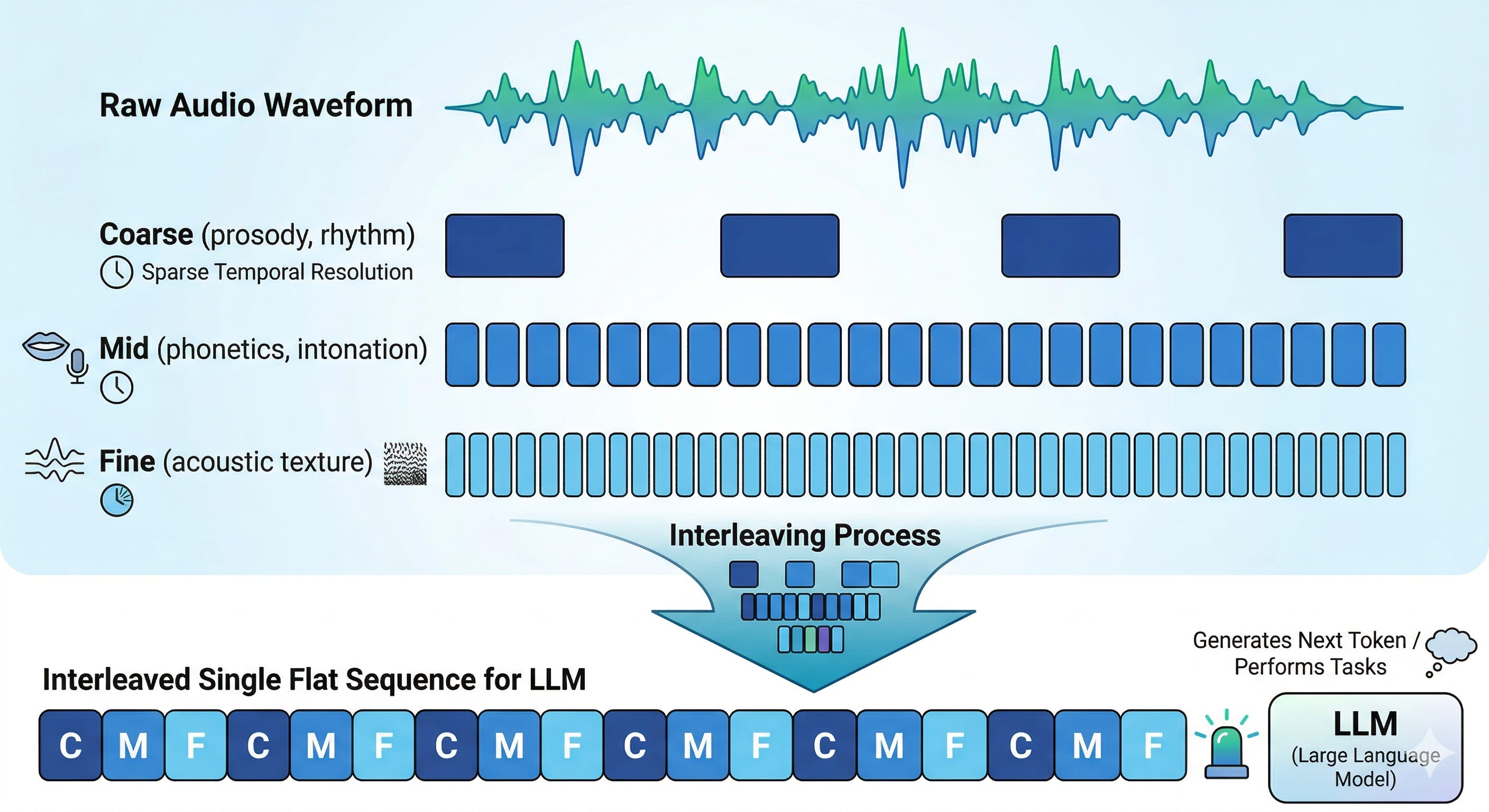
Hierarchical structure: Most modern codecs (like SNAC, EnCodec, or DAC) use multiple quantization layers at different temporal resolutions. Think of it as encoding audio at three different "zoom levels" simultaneously:
Layer 1 (coarse, ~12 Hz) captures the big picture — rhythm, prosody, who’s speaking. It produces 1 token per time frame.
Layer 2 (mid, ~24 Hz) captures phonetic patterns and intonation contours. It runs twice as fast, so for every 1 token from Layer 1, Layer 2 produces 2 tokens.
Layer 3 (fine, ~48 Hz) captures acoustic texture — breathiness, crispness, subtle vocal qualities. It runs four times as fast as Layer 1, producing 4 tokens per frame.
How the LLM Generates Speech
With the codec in place, the training and inference pipeline is straightforward:
Training:
Take a dataset of (text, audio) pairs
Encode all audio through the codec to get audio token sequences
Extend the LLM's vocabulary to include the audio token IDs (so the model can predict them)
Train with standard next-token prediction: given the text tokens, predict the audio tokens
Inference:
Feed text tokens into the LLM
The LLM autoregressively generates audio token IDs
Pass the generated token IDs through the codec decoder
Out comes a waveform (that's the speech!)
The LLM doesn't "know" it's generating speech.
From its perspective, it's just predicting the next token in a sequence. The magic is that the audio codec provides a discrete token space that's structured enough for the LLM to learn meaningful patterns.
The Math (for those who want it)
Audio encoding (frozen codec):
Where c^l in {0, 1, ..., K-1}^{T_l} are the discrete codes at layer l, K is the codebook size, and T_l is the number of tokens at that layer's temporal resolution.
Interleaving into a flat sequence:
For a codec with 3 layers (like SNAC), codes are interleaved so that every 1 + 2 + 4 = 7 tokens represent one temporal frame:
Vocabulary extension:
The codes are offset to avoid collision with text tokens:
Where V_text is the original text vocabulary size.
Training objective (standard next-token prediction):
Where t are the text input tokens and s is the interleaved audio token sequence. Again, Δθ are the LoRA adapters.
Why Finetuning Beats Zero-Shot Cloning
Base TTS models can do "zero-shot voice cloning", where you provide a short audio sample of a voice, and the model generates new speech in that voice. But the results are often... okay. The model captures the basic timbre but misses pacing, emotional expression, and speaking quirks.
Finetuning on a specific voice's recordings teaches the model all of these subtleties.
Think of the difference like this: zero-shot cloning is like hearing someone speak for 10 seconds and then imitating them. Finetuning is like spending weeks studying their recordings until you can reproduce their delivery perfectly.
In practice, 30 minutes of clean, single-speaker audio is often enough for high-quality voice cloning through finetuning. The key is quality over quantity: consistent recording conditions, minimal background noise, and accurate transcriptions.
Key Practical Considerations
Token rate determines max duration. If your codec produces 83 tokens per second and your model’s max generation length is 2048 tokens, you can generate ~24 seconds of speech at most. Plan accordingly — you may need to chunk longer texts.
Repetition penalty is critical. Without it (or with too low a value), TTS models tend to get stuck in loops — repeating the same syllable or producing monotonic droning. A repetition_penalty >= 1.1 is typically required.
Smaller models are often better for TTS. Unlike text generation where bigger models = better quality, TTS prioritizes latency. A 3B parameter model that generates speech in real-time is more useful than a 70B model that takes 30 seconds per sentence. Models under 3B are the sweet spot!
Next Steps
In the upcoming lab, we'll go hands-on with two specific models. Here's what you need to know about each one — we won't repeat this theory on Friday, so this is your reference!
Qwen3-VL (8B) — For Vision Finetuning
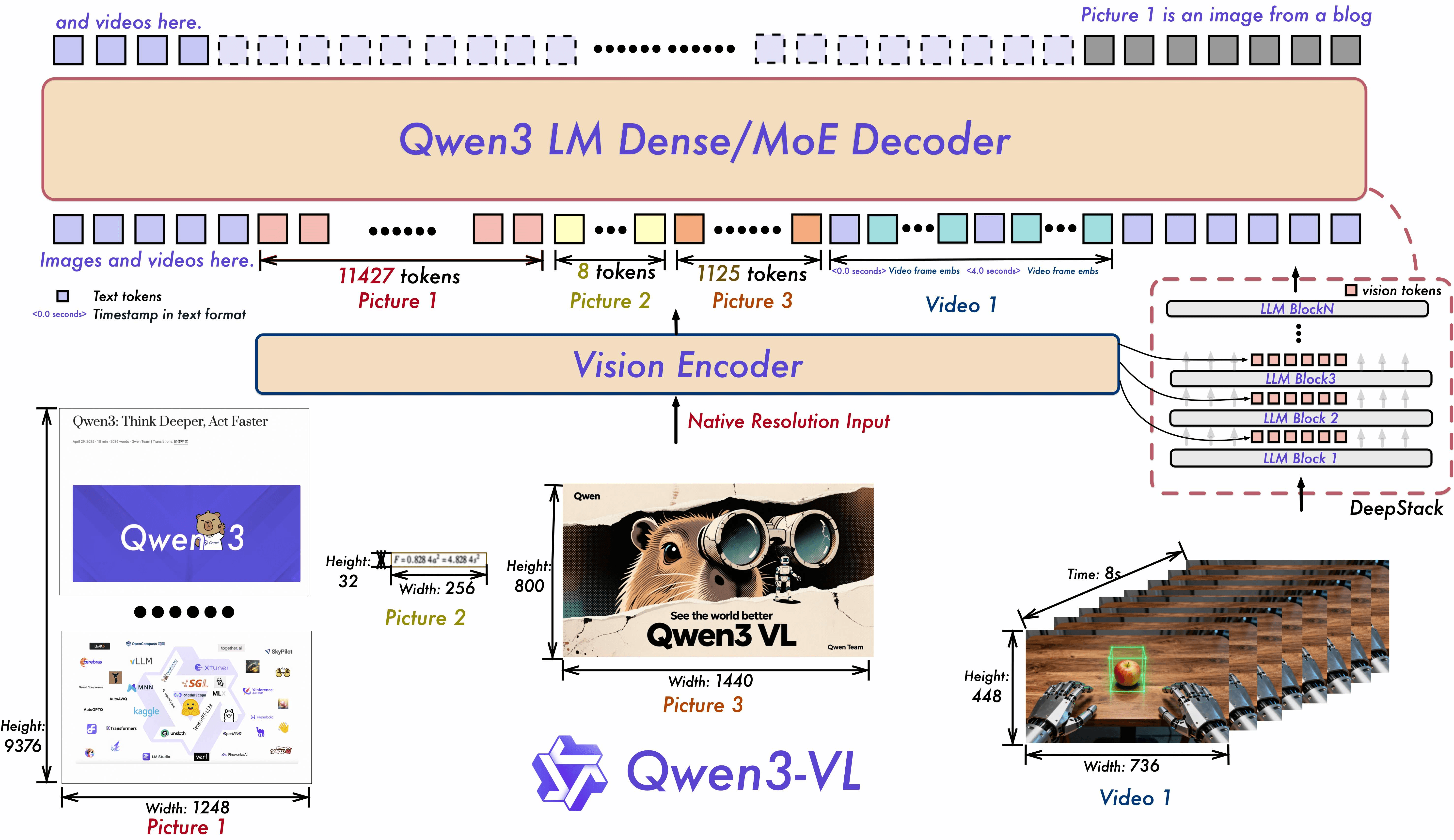
Qwen3-VL is the latest and most capable vision-language model in Alibaba's Qwen series.
It comes in both dense (2B, 4B, 8B, 32B) and mixture-of-experts (30B-A3B, 235B-A22B) variants — we'll use the 8B dense model, which offers a great balance of capability and trainability (and can be finetuned for free on Colab with Unsloth).
What makes it special:
256K native context window: Qwen3-VL supports up to 256K tokens (extendable to 1M), which means you can feed it hundreds of pages of documents, or even hour-long videos, in a single prompt.
DeepStack integration: Unlike Qwen2.5-VL which only used the final ViT output, Qwen3-VL fuses features from multiple levels of the vision encoder. This captures both fine-grained details and high-level semantics — critical for tasks like small-text OCR or subtle visual differences.
Interleaved-MRoPE: An enhanced version of the multimodal rotary position embeddings from Qwen2.5-VL. It allocates full-frequency positional information across time, width, and height dimensions, which dramatically improves long-horizon video reasoning and spatial understanding.
Text-Timestamp alignment: For video inputs, the model no longer relies on relative position IDs to track time. Instead, it uses explicit textual timestamps, enabling precise event localization (e.g., “at 1:23, the player scores a goal”).
Expanded OCR: Supports 32 languages (up from 19 in Qwen2.5-VL), with improved robustness for low-light, blurry, or tilted text — and better handling of rare characters and domain-specific jargon.
Thinking mode: The Instruct and Thinking editions let you toggle chain-of-thought reasoning on or off, useful for complex visual math problems or multi-step document analysis.
In the lab, we'll finetune this model on a handwriting-to-LaTeX conversion task using QLoRA through Unsloth, so you can send it photos of handwritten equations and get clean LaTeX back.
Orpheus-TTS (3B) — For TTS Finetuning
💡 If you want to see Orpheus in action inside a real-world project, check out the course I built with Jesús Copado, where we used it as the voice engine for a fully agentic call center: Building a Production-Ready Agent Call Center.
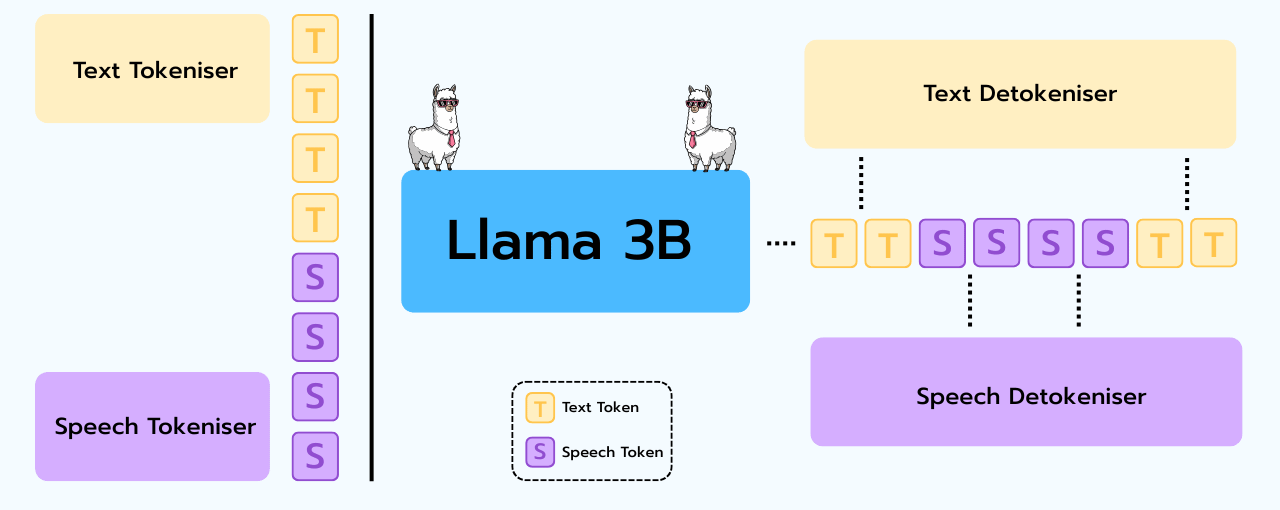
Orpheus-TTS, built by Canopy Labs, is a state-of-the-art open-source TTS system built on the Llama 3B backbone. It demonstrates that an LLM, when properly trained, can produce speech that rivals closed-source commercial services.
What makes it special:
Llama 3B backbone: This is literally a Llama model that has been trained to predict audio tokens. If you've finetuned Llama for text generation, you already understand the underlying architecture. The finetuning workflow is nearly identical.
SNAC codec (24kHz): Orpheus uses the SNAC (Multi-Scale Neural Audio Codec) operating at 24kHz sample rate. It has 3 quantization layers at 12, 24, and 48 Hz, interleaved into 7 tokens per frame (~83 tokens/second total). Each layer has a codebook of 4,096 entries.
Emotive tags: You can control speech expression with inline tags like
<laugh>,<sigh>,<chuckle>,<gasp>, etc. These are part of the text prompt and guide the model’s generation style.Multiple voices: The model ships with 8 preset voices (tara, leah, jess, leo, dan, mia, zac, zoe) that you select by prefixing the text prompt with the voice name, similar to how you’d use a system prompt.
Streaming capability: Orpheus can deliver ~200ms latency for real-time streaming applications, generating speech chunk by chunk as the audio tokens are produced.
In the lab, we'll finetune Orpheus on a custom voice dataset using QLoRA through Unsloth, so you can hear the difference between the base model's generic voices and your finetuned, personalized voice.
The key takeaway from this lesson is that multimodal finetuning isn't a fundamentally different skill from what you've already learned. The architectural innovations — vision encoders, audio codecs — handle the translation between modalities. Your job as a finetuner remains the same: attach LoRA adapters to the transformer backbone, prepare a good dataset, and run SFT.
What is different is the range of problems you can now solve. Text-only finetuning limits you to text-in, text-out tasks. With vision finetuning, you can build systems that understand the visual world. With TTS finetuning, you can build systems that speak with custom voices, emotions, and styles.
On Friday, we'll put this theory into practice.
See you in the lab! 🔬
Resources
Vision finetuning:
TTS finetuning: