


You’ve probably already seen what standard RAG can do.
But what if your system could go further than basic semantic search?
What if it could understand the connections in your data and reason like a true analyst?
In this article, Maikel Gonzalez Baile will introduce us to GraphRAG and Agentic GraphRAG, showcasing a fascinating use case: applying it to security incident analysis.
Let’s go! 👇
A quick introduction to RAG
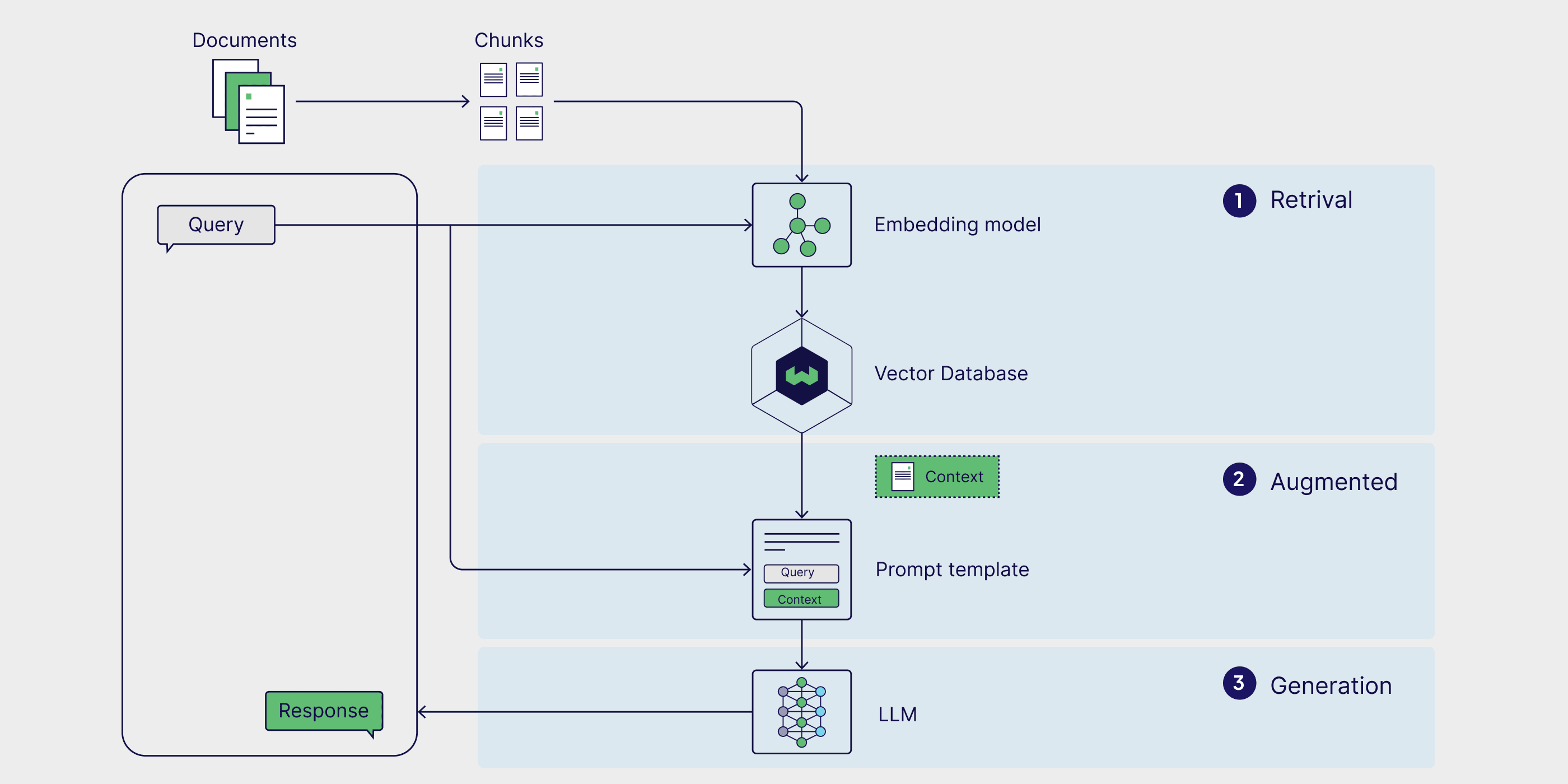
Let’s say you’ve set up your RAG pipeline: documents chunked, vector database running, LLM connected.
The first query works as expected.
Job done, right?
But then you ask a real question. One that requires connecting a tiny detail from one document to a concept in another.
Suddenly, your brilliant RAG pipeline starts to stutter.
It pulls up irrelevant snippets, misses the obvious connection, and gives you an answer that’s confidently … wrong.
If you’ve been there, you’ve hit the fundamental wall of classic RAG.
It’s great at finding individual pages but has no idea how they link together to tell a bigger story.
And that, my friend, is where all the interesting stuff happens.
It’s time to move beyond the flat world of vector search and into a world of connections.
Graphs, the power of connected data
So, if traditional RAG gives us a library of disconnected facts, how do we teach our LLM to read the whole story?
How do we get it to understand not just what the information is, but how it all fits together?
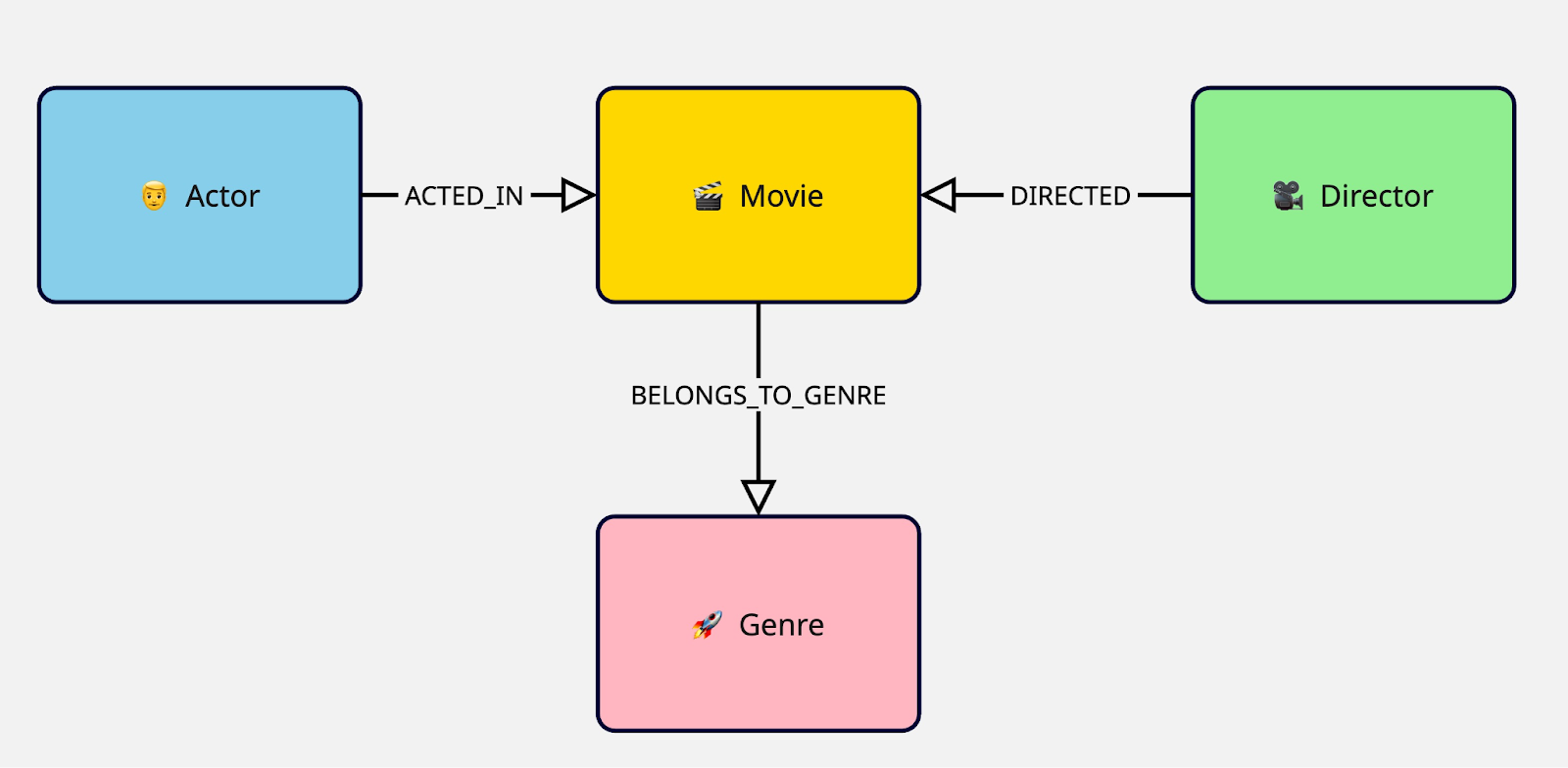
We model it as a Knowledge Graph.
Forget thinking about your data as a flat collection of text files. A knowledge graph represents information as it exists in the real world: a web of interconnected entities.
Nodes: These are the "things" or entities in your data.
Edges (or Relationships): These are the all-important connections between the nodes
Suddenly, the relationships aren't just implied; they are first-class citizens in our data model. This seemingly simple shift is a superpower for three key reasons:
It enables multi-hop reasoning
It delivers surgical precision
It creates a “network of meaning”
Agentic GraphRAG
Okay, so we’ve established that graphs are the perfect backbone for our data because they understand relationships, right?
Well, having a graph is one thing. Using GraphRAG to expand your LLM’s context is another. And an analyst who can truly interpret that graph … that’s on a whole different level.
This is where we level up from just GraphRAG to Agentic GraphRAG.
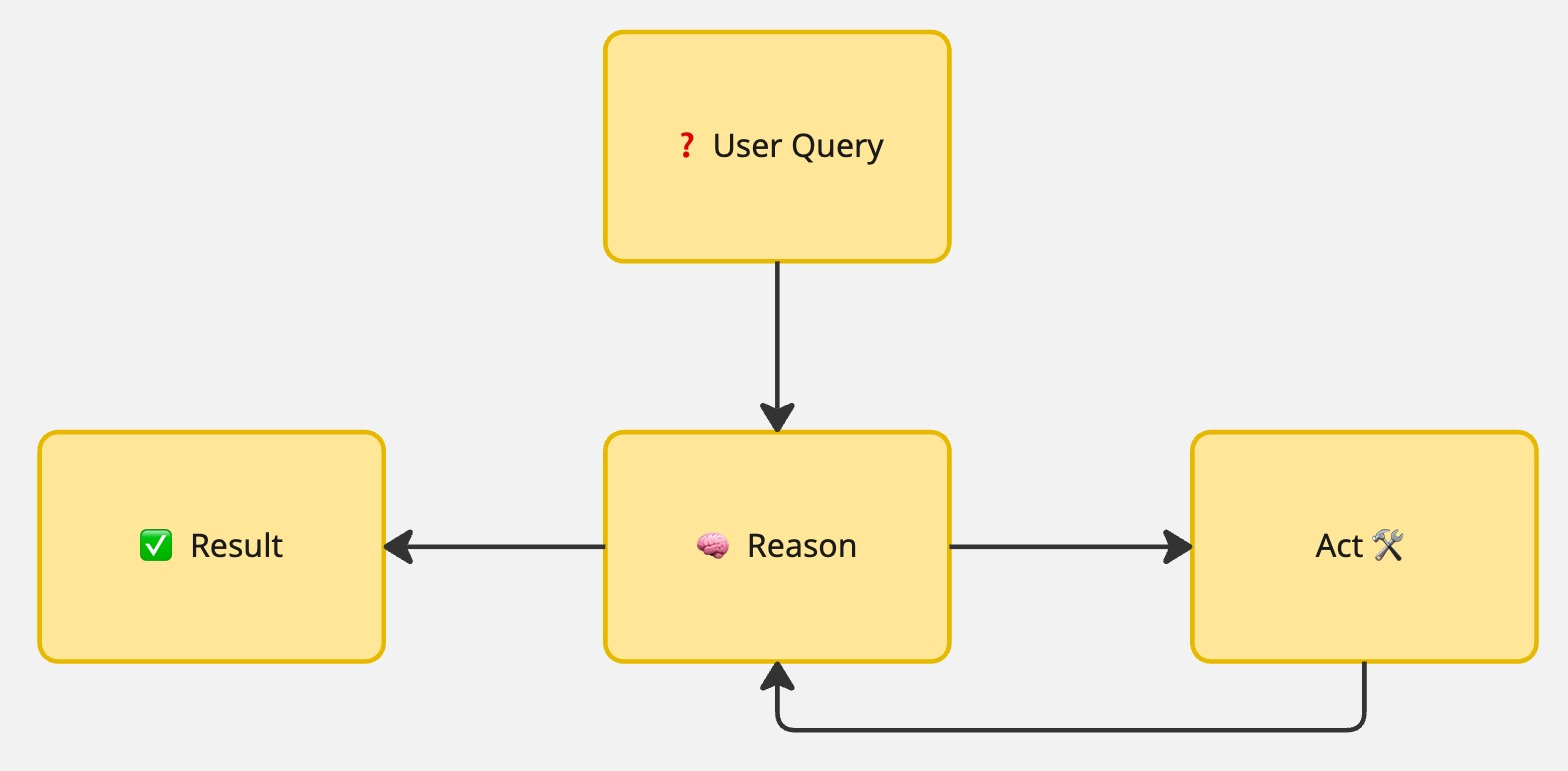
Instead of a rigid, hard-coded pipeline, we introduce an LLM-powered agent, a smart reasoning engine that acts as the “brain” of our operation.
By giving our GraphRAG system the ability to dynamically choose its path, we create something far more powerful and resilient.
It’s not just a Q&A bot, it’s an automated problem-solver that can navigate complexity, recover from errors, and truly reason over connected data.
So what does this solution actually look like under the hood?
Time to see it in action with a real use case.
Automating Security Incident Analysis

Alright, let's bring this down from the clouds of theory and movies to the concrete, messy reality of a production incident in the Cybersecurity space.
Imagine you’re on call, it’s 3 AM, and an alert screams that something is wrong.
You jump into your terminal, and the initial analysis confirms your fears: a critical service is compromised.
You log into your Security Dashboard, which reveals a dozen different issues, maybe a list of warnings or potential vulnerabilities (or CVEs, in security).
Now what?
For a security analyst, a list of CVEs is just the beginning. Which ones matter? Which are noise? Which put your systems at real risk?
Instead of manually piecing context from tickets, assets, and threat intel, our agentic system acts as an autonomous analyst.
Ingesting incident data, reasoning over context, and using a knowledge graph to prioritize CVEs with clear, human-readable analysis.
The agent starts with a structured Incident report, just like this:
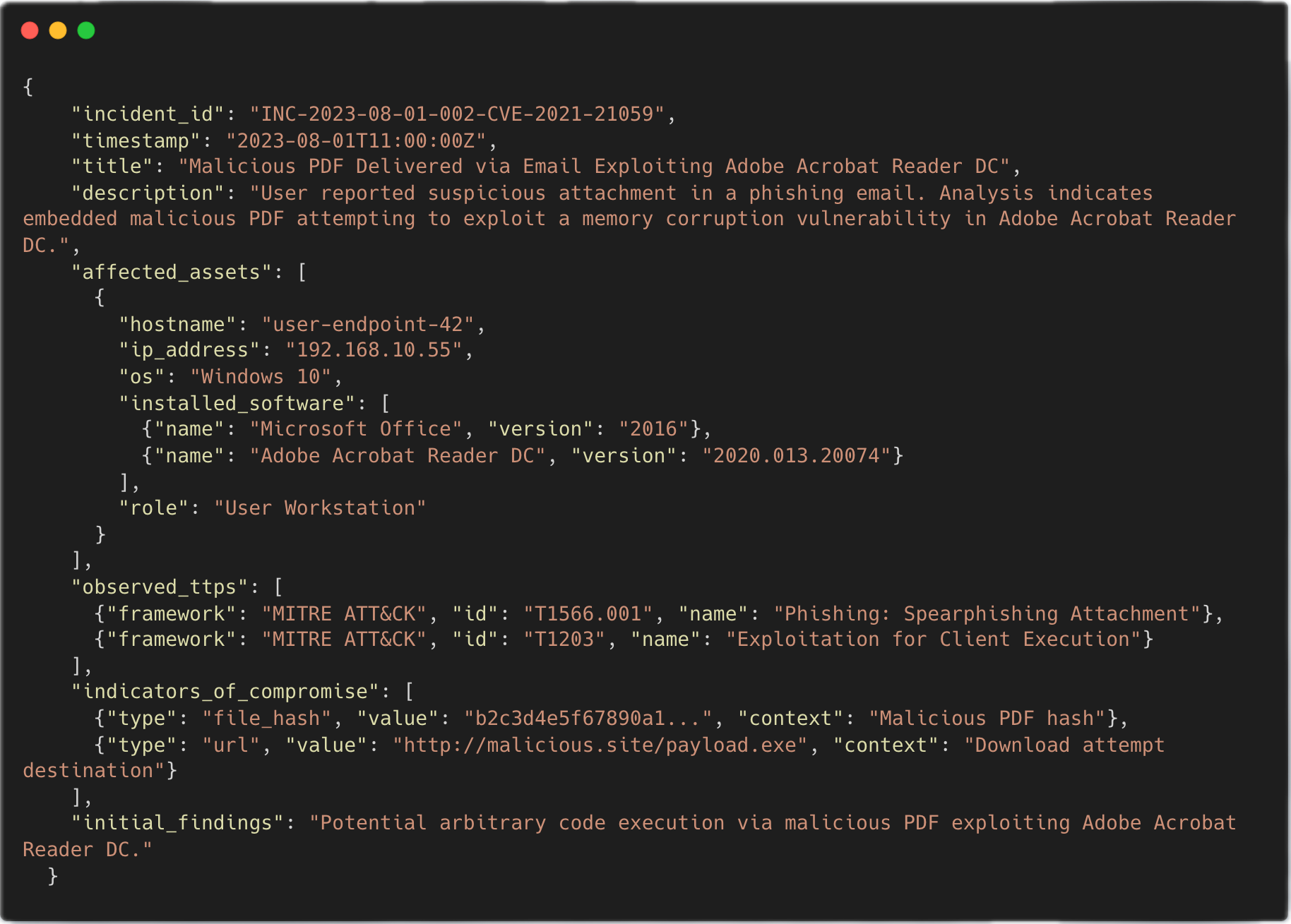
From there, it executes a four-stage workflow, orchestrated by LangGraph as a hierarchical state machine.

This isn’t just a simple lookup. It’s a dynamic, multi-step investigation that mimics the reasoning process of a senior analyst.
And it's a perfect fit for the Agentic GraphRAG architecture.
Now that we know what we’re building and why, let’s pop the hood and look at the architecture that makes it all possible.
Implementation Details
📌 All the code for this section is available in this open-source repository.
Alright, we’ve covered the what and the why.
We know we need a Knowledge Graph to capture relationships and an Agent to intelligently navigate it. But what does this actually look like in code?
How do we build this reasoning engine?
The architecture is built on a modern, production-ready stack designed for clean, decoupled, and observable code:
LangGraph: To orchestrate the agent’s workflow as a robust state machine.
BAML: To reliably get structured output from LLMs without pulling our hair out over parsing broken JSON.
Hexagonal Architecture: To keep our core logic clean and independent of external services like LLM providers or databases.
There’s a main graph that controls the high-level, four-stage process, and within it, two nested sub-graphs execute the iterative, agentic reasoning loops.
Let’s break it down.
Orchestrating the workflow with LangGraph
The main workflow, defined in analyze_incident_graph.py, is the conductor of our orchestra.
It ensures each stage of the analysis happens in the right order, passing the state from one to the next.
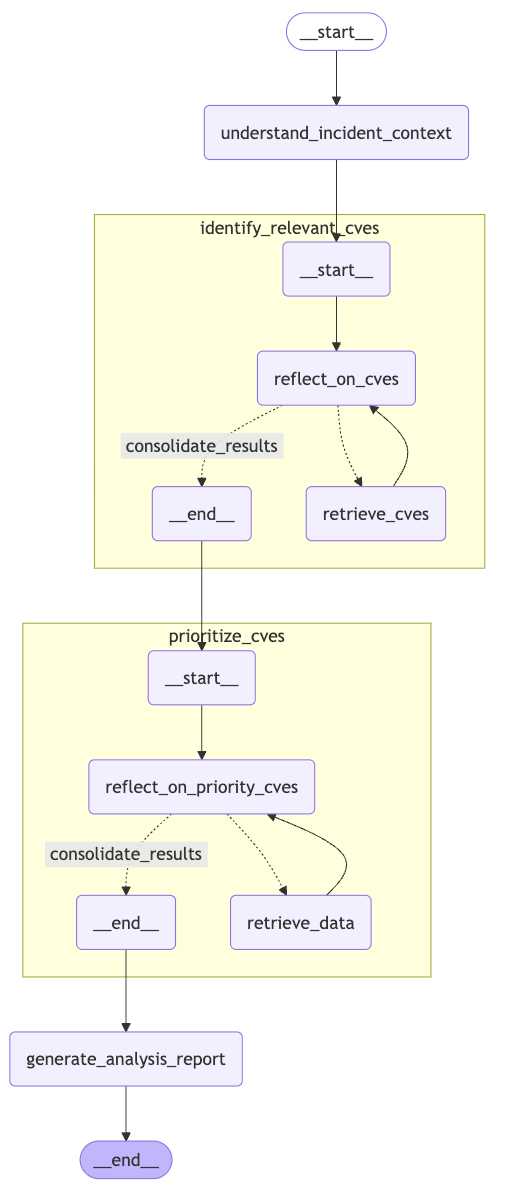
Each of the nodes (understand_incident_context, identify_relevant_cves, etc.) represents one of the major steps we discussed.
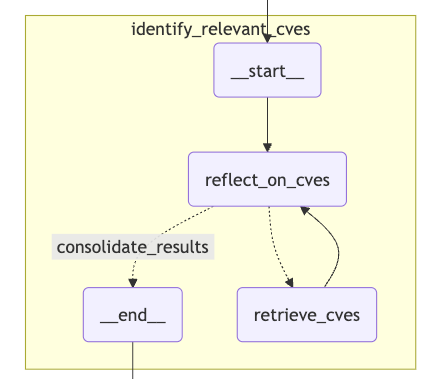
But the real magic happens inside the identify_relevant_cves and prioritize_cves nodes. These aren’t just single function calls; they are entire sub-graphs where our ReAct agent lives.
Inside a ReAct Sub-Graph
Let’s zoom into the retrieve_relevant_cves_graph. This is where the agent enters the Reason -> Act loop to figure out which CVEs are potentially relevant to our incident.
This sub-graph has its own state, its own nodes, and its own logic.
The Agent’s Toolkit
An agent is only as good as its tools (and prompts). In our implementation, we’ve given it two primary ones:
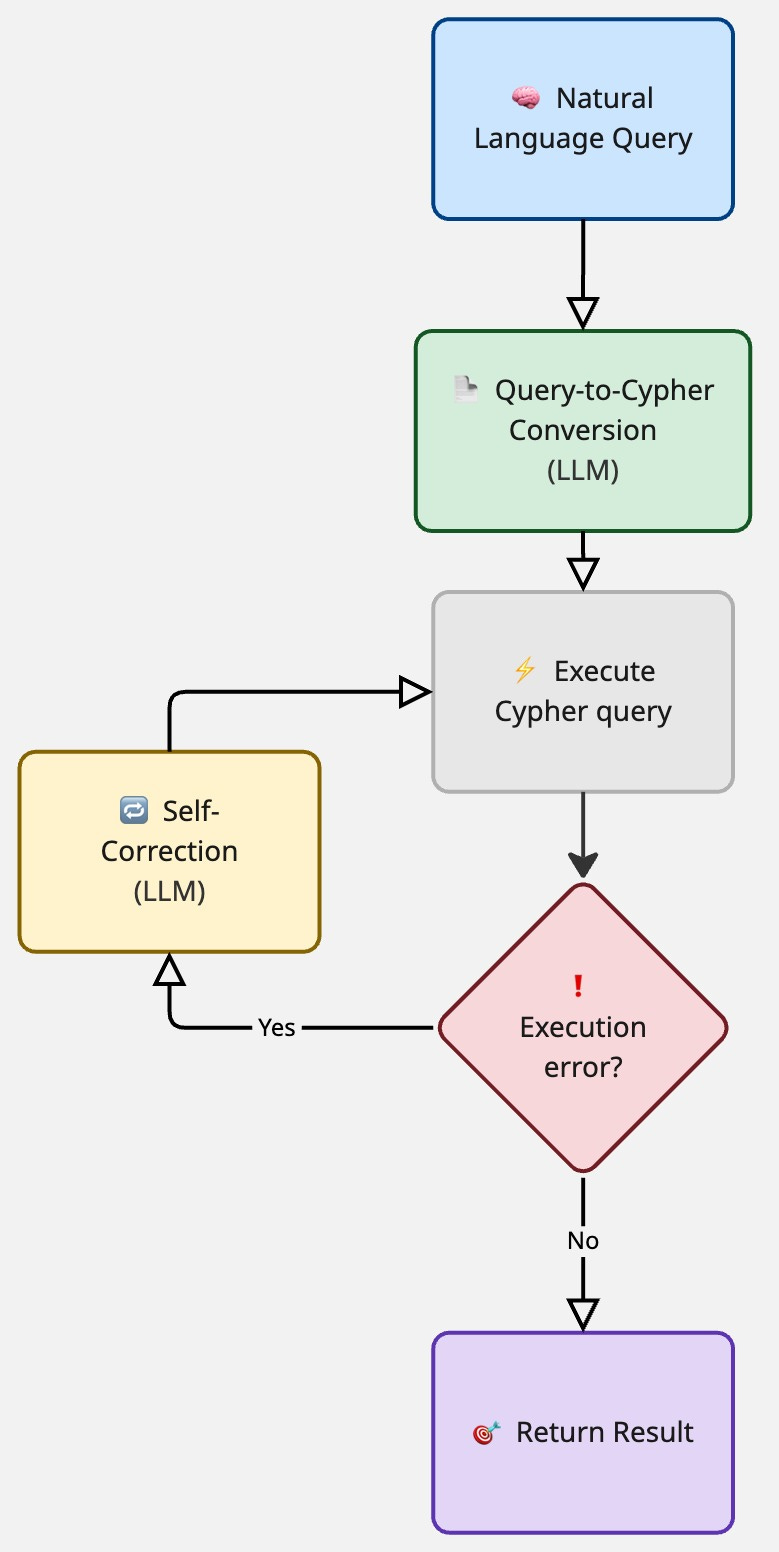
- CybersecurityDatabaseTool
This is the agent's interface to our Neo4j Knowledge Graph. But it’s not just a simple query executor. It has its own LLM-powered brain!
- WebSearchTool
This is a mock to demonstrate the power of the agent to select the right tool.
If the Knowledge Graph doesn't have the answer, the agent can decide to use this tool to search the live web for threat intelligence, news, or vendor advisories.
Conclusion: so, what have we built?
Let’s take a step back.
We didn’t just build another RAG pipeline. We built an autonomous analyst. By combining the structured reasoning of Knowledge Graphs with the dynamic, adaptive intelligence of an LLM agent, we've created a system that can:
Understand Complex Relationships: It doesn't just find keywords; it follows the connections in the data to build a true understanding of the situation.
Reason Dynamically: The agent isn't locked into a single path. It thinks, acts, and observes, adapting its strategy on the fly.
Self-Correct and Recover: It doesn’t just fail silently. It learns from its mistakes and tries again, making it far more reliable in the messy real world.
And that’s everything for today!
Big thanks to Maikel for this great hands-on introduction to GraphRAG and Agentic GraphRAG.
Excited to see the projects you’ll bring to life in the future 😎
Let’s keep building!
Thanks so much for sharing my little contribution, Miguel! It was a really great experience collaborating with you on this :D
This 🖼️ ticle is a masterpiece wonderful work