


You read dozens of AI newsletters packed with insights, from fine-tuning techniques to agent architectures, and then … when you actually need that one article again, it’s gone. Buried somewhere in your inbox, lost among subject lines and half-remembered keywords.
That’s why I got excited about the project built by Benito Martin:
A production-grade RAG system that automatically ingests, indexes, and enables intelligent search acrosss your favorite Substack newsletters.
It goes beyond matching to offer true semantic search, a system that actually understands your intent.
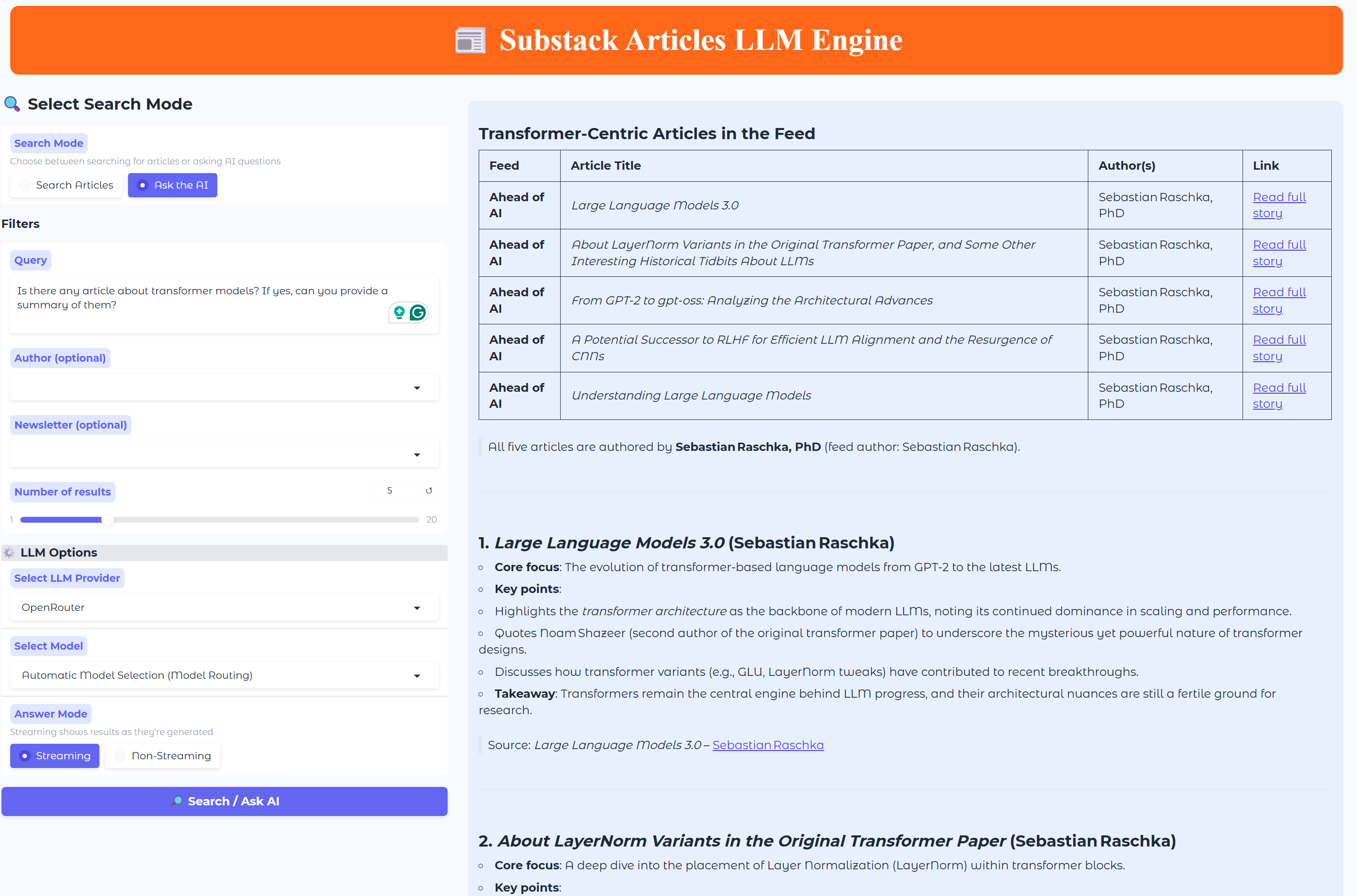
I really like this project because it perfectly embodies the philosophy I try to follow at The Neural Maze: learning by building.
Instead of abstract theory, you learn through hands-on creation, seeing every moving piece of a working pipeline come together.
That’s why I decided to collaborate with Benito on this one, recording a video overview walking you through the full project, showing how all the components connect in practice (more on this in the Course Overview section below).
The entire system runs on free-tier infrastructure (Supabase, Qdrant, Prefect, and Google Cloud Run), so you can build, test, and even deploy your own Substack Engine without spending a cent.
By the end, you won’t just understand how RAG works—you’ll have built your own production-ready system to intelligently search through the AI knowledge that matters most to you.
Ready? Let’s go!
💻 Get the code: Check out the code repository to follow the full course syllabus and get access to all the resources!
Course Overview
To kick things off, I’ve prepared a one-hour video overview of the entire project. We’ll start by walking through the system architecture, using a visual diagram to explain how everything connects—from ingesting Substack RSS feeds into Supabase, to storing vector embeddings in Qdrant, wiring up the backend, and finally deploying it all to Google Cloud Run.
Once the architecture is clear, we’ll move on to the code itself. I’ll guide you through the most important modules and folder structures, showing you how to:
Run the Prefect pipelines to orchestrate data ingestion
Populate the databases with articles and embeddings
Launch both the Gradio UI and the FastAPI backend
By the end of this overview, you’ll have two things:
A solid understanding of how each part of the system works together
The entire project running locally on your machine
After completing the video, you’ll be ready to dive into Benito’s in-depth articles, which explore each component of the system in much more technical detail.
Lesson 1: Setup and articles ingestion
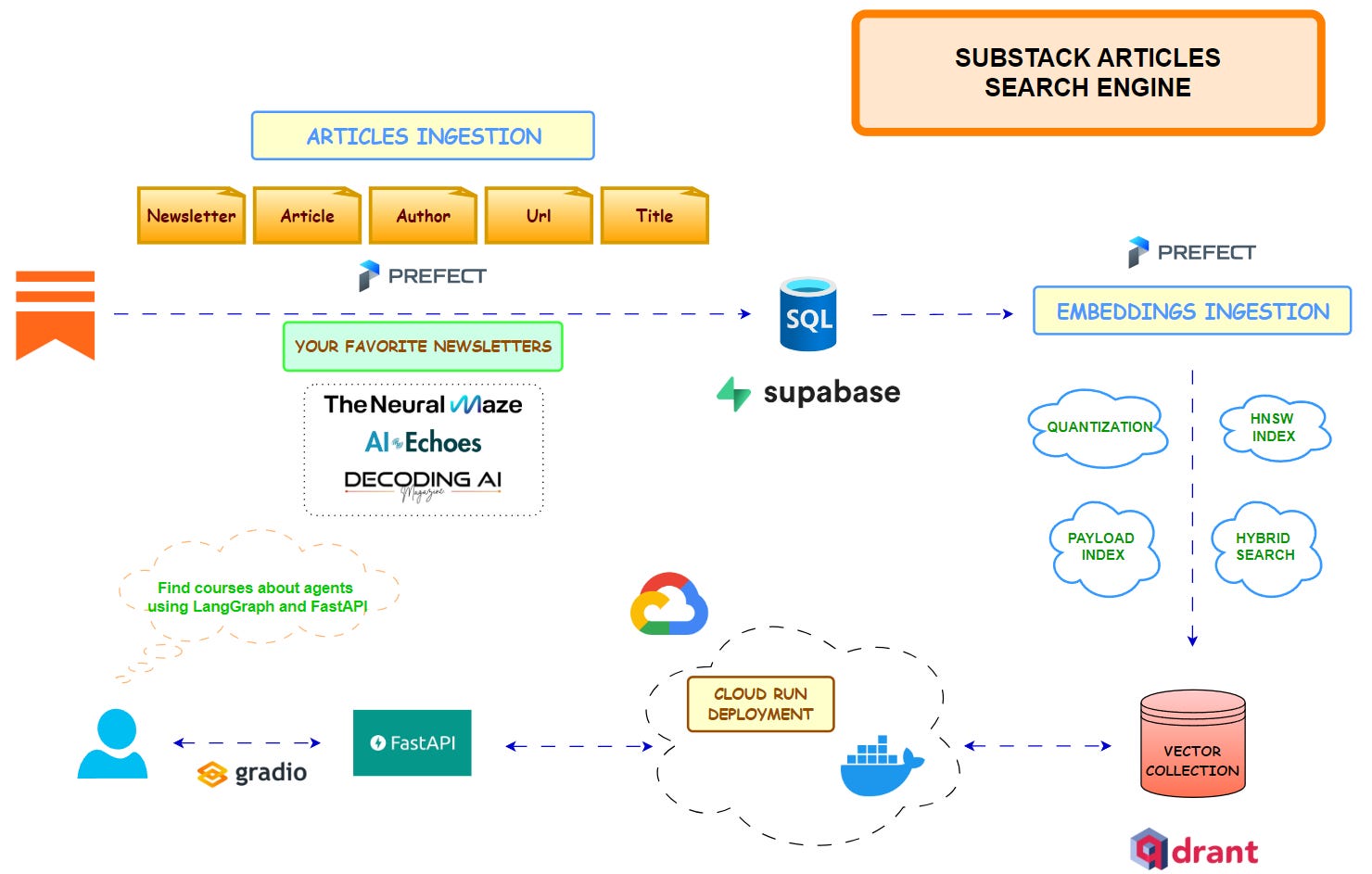
This first lesson lays the foundation for the Substack Articles Search Engine, introducing the project’s architecture and the motivation behind it.
It covers how to set up a Supabase PostgreSQL database to store structured article metadata, define a clean schema for efficient querying, and orchestrate ingestion pipelines using Prefect.
It also walks through how RSS feeds are parsed, cleaned, and ingested into the database while handling real-world challenges such as paywalled content, malformed XML, and duplicate entries.
Beyond ingestion, this lesson also explores automation and configuration best practices that make the system production-ready. It demonstrates how Pydantic Settings ensure type-safe configuration management, and how a Makefile simplifies repetitive development and deployment tasks.
The result is a robust, fault-tolerant ingestion pipeline that forms the backbone of the RAG system—ready for the next steps, where semantic vector search and LLM-powered querying will be added.

Lesson 2: Vector embeddings and Hybrid Search
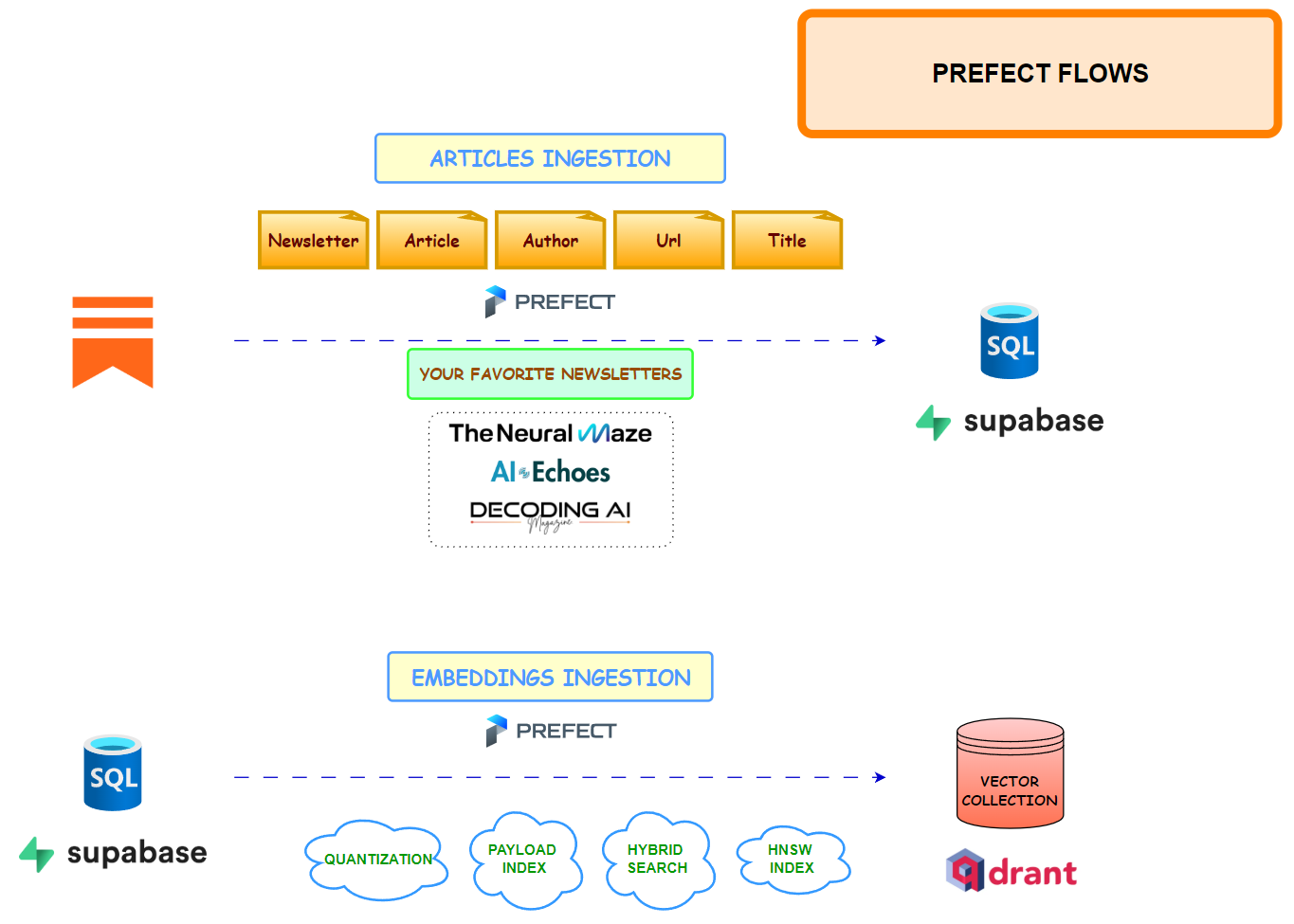
This second lesson builds the semantic search layer on top of the ingestion pipeline. It covers how to configure Qdrant for hybrid search—combining dense embeddings for meaning with sparse (BM25 / IDF) vectors for exact term matching—and explains why techniques like Reciprocal Rank Fusion (RRF) balance relevance and precision.
It walks through text chunking tuned for technical content (keeping code blocks intact, using sensible separators and overlap) so each chunk embeds cleanly.
You’ll set up a memory-efficient bulk upload that streams articles from Supabase, generates dense and sparse embeddings (optionally in parallel), and upserts to Qdrant with deterministic, de-duplicated chunk IDs.
Beyond core retrieval, this lesson explores the performance and reliability choices that make the system production-ready: disabling HNSW during bulk ingest and enabling it afterward, applying scalar quantization (INT8) to shrink memory, and creating payload indexes (e.g., author, title) for fast filtered queries.
Orchestration with Prefect handles retries, incremental updates (by date), and clear run summaries, while Makefile commands keep operations repeatable.
By the end, you have a scalable, production-grade semantic search infrastructure that transforms a static archive into an intelligent knowledge base—ready for the query APIs in the next lesson!
Lesson 3: FastAPI Backend and LLM integration
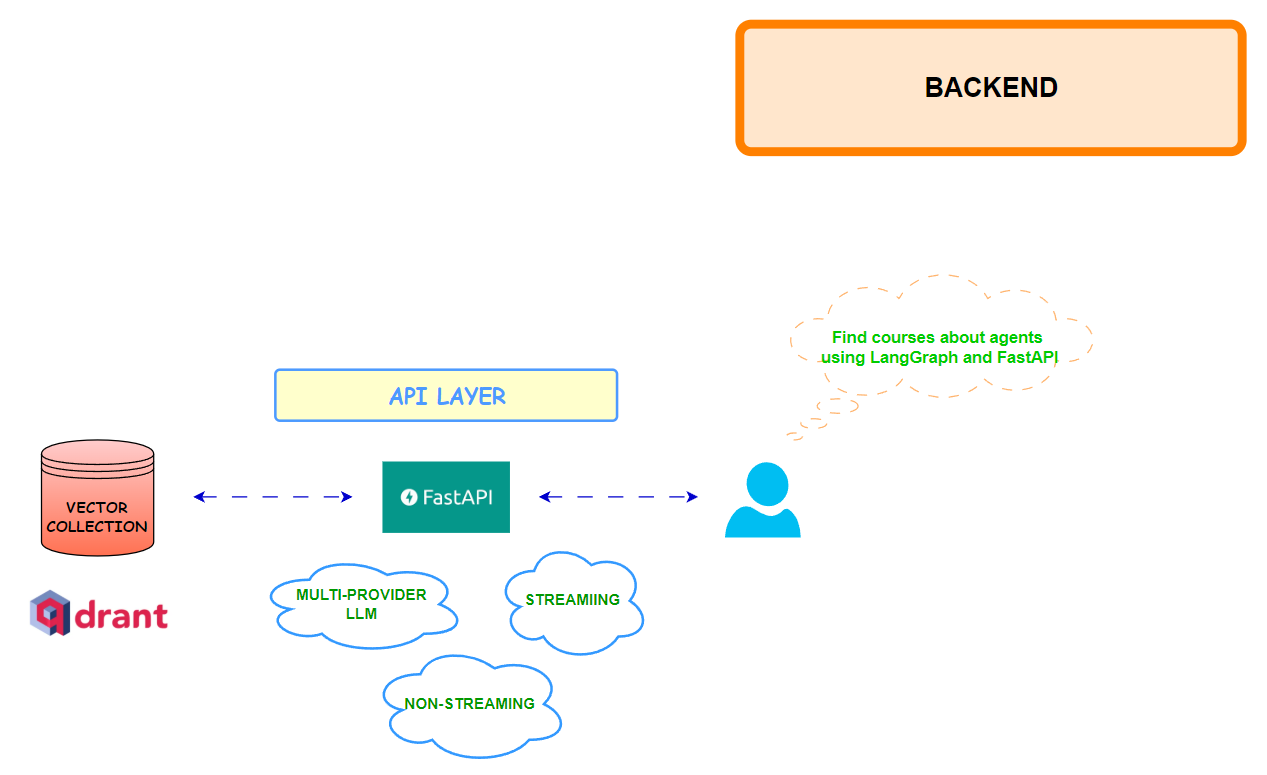
This third lesson introduces the FastAPI backend that connects all previous components—Supabase, Qdrant, and the ingestion pipelines—into a complete Retrieval-Augmented Generation (RAG) system.
It covers how to design a modular API architecture with clear separation of concerns across routes, services, and providers. The lesson walks through implementing RESTful endpoints for health checks, title-only search, and semantic question answering, powered by multi-provider LLM integrations (OpenRouter, OpenAI, Hugging Face). It also explains how to handle both streaming and non-streaming responses, allowing users to receive real-time model outputs.
Beyond the API logic, the lesson explores LLM orchestration and evaluation, including dynamic provider selection, structured prompt construction, and optional response quality scoring using G-Eval metrics.
It details how to manage system lifespan, caching, and middleware for logging, error handling, and CORS configuration—ensuring stability in production.
By the end, you have a fully functional backend capable of transforming vector search results into coherent, cited answers. This marks the point where your Substack knowledge base evolves into an interactive, AI-powered assistant—ready for cloud deployment and UI integration in the next lesson.
Lesson 4: Cloud run deployment and Gradio UI
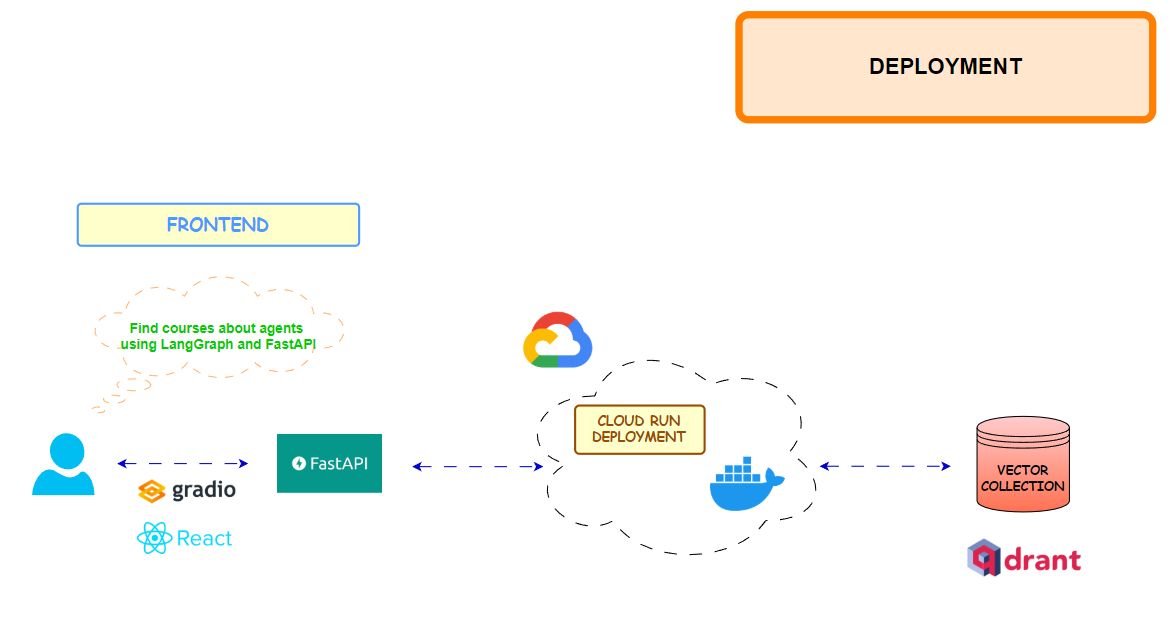
This fourth (and last) lesson focuses on taking the local RAG stack to production with a serverless deployment on Google Cloud Run and a Gradio UI for a friendly, sharable interface.
It covers building a lean Docker image with multi-stage builds, setting cache dirs for model downloads in /tmp (e.g., HF_HOME, FastEmbed cache) to play nicely with Cloud Run, and deploying via a scripted flow that enables required GCP services, builds with Cloud Build, and sets resource limits, env vars, and scaling flags (scale-to-zero, CPU boost).
Once deployed, the FastAPI backend exposes a secure public URL, giving you a globally accessible API that auto-scales and stays within free-tier limits for typical usage.
On the frontend side, the lesson wires up a Gradio app that talks to the deployed API (or localhost), offering two modes: unique-title search and AI Q&A with provider/model selection and optional streaming.
It also outlines hosting choices—Hugging Face Spaces for the quickest path, Cloud Run for keeping everything in GCP, and an optional React + TypeScript + Tailwind frontend for a more polished UI.
By the end, you have a production endpoint and a web interface for your newsletter search engine.
🎉 Congratulations, you’ve made it to the end of this course!!
You know what? Projects like this deserve far more visibility.
I’m honestly tired of the endless resource lists flooding social media — and of people pretending they can teach you everything about AI in a single LinkedIn post. That’s not how you become an engineer.
Real learning happens through building. Projects like this one are what truly make you an ML or AI engineer. And builders like Benito are the real heroes—staying focused on creation, not clout, and steering clear of the so-called AI influencers recycling the same content over and over.
Before I go, a quick update: Jesús Copado and I are wrapping up the code for our Phone Voice Agent Course, deployed on Runpod. I’ll be sharing updates on timelines very soon.
Remember, this will be my first live course, where paid subscribers will get access to:
Deep-dive articles
Weekly live sessions covering each lesson
Let me know what you think and as always, let’s keep building!